

Stop Rubber-Stamping User Permissions with Identity Access Review Automation

Automate Access Reviews Before Permissions Become Risk
Identity access review automation replaces spreadsheet-driven certification with a repeatable workflow: collect access data, scope high-risk systems, send decisions to the right owners, flag unusual or stale permissions, and automatically enforce approved removals.
Start with these five actions:
- Review privileged roles, sensitive applications, guest accounts, and inactive users first.
- Assign managers and application owners as reviewers, with fallback reviewers and escalation rules.
- Use sign-in, job-role, and entitlement data to recommend approve, revoke, or investigate.
- Automatically remove denied access only after testing the workflow on low-risk resources.
- Retain every decision, justification, reminder, and remediation action as audit evidence.
This matters because access reviews often fail through access fatigue: reviewers receive long lists with too little context and approve everything to finish the task. Microsoft's Digital Defense Report 2025, published in October 2025, underscores the continued importance of identity-based attacks. Excess permissions and compromised credentials give attackers a much easier path to sensitive systems.
Automation does not eliminate human judgment. It reserves that judgment for risky exceptions, privileged access, and unclear cases - while making routine certification faster, more consistent, and easier to prove during an audit.
Related content about identity access review automation:
The Dangers of Access Fatigue: Why Manual Certification Fails
Manual user access reviews (UARs) are among the most dreaded operational chores in enterprise IT and security. The typical workflow is painfully familiar: an identity administrator extracts user lists from multiple directories, SaaS consoles, and databases, merges the rows into massive spreadsheets, and emails them to departmental managers.
Faced with hundreds of rows of cryptic permission names (like AWS_IAM_POLICY_DATA_RO_V2), managers experience severe decision fatigue. Without contextual telemetry showing when a user last used an entitlement, managers default to a dangerous coping mechanism: clicking "Select All" and "Approve." This phenomenon—rubber-stamping—completely undermines the core control objectives needed for managing identity and access management risks.
| Review Characteristic | Manual Spreadsheet Review | Automated Identity Governance Review |
|---|---|---|
| Data Ingestion | Manual CSV exports from fragmented portals | Direct API connectors (300+ integrations, SCIM, webhooks) |
| Contextual Visibility | Static account names and nested group IDs | Real-time telemetry (last login, usage heuristics, peer anomalies) |
| Reviewer Fatigue | Extreme; hundreds of lines reviewed per sitting | Low; micro-reviews, prioritized high-risk items, pre-scoping |
| Remediation Speed | Days/weeks of manual IT ticketing for revocations | Closed-loop automated deprovisioning or ITSM orchestration |
| Audit Evidence | Disjointed email chains and disconnected spreadsheets | Immutable, centralized audit trails with full decision justifications |
| Cycle Duration | 4 to 8 weeks per campaign | Hours to minutes per reviewer |
Privilege Creep and Identity-Based Attack Vectors
The primary technical byproduct of rubber-stamping is entitlement accumulation, or privilege creep. As employees change teams, take on cross-functional projects, or cover for colleagues on leave, they accumulate roles that are never pruned.
Industry threat intelligence highlights the severity of this exposure:
- The average corporate employee maintains roughly 15 distinct identities across corporate directories, SaaS environments, and legacy on-premises assets.
- Identity-based attacks take an average of 292 days to detect, giving adversaries nearly ten months of dwell time to move laterally, escalate permissions, and establish persistence.
When threat actors compromise standard credentials, they rarely need to exploit software vulnerabilities. Instead, they navigate existing excessive entitlements, transitioning from standard user profiles to domain-level administrators or cloud infrastructure owners through unmonitored permissions. Implementing sound user permission management practices provides a critical barrier against this lateral expansion.
The Hidden Audit Gaps of Spreadsheet-Driven Reviews
Beyond pure security vulnerabilities, manual spreadsheets create severe compliance blind spots. Regulatory and governance standards—such as Sarbanes-Oxley (SOX) Section 404 IT General Controls (ITGCs), SOC 2 Type II (Trust Services Criteria CC6.1, CC6.2, and CC6.3), ISO/IEC 27001:2022 Control 5.18, and PCI DSS v4.0 Requirement 7—demand verifiable proof that access rights are periodically certified and that unauthorized entitlements are promptly revoked.
Spreadsheets consistently fail internal and external audits due to:
- Assumed Coverage: Security teams assume a CSV export captures all accounts, missing local administrative accounts, orphaned contractor logins, and shadow SaaS access.
- Unobserved Execution: Auditors discover that while a manager flagged an account for removal in a spreadsheet, the corresponding IT helpdesk ticket was never created or completed.
- Lack of Attribution: Standard spreadsheet cells lack cryptographic non-repudiation, making it impossible to verify whether the assigned manager or an unauthorized proxy completed the review.
Meeting modern IAM audit logging requirements demands tamper-resistant logs that record the entire decision lifecycle: from the moment a review is generated to the final API-driven deprovisioning event.
Core Components of Identity Access Review Automation
Modern automated governance shifts organizations from reactive, manual compliance sweeps to an intelligent, event-driven model. Understanding identity governance principles requires examining the integrated components that power automated certification engines.
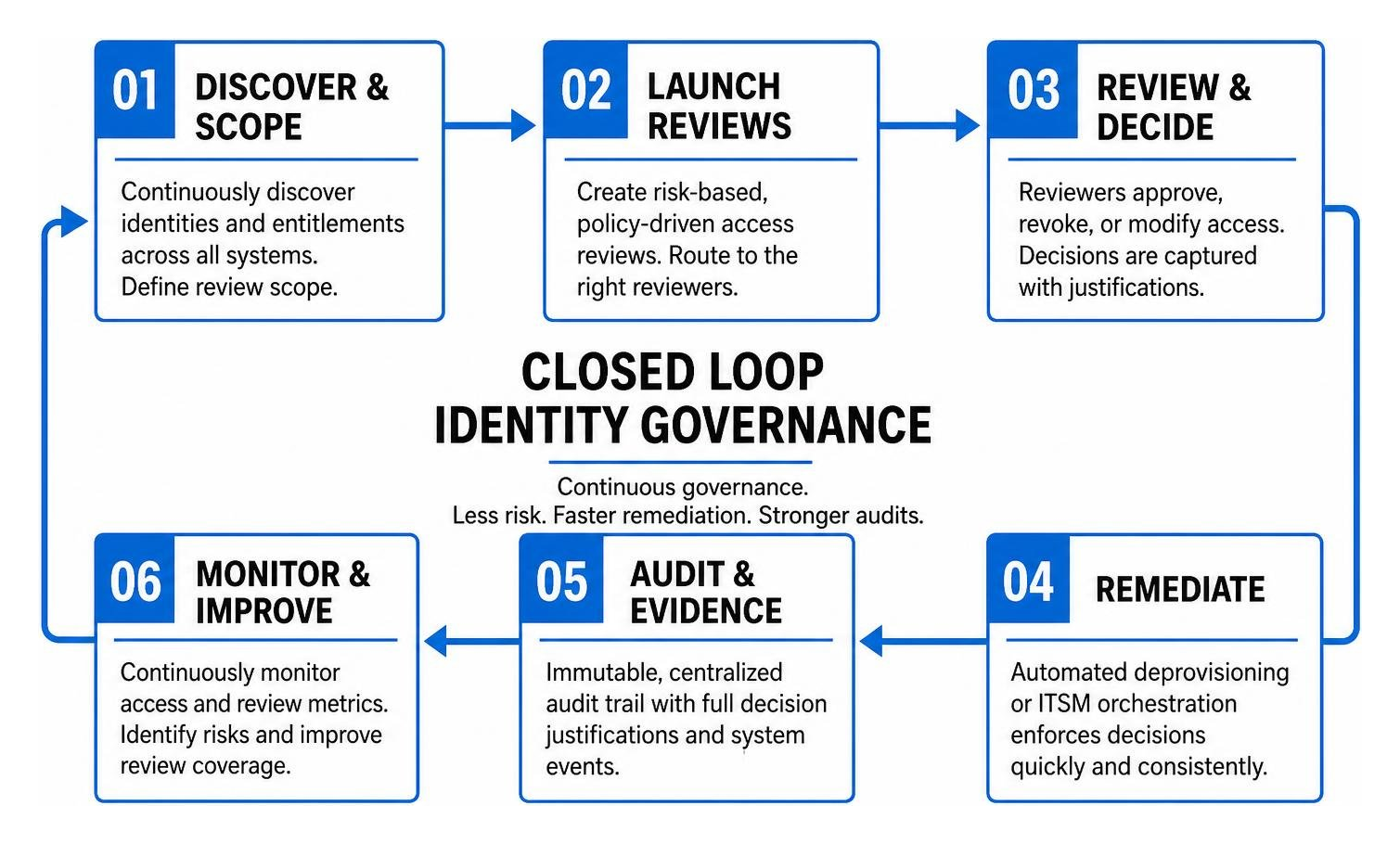
When organizations deploy purpose-built review automation, security teams regularly achieve an 85% reduction in access review turnaround time, moving from several weeks of coordination to completing 1,200 reviews across multi-department footprints in under two weeks with a 100% on-time completion rate.
AI-Driven Identity Access Review Automation for Telemetry and Anomaly Detection
Modern automation tools—including cloud-native identity platforms such as Microsoft Entra ID Governance, Lumos, ConductorOne, and JoySuite AI—incorporate machine learning models to eliminate reviewer guesswork.
These engines continuously correlate static permission data with dynamic runtime telemetry:
- Peer Group Analysis: AI compares an individual’s access profile against their organizational peers (same department, manager, or role). If 95% of software engineers possess read-only access to a production database, but one engineer holds administrative read-write rights, the engine flags this anomaly as an outlier.
- Dormant and Stale Account Identification: By analyzing sign-in timestamps and API access logs across SaaS tools, systems highlight inactive accounts (e.g., no interactive sign-ins for 90+ days) and prompt immediate revocation.
- Segregation of Duties (SoD) Violations: Algorithms flag conflicting permissions—such as an identity holding both billing account creation rights and payment release approval—preventing fraud before compliance violations occur.
Closed-Loop Remediation and Lifecycle Deprovisioning
Reviewing permissions provides zero defensive value if revocations are not executed immediately. Automated systems enforce closed-loop remediation through direct integration with API endpoints, SCIM connectors, and IT Service Management (ITSM) tools like Jira and ServiceNow.
Automated revocation workflows provide:
- Direct API Revocation: When a resource owner denies an entitlement, the governance engine issues an immediate API payload to the target directory or SaaS tool to strip the permission.
- Scheduled Grace Periods: For external contractors or guest users, engines can trigger an automated 30-day sign-in block prior to permanent account deletion, mitigating operational disruptions.
- Automated Ticket Generation: If an application lacks a modern REST API or SCIM interface, the platform generates a pre-formatted, tracked ticket assigned to the target system administrator.
This closed-loop approach routinely strips away 30% or more of stale access entitlements during an organization's initial automated cycle, directly shrinking the identity attack surface and strengthening privileged access governance.
How to Implement an Automated Access Review Workflow in 5 Steps
Transitioning from manual spreadsheets to an automated certification workflow requires structured planning. Following established framework principles, such as Microsoft Entra ID Governance deployment guidelines, ensures seamless operational rollout across business units.

Step 1: Inventory and Classify High-Risk Assets
Before building review campaigns, organizations must establish complete visibility over their identity perimeter. You cannot certify access to resources you do not know exist.
- Discover Shadow IT: Leverage SaaS discovery engines, identity provider logs, and enterprise network telemetry to locate unmanaged applications.
- Prioritize Crown Jewels: Categorize applications by risk profile. Tier-0 systems (Active Directory, Azure AD/Entra ID, AWS Root/IAM, production databases, ERP platforms like SAP or NetSuite) require monthly or quarterly micro-reviews, whereas low-risk productivity tools can be reviewed bi-annually.
Step 2: Establish Context-Aware Policies and Scoping Rules
Define review boundaries using declarative policies rather than sweeping, blanket campaigns. Configure granular criteria according to Microsoft Entra access review configurations and equivalent governance engines:
- Scope by Identity Type: Create distinct reviews for internal employees, third-party contractors, guest accounts, and machine identities.
- Scope by Inactivity: Configure campaigns to isolate users who have not logged into a target system for over 60 or 90 days.
- Role-Based and Attribute-Based Scoping: Evaluate whether users retain permissions that match their current Role-Based Access Control (RBAC) baseline or if anomalous entitlements have accumulated outside their job code.
Step 3: Configure Multi-Stage and Micro-Review Reviewers
Distribute review accountability to mitigate reviewer fatigue. A single IT administrator should never certify access for the entire company.
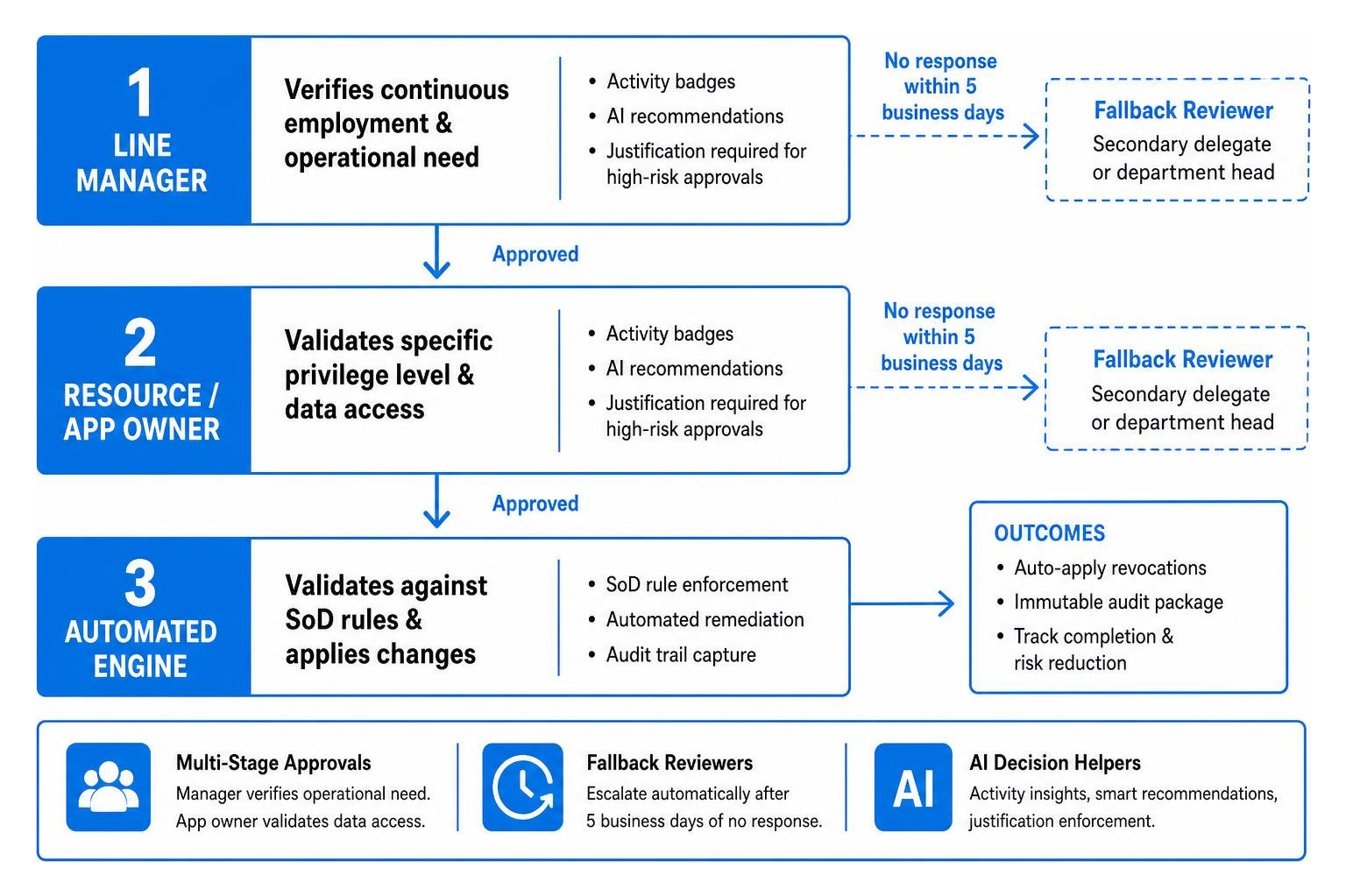
- Assign Multi-Stage Approvals: Route initial certification to the user’s direct manager (who understands current project responsibilities), followed by a secondary review by the application/data owner (who understands the sensitivity of specific roles).
- Establish Fallback Reviewers: Configure automated escalation pathways. If a primary manager fails to respond within 5 business days, the engine reassigns the task to a designated secondary delegate or department head.
Step 4: Streamline Decision Support with AI Decision Helpers
Provide reviewers with actionable context directly within the review pane. Rather than showing bare usernames, supply data-backed recommendations:
- Activity Badges: Display "Active within 24 hours" or "No sign-in for 120 days."
- Smart Recommendations: Tools like JoySuite AI Access Review Helper generate contextual recommendations (e.g., "Revoke access: User transferred from Finance to Marketing 45 days ago"), allowing reviewers to make informed decisions in seconds.
- Justification Enforcement: Require mandatory written justification if a reviewer chooses to approve access that the system has flagged as high-risk or anomalous.
Step 5: Automate Revocation and Audit Trail Generation
Finalize the campaign by activating automated downstream execution and evidence capture:
- Enable Auto-Apply Settings: Turn on direct remediation to apply approved deprovisioning actions as soon as the review window closes.
- Generate Immutable Audit Packages: Export signed, timestamped audit logs containing reviewer details, timestamps, decision justifications, and proof of revocation.
- Track Long-Term Metrics: Measure cycle completion velocity and total revoked entitlements to present quantifiable risk reduction metrics to executive leadership and external auditors.
Overcoming Edge Cases: Machine Identities, Guests, and Shadow IT
Standard human user accounts represent only a fraction of the enterprise attack surface. An effective automated governance architecture must address complex identity edge cases.
Governing Non-Human Identities and Service Accounts
Non-human identities (NHIs)—including service accounts, API keys, OAuth app registrations, and automated bots—often outnumber human employees by a factor of five to one. These accounts frequently possess broad, long-lived administrative privileges and lack interactive login interfaces, making them prime targets for credential theft.
- Workload Identity Reviews: Automate periodic certification of service principal credentials and API token assignments, routing reviews directly to the engineering teams that manage the dependent workloads.
- Static Key Detection: Flag service accounts using static passwords or unrotated API keys, requiring resource owners to certify continuous operational necessity or migrate credentials to automated secret management vaults.
Scaling Identity Access Review Automation for Guest and Cross-Domain Access
Modern digital business models rely heavily on external collaboration with vendors, contractors, and partners across Microsoft 365 Groups, Teams shared channels, and multi-tenant environments. However, these accounts frequently remain active long after external contracts conclude.
Automated governance platforms address this exposure by:
- Evaluating B2B Federation Lifecycle: Enforcing automated reviews on external guests every 30 days, terminating cross-domain federation if the guest account becomes inactive.
- Standardizing Provisioning with SCIM: Leveraging protocols like SCIM cross-domain identity management to ensure that when an external vendor is offboarded from their parent directory, access termination propagates instantly across all connected systems.
- Enforcing Account Expiration: Automatically converting standing guest permissions into time-bound, just-in-time access packages with mandatory re-attestation requirements.
Frequently Asked Questions about Access Review Automation
How does automated access review integrate with existing compliance frameworks like SOX and SOC 2?
Automated platforms integrate directly with compliance frameworks by transforming subjective, periodic attestations into continuous, auditable controls. For SOX Section 404 ITGCs, these systems generate cryptographic audit trails that demonstrate segregation of duties and verify that financial reporting system access is reviewed and authorized by business process owners.
For SOC 2 Type II, ISO 27001, and PCI DSS v4.0, automated systems continuously capture runtime evidence showing that access changes (joiner, mover, and leaver events) trigger immediate privilege adjustments, eliminating the typical compliance gaps caused by missing or incomplete documentation.
Can automation completely replace human reviewers in access certifications?
No. Complete elimination of human oversight introduces severe governance risks. Automation is designed to handle operational overhead—such as ingesting telemetry, analyzing activity trends, flagging anomalies, routing tasks, and executing API revocations.
The optimal model is hybrid governance: the automation engine pre-certifies low-risk, standard role assignments that strictly adhere to established baselines, while escalating high-risk privileges, anomalous entitlements, and policy exceptions to human managers and data owners for formal attestation.
What key metrics measure the ROI of access review automation?
Organizations measure the return on investment (ROI) of access review automation using four primary operational and security metrics:
- Cycle Time Reduction: Decreasing the overall time required to complete an enterprise review campaign from months to days.
- Reviewer Time Savings: Reducing the time individual business managers spend reviewing permissions from hours per quarter to less than 15 minutes per cycle (saving an estimated 50+ hours quarterly per department).
- Attack Surface Reduction: The total percentage of stale, dormant, or over-privileged entitlements removed across critical infrastructure (typically exceeding 30% in initial automated cycles).
- Audit Readiness Velocity: Slashing audit preparation overhead by up to 90% by generating one-click, audit-ready compliance reports.
Conclusion
As enterprises navigate an increasingly perimeterless threat landscape characterized by multi-cloud infrastructure and rapid SaaS expansion, manual, spreadsheet-based access certifications are no longer viable. Rubber-stamping permissions does not satisfy modern compliance standards—it actively conceals critical security vulnerabilities and invites identity-based compromise.
Adopting identity access review automation enables organizations to move toward a mature Zero Trust architecture rooted in continuous verification and least privilege. By combining AI-driven telemetry, context-aware scoping, and automated, closed-loop remediation, security teams can eliminate access fatigue, pass regulatory audits with confidence, and systematically dismantle lateral movement paths across their digital enterprise.
To evaluate the leading platforms and architectural frameworks securing enterprise access today, explore our comprehensive technical guide to the best identity access management solutions.