
The Ultimate Guide to IAM Audit Logging Requirements
Audit logs are the first thing a compliance auditor asks for—and the first thing an attacker tries to erase. Here's how to configure IAM audit logging across AWS, GCP, and OCI to satisfy SOC 2, PCI DSS, and FedRAMP.

Why IAM Audit Logging Requirements Are Impossible to Ignore in 2026
IAM audit logging requirements sit at the intersection of three forces that are pressing harder on security teams than ever before: surging identity-based attacks, tightening regulatory mandates, and increasingly distributed cloud infrastructure.
Here is a quick summary of what IAM audit logging requires across major frameworks:
| Framework | Core IAM Logging Requirement | Minimum Retention |
|---|---|---|
| SOC 2 CC7.2 | Log and monitor access, privilege changes, and anomalies | 12 months |
| ISO 27001 A.8.15 | Capture, protect, and review logs of user activity and access | 12 months (typical) |
| PCI DSS Req 10 | Audit all access to system components and cardholder data | 12 months (3 months accessible) |
| HIPAA §164.312(b) | Record and examine activity in systems containing ePHI | 6 years |
| FedRAMP AU-3 | Capture event type, timestamp, location, identity, and outcome | 1 year online, 3 years archived |
When compromised credentials were used to shut down a major US gas pipeline in 2021, it was a sharp reminder that identity security failures are not theoretical. CISA and the NSA responded with joint guidance that now explicitly names IAM auditing and monitoring as a core security pillar — alongside multi-factor authentication and environmental hardening.
The problem is that knowing you need IAM audit logs and properly configuring them are very different things. Across AWS, Google Cloud, and Oracle Cloud Infrastructure, the log types, default settings, API methods captured, and cost implications all differ. A misconfigured audit trail is not just a compliance gap — it is a blind spot that attackers actively exploit.
This guide breaks down exactly what IAM audit logging requires, how to configure it across major cloud platforms, how to use those logs to detect real identity threats, and how to structure your logging program to satisfy auditors without drowning your team in noise and cost.
Meeting Modern IAM Audit Logging Requirements for Compliance
Compliance is often the initial driver for formalizing an identity logging program. If you are preparing for an audit, you cannot rely on default cloud configurations. Auditors expect a documented, continuous, and tamper-resistant process.
SOC 2 CC7.2: Continuous Monitoring and Anomaly Detection
Under the SOC 2 Trust Services Criteria, Common Criteria 7.2 (CC7.2) requires organizations to monitor their systems to detect anomalies and identify security incidents. In the context of identity, this means you must log every successful and failed login, multi-factor authentication (MFA) bypass or challenge, password reset, and privilege escalation.
During a SOC 2 Audit: Strengthening Trust Through Security, Integrity, and Compliance, examiners will look for evidence of active alerts configured for high-risk identity modifications, such as the creation of new administrative accounts or changes to federated identity provider (IdP) settings.
ISO 27001 A.8.15 & A.8.17: Logging and Monitoring Discipline
The ISO 27001 standard focuses on operational control. Control A.8.15 mandates the generation and preservation of utility logs, while A.8.17 requires the protection of log information against tampering and unauthorized access. To satisfy ISO 27001, your IAM logging must prove segregation of duties: the systems administrators who possess the power to modify production environments must not have the permissions required to delete or alter the audit logs recording their actions. Refer to our Log Management & Monitoring Policy for SaaS: SOC 2 CC7.2, ISO 27001 A.8.15, and SIEM Implementation (2026) | ComplyKit for a deep dive into structuring these policies.
FedRAMP AU-3: The Content of Audit Records
For organizations operating within federal authorization boundaries, the NIST SP 800-53 Rev 5 control AU-3 (Content of Audit Records) sets a strict baseline. It is not enough to simply log that "an event occurred." Every audit record must capture:
- What type of event occurred (e.g., policy modification, role assumption).
- When the event occurred (synchronized to an authoritative NTP source with a drift of less than 50 milliseconds).
- Where the event occurred (identifying the logical boundary, service name, region, and resource ID).
- Source of the event (IP address, client user-agent).
- Outcome of the event (success, failure, or permission denial).
- Identity of any users or subjects associated with the event.
To ensure your systems are audit-ready, you can review the specific schema requirements detailed in the FedRAMP Moderate: Content of Audit Records | Daydream framework.
Deciphering Cloud Provider Log Types: AWS, GCP, and OCI
Each major cloud provider categorizes and generates identity logs differently. Understanding these platform-specific architectures is essential to avoid leaving "forgotten logs" where attackers can hide their lateral movements. To learn more about how overlooked logs can expose your organization, read The Forgotten Logs: Where Breaches Hide.

AWS Identity and Access Management and CloudTrail
In AWS, security and operational auditing rely on AWS CloudTrail. CloudTrail captures API calls made by or on behalf of AWS IAM and the AWS Security Token Service (STS).
- Management Events: Enabled by default, these record control plane operations, such as creating a user, attaching a policy, or assuming a role (
AssumeRole). CloudTrail retains these events for 90 days at no cost. For compliance, they must be streamed to an S3 bucket or CloudWatch Logs for long-term retention. - Data Events: High-volume, high-cost events that track resource-level actions, such as S3 object-level access or Lambda function executions. While critical for data security, they must be configured selectively to avoid runaway costs.
Google Cloud IAM and Cloud Logging
Google Cloud organizes its audit trails into four distinct categories under Cloud Logging audit logging | Google Cloud Documentation:
- Admin Activity Logs: Record API calls or administrative actions that modify resource configurations (e.g., creating a service account). These are always enabled, free of charge, and retained for 400 days.
- Data Access Logs: Record API calls that read resource configurations, or create, modify, or read user-provided data (e.g., testing permissions or listing service accounts). These are disabled by default due to high volume and ingestion costs.
- System Event Logs: Record administrative actions taken by Google Cloud infrastructure (free and always on).
- Policy Denied Logs: Generated when a user or service account is denied access due to a security policy violation (e.g., IAM policy block).
Oracle Cloud Infrastructure (OCI) Audit and Log Analytics
In OCI, identity events flow automatically into OCI Audit, which serves as the authoritative, long-retention store for identity activity. OCI captures all API interactions across your tenancy. Through OCI Logging, these events can be forwarded via a Service Connector to OCI Log Analytics.
When paired with native tools like LoganAI, OCI Log Analytics allows security teams to parse raw JSON identity logs and summarize patterns directly within the platform, eliminating the immediate need for complex, third-party SIEM platforms.
Multi-Cloud IAM Log Comparison
| Metric / Feature | AWS CloudTrail | Google Cloud Logging | OCI Audit |
|---|---|---|---|
| Default Retention | 90 Days | 400 Days (Admin Activity) | 365 Days |
| Admin Log Cost | Free (First copy of management events) | Free | Free |
| Data Log Cost | Paid (S3/Lambda data events) | Paid (Data Access logs) | Paid (Forwarding/Analytics) |
| Identity Service Name | iam.amazonaws.com |
iam.googleapis.com |
identity |
| Tamper Evidence | Log File Integrity validation | Signed log entries / export sinks | WORM-equivalent OCI Audit store |
Technical Implementation: API Calls, Filtering, and Schema Standards
Implementing a robust IAM audit logging program requires identifying the exact API calls that represent high-risk activities, filtering out operational noise, and normalizing the output into a consistent schema.
High-Risk API Methods to Target
When configuring your SIEM filters or cloud logging sinks, you must prioritize monitoring for methods that allow attackers to escalate privileges or establish persistence:
- Policy Modifications: In GCP, monitor
google.iam.v1.IAMPolicy.SetIamPolicy. In AWS, monitorPutUserPolicy,AttachRolePolicy, andCreatePolicyVersion. In OCI, track anyUpdatePolicyactions. - Credential Creation: Track when new long-lived credentials are created. In GCP, target
google.iam.admin.v1.CreateServiceAccountKey. In AWS, watch forCreateAccessKey. - Identity Impersonation: Monitor
AssumeRolein AWS STS, andGenerateAccessTokenor service account impersonation events in GCP.
Normalizing the Schema
To satisfy enterprise requirements, such as those defined in the brds/brd-compliance-audit-trail-2026-05-17/brd.md at main · bmad-code-org/bmad-method-sample-data, your logging pipeline should normalize raw logs from various platforms into a standardized schema.
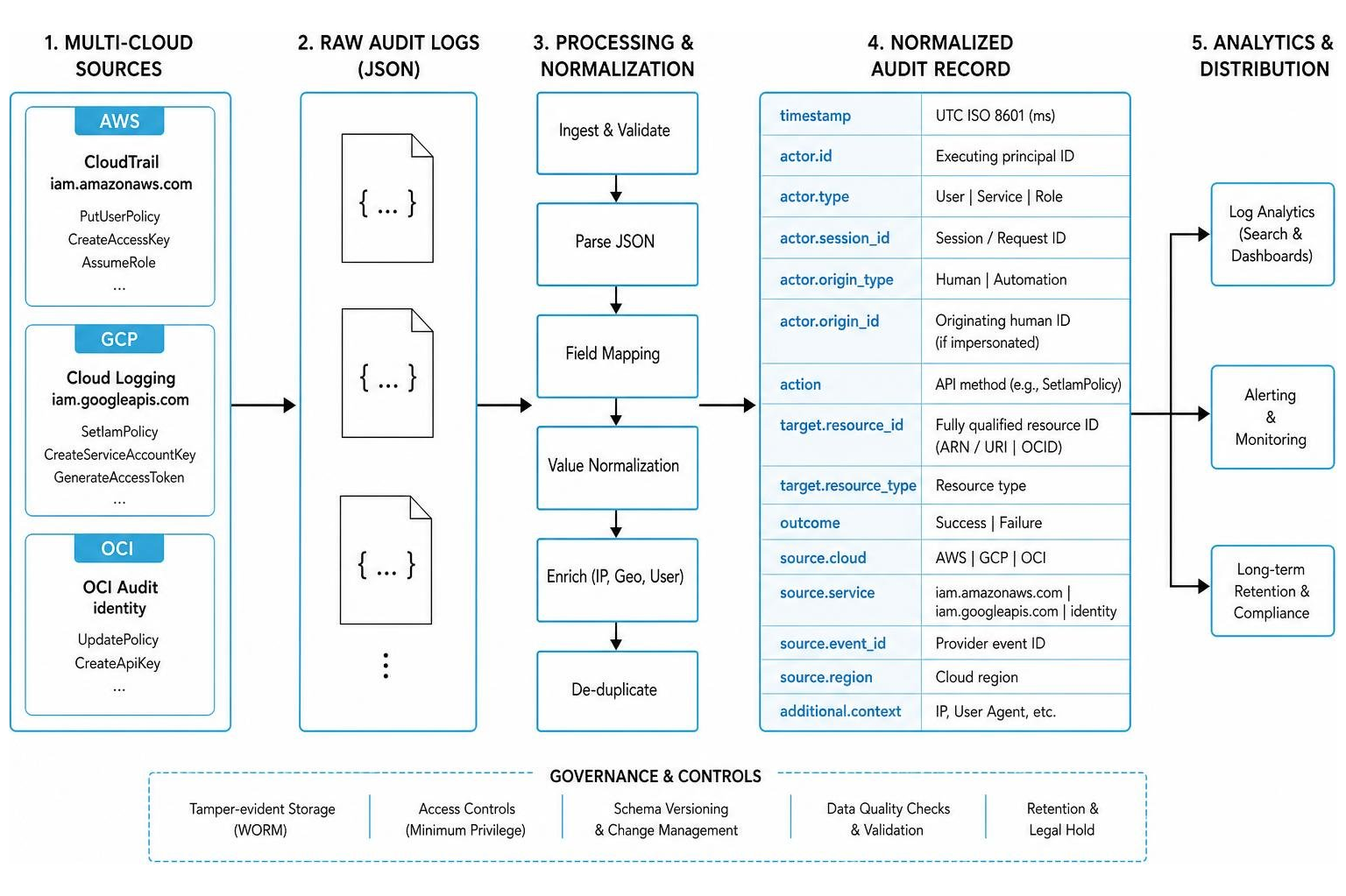
A compliant normalized schema must include the following metadata fields on every record:
- Timestamp: High-precision UTC timestamp (ISO 8601 format, millisecond precision).
- Actor (Principal): The unique identifier of the human user, service account, or automation principal initiating the call. If user impersonation or delegation occurs, the schema must preserve both the executing principal and the originating human identity.
- Action: The exact API method executed (e.g.,
SetIamPolicy). - Target Resource: The fully qualified resource identifier (ARN, URI, or OCID) of the resource being accessed or modified.
- Source IP & Location: The initiating IPv4/IPv6 address and geolocated country/region.
- Outcome & Status: A binary indicator of success or failure, accompanied by the raw error code (e.g.,
PermissionDenied).
Threat Detection: Identifying Identity Attacks with IAM Logs
A pile of raw logs is only useful if you can actively query it to stop security breaches. By mapping your logging strategy to threat detection use cases, you can identify common identity attacks before they escalate into full-scale compromises.
1. Brute-Force and Password-Spraying
Attackers attempt to guess credentials by trying multiple passwords against a single account, or a single common password against hundreds of accounts.
- Log Indicator: A sudden spike in failed authentication events.
- Detection Logic: Trigger an alert when a single IP address or user account records 3 or more failed authentication attempts within a 5-minute window, followed immediately by a successful login.
2. Impossible Travel (Geographic Anomalies)
Impossible travel occurs when a single user credential is used to authenticate from two geographically distinct locations in a timeframe that is physically impossible to achieve by commercial travel.
- Log Indicator: Successful session creations from different IP geolocations.
- Detection Logic: Calculate the distance and time elapsed between consecutive successful logins for a single user ID. If the required velocity exceeds 1,000 km/h (e.g., logging in from New York, and then 15 minutes later from London), flag the session for immediate MFA step-up or session revocation.

3. Service Account Interactive Logins
Service accounts are designed strictly for machine-to-machine, automated programmatic workflows. They should never be used by human operators to log in interactively via standard web browsers.
- Log Indicator: Interactive console logins or browser-based User-Agent strings associated with service account principals.
- Detection Logic: Run a query that isolates authentication events where the username contains service account indicators (e.g.,
integration,service-account,bot, orimpl), and the client user-agent matches common browsers (e.g., Chrome, Safari, Edge, or Firefox).
4. Privilege Escalation (Shadow Admin Creation)
An attacker with limited access attempts to grant themselves or a compromised secondary account full administrative privileges.
- Log Indicator: Calling policy modification APIs on highly privileged roles.
- Detection Logic: Monitor for
SetIamPolicyorAttachUserPolicycalls where the policy payload grants administrative permissions (such as*in AWS orroles/ownerin GCP) to a non-standard or newly created user account.
To establish a comprehensive posture against these threats, consult Unlocked's Identity and Access Management Guide 2026.
Best Practices for Configuring and Securing IAM Audit Logs
To build a logging program that is both operationally useful and resilient against sophisticated attackers, implement the following best practices.
1. Enable Multi-Region Logging and Global Events
In AWS, global services like IAM and STS log their activity to the us-east-1 region by default. If you only configure single-region CloudTrail logging in your active operational regions, you will miss critical IAM changes. Always enable multi-region logging and explicitly include global service events in your CloudTrail configurations.
2. Enforce Log Immutability and Segregation of Duties
If an attacker compromises your production environment with administrative privileges, their first step is often to delete or modify CloudTrail or Cloud Logging configurations to erase their tracks.
- WORM Storage: Store your centralized logs in Write-Once-Read-Many (WORM) storage, such as an S3 bucket with S3 Object Lock enabled in Compliance mode, or an OCI Audit store.
- Dedicated Log Archive Account: Ship all logs to a completely isolated cloud account that is dedicated solely to security logging and archiving. Deny delete permissions on this bucket to all production principals, including administrators.
3. Implement Log File Integrity Validation
Enable log file integrity validation on your logging pipelines. AWS CloudTrail, for example, delivers a signed digest file every hour containing the SHA-256 hashes of the log files. This allows you to run validation commands (such as aws cloudtrail validate-logs) to prove to auditors that your logs have not been modified or deleted.
4. Restrict Access to Audit Logs (NIST SP 800-53 AU-6(7))
In accordance with NIST SP 800-53: AU-6(7): Permitted Actions | Daydream, you must explicitly define who has permission to review, analyze, and report on audit log data.
- Create a "permitted-actions matrix" mapping roles (e.g., SOC Analyst, Security Engineer, Compliance Officer) to specific log-viewing capabilities.
- Enforce least privilege by removing destructive capabilities (such as index deletion or configuration modification) from standard analyst roles.
- Isolate platform administration (SIEM configuration) from audit review.
- For a complete breakdown of managing administrative access controls, consult the User Permission Management & Access Control Best Practices for IT Teams guide.
5. Optimize Logging Costs with Exclusion Filters
While comprehensive logging is essential, enabling full data-level logging across high-traffic applications can result in massive ingestion costs.
- GCP Exemptions: Use service account exemptions in GCP to exclude high-frequency, trusted automated service accounts from generating noisy
DATA_READorDATA_WRITElogs, while keepingADMIN_WRITElogs fully enabled. - Tiered Storage: Keep the most recent 90 days of logs in hot, highly queryable storage (e.g., CloudWatch or a SIEM) for active security operations, and use lifecycle policies to transition older logs to cost-effective cold storage (e.g., Amazon S3 Glacier Deep Archive) to satisfy long-term compliance mandates. Refer to the SEC04-BP01 Configure service and application logging - Security Pillar guidelines for further cost-optimization strategies.
Frequently Asked Questions about IAM Audit Logging Requirements
What are the core IAM audit logging requirements for SOC 2?
SOC 2 CC7.2 does not dictate a rigid checklist of technical settings, but rather requires that you have the operational capability to detect and respond to security anomalies. For IAM, this means you must log and actively monitor authentication attempts, MFA failures, password resets, and administrative privilege changes. Auditors will sample your logs to verify that you maintain a continuous trail of administrative activity and can produce evidence of alerts triggered by unauthorized or suspicious access attempts.
How do I configure IAM audit logging requirements in multi-cloud environments?
In a multi-cloud architecture, the best practice is to centralize all identity events into a single, unified Security Information and Event Management (SIEM) platform or a security data lake. This requires:
- Configuring native export sinks (e.g., AWS CloudTrail S3 delivery, Google Cloud Log Sinks, OCI Service Connectors) to stream logs to a central ingestion point.
- Normalizing the incoming logs into a consistent schema so that an identity action in AWS (like
AssumeRole) is parsed and analyzed using the same rules as an identity action in GCP (like service account impersonation). - Ensuring consistent time synchronization using NTP across all cloud environments to allow for accurate cross-platform event correlation during incident response.
How long should IAM audit logs be retained?
Log retention periods are determined by your industry and regulatory obligations. Standard practices include:
- SOC 2 and ISO 27001: Typically require a pragmatic default of 12 months of log retention.
- PCI DSS: Requires a minimum of 12 months of retention, with at least the most recent 3 months kept immediately accessible and queryable.
- FedRAMP Moderate: Mandates keeping logs online for 1 year and archiving them for at least 3 years.
- HIPAA: Requires retaining security and audit documentation for a minimum of 6 years.
Conclusion
Satisfying IAM audit logging requirements is a foundational step in securing your organization's digital identity boundary. By understanding the distinct logging architectures of AWS, GCP, and OCI, targeting high-risk API methods, and enforcing strict log integrity controls, you can build an audit-ready logging program that acts as an active line of defense against modern identity threats.
If you are looking to simplify your identity security architecture, Unlocked provides the comprehensive technical resources you need to compare solutions and implement best practices. For a detailed evaluation of modern enterprise identity tools, read our IAM Tool Guide: Secure Access, User Management, and Compliance Explained.
Ready to elevate your identity security posture and stay ahead of compliance audits? Sign up for Unlocked to access expert security playbooks, deep-dive technical guides, and practical compliance toolkits.