
Demystifying Federated Identity Attribute Mapping and Release
Federated identity attribute mapping decides who gets access to what across SSO. This guide covers SAML assertions, OIDC claims, CEL mapping for Google Cloud, WIF principals, and provisioning.

When Identity Crosses Boundaries: What Federated Identity Attribute Mapping Actually Does
Federated identity attribute mapping is the process of translating user identity data — like name, email, department, or group membership — from your organization's identity provider (IdP) into a format that a target application or cloud platform can understand and act on.
In plain terms: when a user logs into a third-party app using their company credentials, something has to tell that app who they are and what they're allowed to do. That "something" is attribute mapping.
Here's the quick version:
| Concept | What it means |
|---|---|
| Federated identity | Your org's IdP vouches for users so they don't need separate accounts everywhere |
| Attribute | A piece of user data — email, role, department, group ID |
| Attribute mapping | Translating IdP attribute names/formats into what the target app expects |
| Why it breaks | IdPs and apps use different naming conventions, formats, and data types |
Getting this right is the difference between SSO that just works and hours of debugging SAML assertion errors — a frustratingly common experience for security engineers configuring platforms like Google Cloud's Workforce Identity Federation or enterprise tools like Okta and PingFederate.
The challenge isn't the concept. It's the details: a misnamed claim, an unindexed list attribute, or a missing google.subject mapping can silently break access for entire user groups. And in environments where federation is the only authentication path, that's a production incident waiting to happen.
This guide walks through exactly how attribute mapping works across the most common protocols (SAML and OIDC), how to configure it correctly in real cloud environments, and how to avoid the pitfalls that trip up even experienced engineers.
What is Federated Identity and How Does It Enable SSO?
Federated identity management (FIM) establishes a trust relationship between two distinct security domains: the Identity Provider (IdP), which owns the user directory and authenticates the user, and the Service Provider (SP), which hosts the application or cloud resources the user needs to access. By separating authentication from authorization, organizations can implement seamless Single Sign-On (SSO) across enterprise applications, cloud portals, and specialized platform ecosystems.
To understand how this functions, it helps to read The Full Guide to Federated Identity Manager and Federated Identity Management. At its core, instead of forcing users to maintain distinct credentials for every SaaS tool or cloud platform, the SP delegates the task of verifying the user’s identity to the IdP.
The Trust Flow and CSI Application Integration
Consider a real-world scenario involving CSI applications. CSI utilizes Auth0 as its underlying identity provider to manage authentication. When a customer decides to federate their identity with CSI, they establish a secure trust relationship between their own corporate IdP (such as Microsoft Entra ID, Okta, ADFS, PingFederate, or Google Workspace) and CSI's Auth0 tenant.
- The Request: A user attempts to access a CSI application.
- The Redirection: The CSI application redirects the user's browser to the customer's federated IdP.
- The Authentication: The customer's IdP authenticates the user locally. This is a critical security boundary: the customer's credentials never leave their own environment.
- The Assertion: Upon successful authentication, the IdP generates a cryptographically signed assertion (or token) containing user attributes and redirects the browser back to CSI's Auth0 tenant.
- The Grant: Auth0 validates the signature, maps the incoming attributes to CSI's internal schema, and grants the user secure access.
To dive deeper into this security model, see our resource on Identity and Access Management (IAM): The Complete Guide to Security, Access, and Credential Management.
Mitigating Modern Session Attacks at the IdP Level
Because federated identity concentrates authentication at a single point, securing that initial authentication event is paramount. If an attacker compromises a user's IdP session, they gain a key to every trusted service provider connected to that federation.
Modern attack campaigns frequently use Adversary-in-the-Middle (AiTM) phishing proxies to bypass legacy multi-factor authentication (MFA) by stealing session cookies. To mitigate AiTM attacks and session hijacking, organizations must enforce phishing-resistant FIDO2 authenticators (such as EveryKey) directly at the IdP level. When phishing-resistant hardware authenticators are bound to the domain, the cryptographic challenge cannot be proxied by an attacker, ensuring that the assertions released to downstream SPs are backed by a verified, tamper-proof authentication event.
The critical nature of securing these federated trust relationships was highlighted in a late 2025 threat intelligence report detailing a campaign by Midnight Blizzard (APT29). The threat actors targeted federated trust configurations by compromising active directory federation services (ADFS) and manipulating SAML token signing certificates. By injecting unauthorized attributes into SAML assertions, they bypassed downstream multi-factor authentication (MFA) policies and escalated privileges across multi-tenant cloud environments. This incident underscores that federated identity is not just a convenience tool, but a high-value target where a single misconfigured attribute mapping or compromised signing key can expose an entire enterprise network.

SAML vs. OIDC: Protocol Differences in Federated Identity Attribute Mapping
When configuring federated identity attribute mapping, security engineers must understand the architectural differences between the two dominant federation protocols: Security Assertion Markup Language (SAML 2.0) and OpenID Connect (OIDC).
| Feature | SAML 2.0 | OpenID Connect (OIDC) |
|---|---|---|
| Data Format | XML (Extensible Markup Language) | JSON (JavaScript Object Notation) |
| Transport Token | SAML Assertion (Base64 encoded XML) | JSON Web Token (JWT) - ID Token |
| Standard Specifications | OASIS SAML 2.0 | OpenID Connect Core 1.0 / RFC 7519: JWT |
| Attribute Container | <saml:AttributeStatement> |
JSON Claims payload |
| Subject Identifier | <saml:NameID> |
sub claim |
| Attribute Naming | Long, formal URIs (e.g., schemas.xmlsoap.org) | Short, standardized keys (e.g., email, given_name) |
| Extensibility | Highly flexible, but requires manual mapping | Standardized scopes (profile, email) reduce mapping overhead |
SAML Assertions: XML Complexity and NameID
SAML 2.0 relies on XML-based assertions. Because SAML does not mandate a strict, universal naming convention for attributes, different identity providers release user attributes using highly disparate formats.
For instance, Microsoft Entra ID typically releases the user's email address using a long, formal URI claim name: http://schemas.xmlsoap.org/ws/2005/05/identity/claims/emailaddress
Meanwhile, a custom Shibboleth or PingFederate configuration might release it simply as mail or email. The subject of the assertion—the unique identifier for the authenticated user—is transmitted in the <saml:NameID> element. If the NameID is transient, it changes with every session, which can break stateful integrations unless auto-federation or account linking is configured.
OIDC Claims: Standardized JSON Payloads
OIDC, which sits as an identity layer on top of OAuth 2.0, simplifies mapping by utilizing lightweight JSON payloads defined by RFC 7519: JSON Web Token (JWT) Specification. OIDC defines standard "scopes" (such as openid, profile, and email) that map directly to pre-defined JSON claims.
When an OIDC client requests the profile scope, the IdP is obligated to return standard claims like given_name, family_name, and preferred_username. This high level of standardization means that OIDC integrations often require far less manual attribute mapping than their SAML counterparts.
To understand why modernizing your IAM infrastructure to support these protocols is crucial, see our analysis of Identity Management Benefits: Why Modern IAM Is Essential for Secure, Efficient Access and explore Federated Identity Management Systems.
Step-by-Step: Configuring Attribute Mapping in Cloud Environments
Configuring federated identity attribute mapping requires a systematic approach. Misconfigurations can lead to authentication failures, over-privileged users, or silent data leakage.
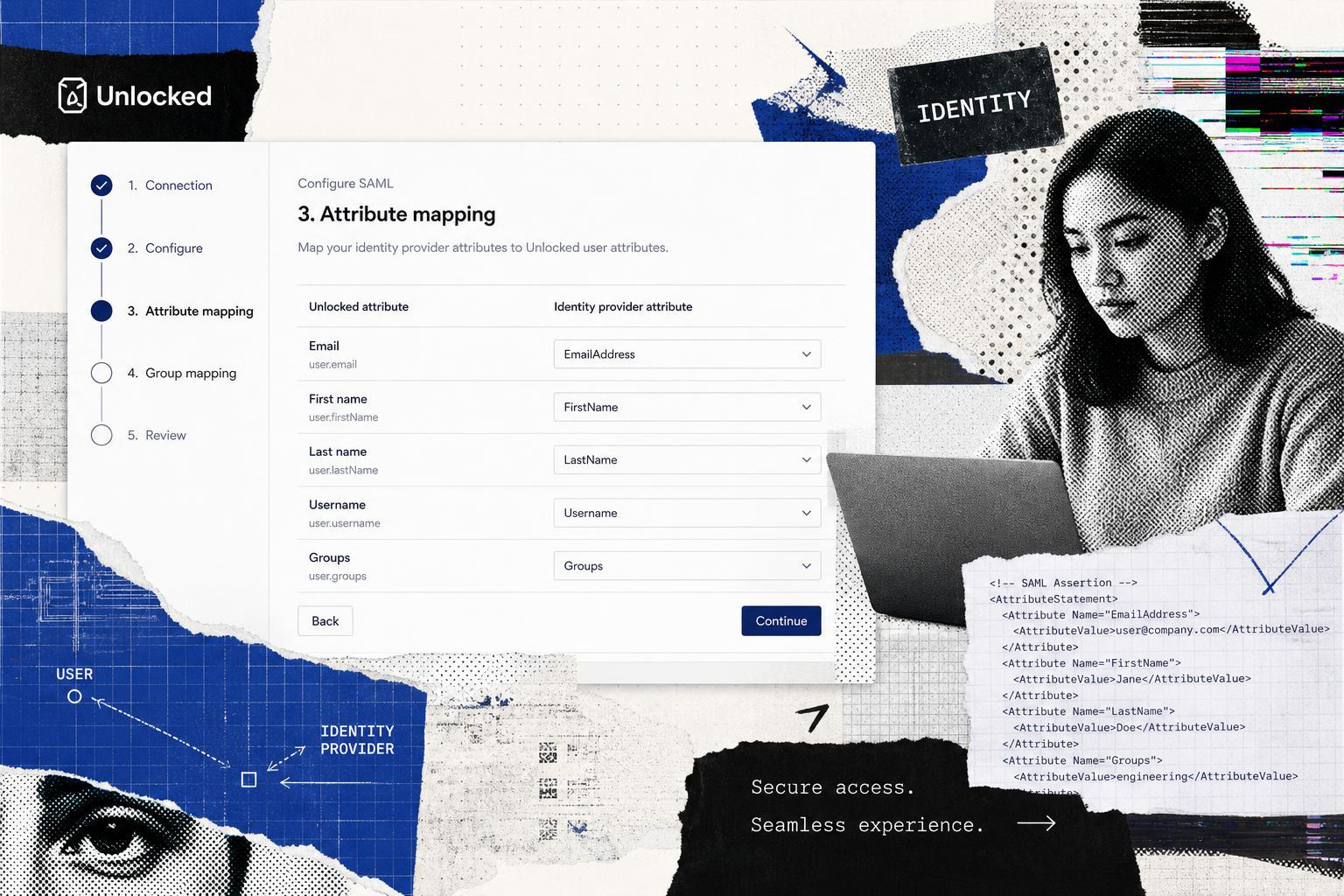
Setting Up Federation in the CSI Customer Center
CSI provides a self-service configuration wizard within the CSI Customer Center to establish federation without charging additional fees.
- Access the Wizard: Navigate to Settings > Federated Identity Settings in the CSI Customer Center.
- Initiate the Connection: Select the Custom SAML option (regardless of your specific enterprise IdP type, as Auth0 handles the downstream translation).
- Upload IdP Metadata: Provide your IdP’s metadata URL or upload the XML metadata file directly.
- Acquire CSI Metadata: After initiating the setup, the wizard will generate the CSI Service Provider metadata. If you need the direct metadata URL, email
identity@csiamerica.com. - Configure Attribute Mapping: In your corporate IdP, configure the attribute contract to release the following mandatory claims:
email(User's primary email address)given_name(First name)family_name(Last name)name(Full name)user_id(Unique persistent identifier)
- Test the Connection: Use the built-in testing utility to verify that the attributes are correctly resolved before enabling SSO globally.
Note on Client Secrets: If you are federating using an OIDC-based Azure AD/Entra ID enterprise application, you must proactively update your client secrets within the CSI Customer Center before they expire to prevent authentication outages.
For more on configuring mapping logic in enterprise platforms, consult standard identity provider documentation, which outlines how to map user attributes and establish secure account mapping rules across federated systems.
How to Map SAML Claims to Google Cloud Using Federated Identity Attribute Mapping
Google Cloud’s Workforce Identity Federation (WIF) allows you to use an external IdP (like Entra ID or Okta) to authorize human users to access Google Cloud resources directly without synchronizing identities to Google Cloud accounts.
When mapping SAML attributes to Google Cloud, you must write Common Expression Language (CEL) expressions to map incoming SAML assertions to Google Cloud’s target attributes. This process is documented in detail in the Attribute mapping for workforce pools | Google Cloud IAM guide.
The Array Pitfall in CEL Mapping
A common pitfall during WIF configuration is ignoring the data types of incoming SAML assertions. In SAML, all attributes are transmitted as arrays (lists) of strings, even if they only contain a single value.
If you attempt to assign a multi-valued attribute directly to a single-value target field in Google Cloud, the mapping will fail. You must explicitly reference the first element of the array using [0] indexing.
Example CEL Mapping Configuration
Below is a typical CEL configuration mapping Entra ID SAML assertions to Google Cloud WIF attributes:
Crucial Consideration for Gemini Enterprise: If your organization uses Gemini Enterprise, the google.subject attribute must map to the user's primary email address. Mapping it to an opaque identifier like an Object ID will prevent Gemini from unifying data access correctly.
For teams managing this infrastructure via code, you can use the googleiamworkforce_pool | Resources | hashicorp/google | Terraform Registry resource to automate pool deployment. If your environment is backed by an enterprise IdP, you can manage your adapter contracts programmatically using the corresponding Terraform providers for your identity platform.
Assigning IAM Permissions to Workforce Identity Federation (WIF) Principals
Once your attributes are mapped, you must assign IAM permissions to those federated identities. In a Zero Trust architecture, permissions should be assigned to groups rather than individual users to ensure scalability and ease of audit. Read more about this approach in Secure IAM: Protecting Digital Identities and Access in a Zero Trust World.
The Correct WIF Principal Format
In Google Cloud, you do not assign roles to standard user accounts when using WIF. Instead, you reference WIF principals using the principalSet format.
Best Practice: Use Group Object IDs, Not Display Names
When mapping Entra ID groups to google.groups, always map the Entra ID Group Object ID (UUID) rather than the group's display name. Group display names are mutable and can be changed by an administrator, which would silently break IAM policies. Object IDs are globally unique, immutable, and mitigate the risk of privilege escalation through group renaming.
Example gcloud Command
To grant the roles/discoveryengine.user role to a specific Entra ID group within a workforce pool, execute the following command:
For AWS environments, similar structural rules apply when mapping attributes to IAM session tags, as detailed in the Configure attribute mappings | AWS IAM Identity Center documentation.
Advanced Mapping: Automated Provisioning, MFA, and Lifecycle Management
Attribute mapping is only one part of the identity lifecycle. To maintain operational efficiency, organizations must coordinate attribute mapping with user provisioning and runtime security policies.
JIT vs. SCIM Provisioning
While attribute mapping allows an application to read a user's data during the login flow, it does not necessarily create a persistent record of that user in the target application's local database.
- Just-In-Time (JIT) Provisioning: JIT uses the attributes passed in the SAML or OIDC token to dynamically create or update the user account on the fly during their first login. This is highly efficient but means users cannot be assigned permissions or pre-loaded into workflows until they have logged in at least once.
- SCIM (System for Cross-domain Identity Management): SCIM is an open standard that synchronizes identity data out-of-band. A SCIM client running on the IdP monitors the directory for changes (new users, group changes, terminations) and pushes those updates to the target application via REST APIs.
To implement automated lifecycle management securely, refer to Cross-Domain Identity Management: Automating and Securing User Provisioning with SCIM.
What Happens Without Automated Provisioning?
If automated provisioning (JIT or SCIM) is not enabled, a federated user who does not exist in the target application's database will receive an access error immediately after authenticating at their IdP.
For platforms like CSI, administrators must use the User Management Dashboard (UMD) to bulk import contacts into the CSI User Database before those users attempt to log in. The incoming federated user's email address is then matched against the pre-provisioned record to complete the login sequence.
For advanced configurations, enterprise identity platforms typically support linking identities on the fly using auto-federation and mapping incoming attributes directly to existing user accounts during the authentication handshake.
Best Practices for Maintaining Federated Identity Attribute Mapping and Security
- Enforce Signing Key and Certificate Rotation: SAML trust is anchored on cryptographic certificates. Establish a strict key rotation schedule. If a signing certificate expires, SSO will fail globally. Use metadata URLs that support automated certificate rollover rather than static XML files.
- Verify
acrClaims for Runtime MFA: Do not assume that because a user is federated, they have completed MFA. Configure your SP to inspect theacr(Authentication Context Class Reference) claim within the OIDC token (or theAuthnContextClassRefin SAML) to verify that the IdP enforced phishing-resistant multi-factor authentication. Refer to NIST SP 800-63C: Federation and Assertions for compliance mapping. - Establish Centralized Governance: Maintain a clean, audited source of truth. As roles change, attributes must be updated in the centralized directory to propagate downstream immediately. For more on this, see Identity Manager: Centralizing User Access and Governance in the Enterprise.
Frequently Asked Questions about Federated Identity Attribute Mapping
What happens if a new federated user is not in the target application database?
If neither JIT nor SCIM provisioning is configured, the user will successfully authenticate at their IdP, but the target application (the Service Provider) will reject them with an access error (such as a "User Not Found" or database lookup error). To resolve this, an administrator must manually pre-provision the user account (for example, via the CSI User Management Dashboard) using the exact matching email address before the user attempts to log in.
How do I securely manage and rotate federation metadata and certificates?
Always prioritize dynamic metadata URLs over uploading static XML files. Modern IdPs publish their active and upcoming signing keys on public JWKS (JSON Web Key Set) endpoints or SAML metadata URLs. If your Service Provider supports dynamic metadata consumption, it will automatically download and trust the new certificate during a rollover, completely avoiding manual intervention and the associated risk of an authentication outage.
How does MFA carry over in a federated setup?
Once federated, the responsibility for enforcing multi-factor authentication (MFA) lies entirely with your corporate IdP. When a user logs into a federated application, the application redirects them to your IdP, which executes your local security policies (such as conditional access policies). To ensure this trust is secure, the Service Provider can validate the authnContextClassRef (SAML) or acr (OIDC) claim inside the assertion token to verify that a secure, phishing-resistant FIDO2 hardware key (such as EveryKey) was used to complete the login.
Conclusion
Federated identity attribute mapping is a highly technical but essential component of modern enterprise security. When configured correctly, it bridges the gap between different security domains, enabling seamless access control, automated provisioning, and a robust Zero Trust security posture.
By understanding the differences between SAML and OIDC, writing precise CEL expressions, and enforcing strict lifecycle management, security practitioners can eliminate authentication errors and protect their organizations from modern identity-based threats.
To evaluate how your organization can deploy modern, secure identity architectures, explore our comprehensive Best Identity Access Management Solution of 2026 buyer's guide.