
Basic vs Form-Based Authentication and Why You Should Care
Basic authentication resends your credentials with every request; form-based authentication swaps them once for a session cookie. That single difference shapes security, MFA support, and logout.

What's the Real Difference Between Form-Based Authentication and Basic Authentication?
When comparing form based authentication vs basic authentication, the short answer is this: Basic authentication sends your credentials with every single HTTP request, while form-based authentication exchanges credentials once and then uses a session cookie to maintain access.
Here's a quick breakdown before we go deeper:
| Feature | Basic Authentication | Form-Based Authentication |
|---|---|---|
| Credential transmission | Every request (Base64-encoded) | Once at login, then session cookie |
| Session management | None — stateless by design | Yes — server-side session with cookie |
| Logout capability | Not reliably supported | Full logout and session invalidation |
| Custom login UI | No — browser native dialog | Yes — custom HTML login page |
| MFA compatibility | Difficult to implement | Straightforward to layer in |
| Primary use case | APIs, internal tools, dev environments | Web browser clients, consumer apps |
| Defined by | RFC 7617 | No formal RFC |
Both methods are built on the same basic idea: verify a user's identity before granting access to protected resources. But how they do that — and what happens after — is where the meaningful differences emerge.
Basic auth is simple and standardized. It's baked directly into the HTTP protocol. Form-based auth is more flexible and user-friendly, but it requires more work to implement correctly.
Neither method is inherently safe without HTTPS/TLS. Credentials sent over unencrypted connections — whether Base64-encoded or posted through an HTML form — can be intercepted. That's not a debate; it's a hard fact that both the MDN documentation and RFC 7617 make explicit.
The reason this comparison matters in 2026 isn't academic. Microsoft and Google have both moved aggressively to deprecate Basic authentication across their platforms — and for good reason. Basic auth's inability to support modern MFA workflows makes it a structural liability in environments where credential-based attacks remain one of the most common initial access vectors in reported breaches.
If you're an IT administrator deciding which method to implement, a security engineer reviewing an existing codebase, or a CISO evaluating authentication posture across your application portfolio — the choice between these two methods has direct implications for your security controls, your compliance position, and your users' experience. Let's break it all down.
Form based authentication vs basic authentication vocab explained:
Core Architectural Differences: Form Based Authentication vs Basic Authentication
To understand the core architectural differences between these two methodologies, one must look at where the authentication logic resides.
HTTP Basic Authentication is a standard protocol defined originally in RFC 1954 and updated in RFC 7617. Because it is built directly into the HTTP protocol, it operates at the HTTP server layer. When a client attempts to access a protected resource, the server responds with an HTTP 401 Unauthorized status and a WWW-Authenticate: Basic realm="Access Restricted" header. The web browser intercepts this challenge and displays its own native, un-stylable modal dialog requesting a username and password. Once entered, the browser encodes these credentials in a single string using Base64 encoding (e.g., Authorization: Basic dXNlcm5hbWU6cGFzc3dvcmQ=) and transmits them in the HTTP headers.
Conversely, form-based authentication is not formalized by any single RFC. It is an application-layer mechanism that uses standard HTML forms to collect credentials. When an unauthenticated user requests a restricted page, the application itself intercepts the request and redirects the user to a custom login page. The credentials are submitted to the server via an HTTP POST request, typically in the request body as application/x-www-form-urlencoded data.
Because form-based authentication lives in the application layer, developers have complete control over the user experience, validation flows, and page design. This distinction is covered extensively in the Forms Based Authentication Explained guide, which details how application-layer mechanisms allow for rich customization compared to rigid server-level protocols.
A key point of divergence is that Basic authentication relies entirely on the HTTP protocol's statelessness. It does not establish a session. Instead, to keep the user "logged in," the browser caches the credentials locally and silently appends the Authorization header to every subsequent request to that domain. Form-based authentication, however, transitions immediately into a stateful session management flow once the initial POST request is validated. This foundational difference is also highlighted in the classic comparison of Basic Authentication and Form based Authentication, illustrating how the transition from raw credentials to session tokens changes the mechanics of web access.
Session Management and State Control
Session management is where the operational differences between these two methods become highly visible to both developers and users. Because HTTP is inherently stateless, applications must find a way to recognize a user across sequential requests.
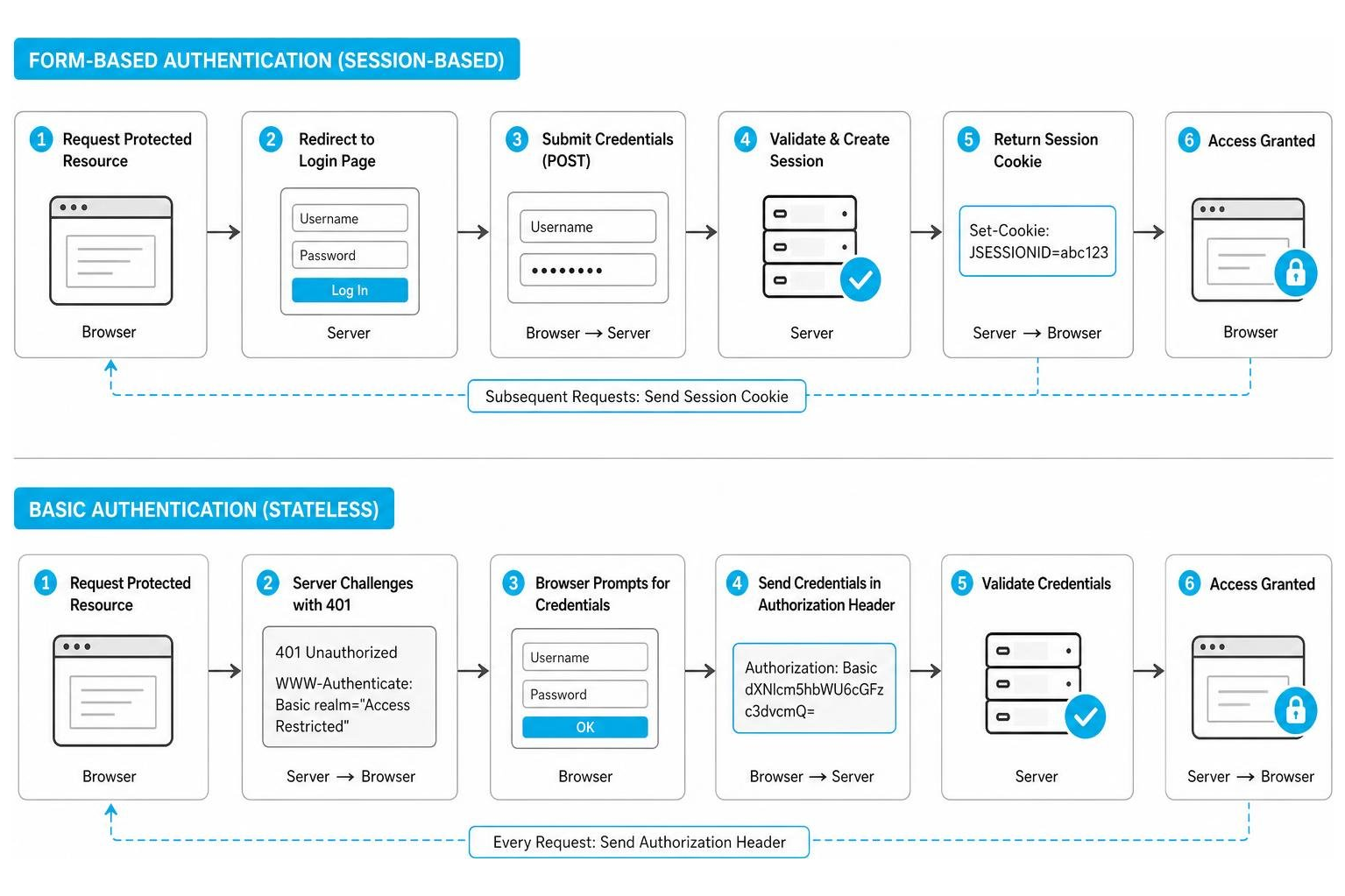
In a form-based authentication model, the server validates the credentials submitted via the HTML form, creates a session record in its database or memory store, and returns a unique session identifier to the client. This identifier is stored in a session cookie (such as JSESSIONID or PHPSESSID) within the browser. On subsequent requests, the browser automatically transmits this cookie. The server reads the cookie, matches it against its active sessions, and authorizes the request.
This model offers granular state control:
- Explicit Logout: The user can click a "Logout" button, prompting the application to invalidate the session on the server and instruct the browser to delete the cookie.
- Session Timeouts: The server can automatically destroy sessions after a set period of inactivity (e.g., 15 minutes), mitigating the risk of unauthorized access on abandoned devices. Learn more about configuring these parameters in the Form Based Authentication Guide 2026.
With Basic authentication, there is no session. The browser continues to send the raw username and password in the Authorization header with every request. This introduces significant limitations:
- No Reliable Logout: Because the browser caches the credentials and automatically attaches them to requests, there is no built-in way to log out. The browser will keep sending the credentials until it is closed, or until the cache is cleared. Developers often have to resort to hacks, such as returning a
401 Unauthorizedresponse with an invalid realm to trick the browser into clearing its cache, but this behavior is inconsistent across different browsers. - No Idle Timeouts: Since the server does not track a session state, it cannot implement an idle timeout. If an authenticated browser is left unattended, the resource remains accessible indefinitely.
This architectural difference also explains why form-based authentication is generally not considered RESTful. REST architecture mandates that each request must contain all the information necessary to understand and process it, without relying on stored server-side context. By relying on server-side sessions, form-based systems violate this stateless constraint, a topic thoroughly debated in Why is form based authentication NOT considered RESTful?.
Security Implications and Vulnerability Profiles
From a security perspective, both Basic and form-based authentication carry distinct risk profiles that security engineers must manage.
The table below outlines the primary threat vectors and how each authentication method fares against them:
| Threat Vector | Basic Authentication Risk | Form-Based Authentication Risk |
|---|---|---|
| Credential Interception | High. Credentials are sent with every single request. If TLS is terminated early or misconfigured, credentials are exposed. | Moderate. Credentials are sent only once during the initial login phase. |
| Brute-Force Attacks | High. Often lacks built-in rate limiting at the server level, allowing attackers to continuously submit requests with guessed credentials. | Moderate. Easy to implement account lockouts, CAPTCHAs, and rate limiting in the application code. |
| Cross-Site Request Forgery (CSRF) | Low. Browsers do not automatically attach the Authorization header to cross-origin requests unless explicitly configured via CORS. |
High. Browsers automatically send cookies with cross-origin requests, requiring developers to implement CSRF tokens. |
| Cross-Site Scripting (XSS) | Low. Credentials are held in browser memory rather than accessible storage. | High. If session cookies are not configured with the HttpOnly flag, scripts can steal session tokens. |
| Multi-Factor Authentication (MFA) | Extremely High. The stateless, header-based nature of Basic auth makes it nearly impossible to prompt for an MFA challenge. | Low. Easily integrated into the application-layer login flow before a session is established. |
Because Basic authentication transmits credentials with every single request, the attack surface for credential harvesting is significantly larger. If an organization terminates TLS at a reverse proxy and routes unencrypted HTTP traffic internally, any compromised internal node can sniff the plaintext credentials (since Base64 is merely an encoding scheme, not encryption).
Furthermore, the lack of MFA compatibility is a critical failure point in modern enterprise environments. In contrast, form-based authentication can easily orchestrate multi-step authentication processes, redirecting users to an MFA challenge screen after password verification but before issuing the session cookie. This evolution from basic, single-factor protocols to modern multi-layered architectures is discussed further in Understanding Password Authentication Protocols from PAP to Modern Security.
Implementation and Framework Considerations
When implementing these patterns in enterprise frameworks, developers must understand the underlying filters and endpoints.
In Java-based environments, legacy systems configured form-based authentication using declarative settings in the deployment descriptor (web.xml). This approach relied on the application server's container-managed security, requiring specific configuration elements:
This model required the HTML login form to submit its POST request to a special system-defined action URL named j_security_check, using the exact field names j_username and j_password. While simple to configure, it offered very little flexibility for custom error handling or dynamic multi-factor authentication, as detailed in the guide on Specifying an Authentication Mechanism (The Java EE 6 Tutorial, Volume I).
Modern frameworks like Spring Security provide much more robust configurations. Spring Security utilizes a chain of servlet filters to intercept requests.
- Basic Authentication: Managed by the
BasicAuthenticationFilter. It looks for theAuthorizationheader, decodes the credentials, and passes them to theAuthenticationManager. - Form-Based Authentication: Managed by the
UsernamePasswordAuthenticationFilter. It intercepts POST requests to/login, extracts the username and password, and attempts authentication.
To secure passwords properly in either flow, developers must use a secure hashing algorithm. Spring Security enforces this via the PasswordEncoder interface, with BCryptPasswordEncoder being the standard default. Plaintext passwords should never be stored in the database. Instead, a custom UserDetailsService fetches the hashed password from the database, and the framework compares it with the incoming credentials.
For a side-by-side comparison of how these filters behave under the hood in Spring, developers can consult the Comparison of Form Login, Basic Authentication, and Digest Authentication in Spring Security | by Sithara Wanigasooriya | Medium, which provides code examples and architectural flowcharts for each.
When to Use Each Method in Modern Architectures
Choosing between these methods requires evaluating your application's architecture, target audience, and security requirements.
Why form based authentication vs basic authentication matters for web applications
For consumer-facing or enterprise web applications accessed via standard browsers, form-based authentication is almost always the correct choice. The user experience of Basic authentication is highly disruptive; the browser's native login modal cannot be styled, branded, or localized, and it offers no path for self-service password resets, registration links, or single sign-on (SSO) redirects.
Furthermore, session control is vital for compliance and security in web apps. Being able to automatically terminate an inactive session prevents unauthorized access if a user leaves their workstation. To explore the mechanics of securing these browser-based forms, refer to Forms Based Authentication Explained: How Web Login Forms Work and How to Secure Them.
Choosing form based authentication vs basic authentication for APIs and microservices
For APIs and microservices, the conversation shifts. Because RESTful APIs should remain stateless, form-based sessions are highly discouraged. However, HTTP Basic authentication is also rarely suitable for production APIs due to the continuous transmission of credentials.
Instead, modern API architectures rely on token-based authentication (such as OAuth 2.0 and JSON Web Tokens). In these architectures, a client might use a form-based flow once to exchange credentials for a short-lived token (JWT), and then use that token in the Authorization: Bearer <token> header for subsequent API calls.
Basic authentication is occasionally retained for internal, legacy, or machine-to-machine integrations where the simplicity of the protocol outweighs the complexity of managing a token server. In Windows-heavy enterprise environments, teams often compare forms-based setups against Kerberos single sign-on, implementing fallback mechanisms to handle non-Windows clients. This architectural trade-off is explored in the Forms Based Authentication Kerberos Comparison.
Frequently Asked Questions
Why is Basic authentication considered deprecated for production web apps?
Basic authentication is considered deprecated because it lacks support for modern security controls, most notably Multi-Factor Authentication (MFA) and granular session management. Additionally, because it transmits credentials with every single request, it increases the risk of credential exposure if there are any misconfigurations in the transport layer security (TLS/HTTPS).
Can you implement Multi-Factor Authentication (MFA) with Basic authentication?
No, not natively. The HTTP Basic authentication protocol is a single-step challenge-response mechanism. It expects a username and password in a single header and does not have a standardized way to pause the request, issue an MFA challenge (like an SMS OTP or authenticator app prompt), and collect the second factor. Implementing MFA requires moving to an application-layer method like form-based login or modern federated identity protocols (OIDC/OAuth 2.0).
How does logout work differently in form-based vs Basic authentication?
In form-based authentication, logout is simple and reliable: the application destroys the session on the server and deletes the session cookie from the browser. In Basic authentication, there is no session to destroy. The browser caches the credentials and sends them automatically with every request. To "log out," the user must either close the entire browser or the application must use complex workarounds to force the browser to overwrite its cached credentials.
Conclusion
Understanding the differences between form based authentication vs basic authentication is essential for designing secure, modern systems. While Basic authentication offers simplicity and zero-dependency implementation at the server level, its stateless nature, lack of reliable logout, and incompatibility with Multi-Factor Authentication make it a high-risk choice for production web applications in 2026. Form-based authentication provides the necessary application-layer control to enforce sessions, implement timeouts, and deliver a polished user experience.
However, as security landscapes evolve toward Zero Trust, even traditional form-based session cookies are being augmented or replaced by centralized identity providers and modern token-based protocols.
For organizations managing complex application portfolios, coordinating these authentication methods can be challenging. This is where centralized access control platforms and hardware-assisted identity tools, such as EveryKey, help bridge the gap. By managing credentials securely and automating the login flow across both legacy basic auth endpoints and modern web forms, security teams can significantly reduce their credential-stuffing risk while maintaining a seamless user experience.
To learn more about optimizing your web login security, read our comprehensive guide on Forms Based Authentication Explained: How Web Login Forms Work and How to Secure Them, or sign up for Unlocked to get the latest cybersecurity insights delivered straight to your inbox.