Forms-Based Authentication or Kerberos: Choosing the Right Gatekeeper
Forms-based authentication and Kerberos solve the same problem in very different ways. This breakdown compares how each handles credentials, encryption, delegation, and daily administration for your environment.

Which Authentication Protocol Should You Choose: Forms-Based or Kerberos?
Any forms based authentication Kerberos comparison starts with a fundamental split: one protocol is built for the web, the other for the network.
Here is the short answer for readers who need a quick orientation:
| Factor | Forms-Based Authentication | Kerberos |
|---|---|---|
| Best for | Web apps, legacy systems, cloud/SaaS | Domain-joined networks, enterprise intranet |
| Credential handling | Username/password submitted via HTML form; session managed by cookie | Ticket-based; credentials never traverse the network after initial login |
| SSO support | Requires IdP integration; not native | Native SSO across domain services |
| Mutual authentication | No — server is not verified by default | Yes — client and server both verify each other |
| MFA compatibility | Strong; easily layered on | Supported but more complex to integrate |
| Infrastructure dependency | Web server + TLS + session store | Active Directory, KDC, DNS, time sync |
| Interoperability | High — works on any OS, browser, or device | Best on Windows domains; complex outside them |
| Primary attack risks | Credential stuffing, phishing, session hijacking | Pass-the-ticket, SPN abuse, replay attacks |
These two approaches solve the same problem — proving who you are — but they were designed for completely different environments and threat models.
Forms-based authentication is the login form you see on almost every website. It is simple, flexible, and works anywhere a browser runs. Kerberos is the default protocol on Windows Active Directory networks, quietly handling authentication for over 90% of domain-joined systems without users ever seeing a password prompt.
Choosing the wrong one does not just create friction. It creates security gaps — whether that is credential exposure on an unprotected form, or a misconfigured Kerberos delegation opening a path for lateral movement.
This guide breaks down how each protocol actually works, where each one is genuinely stronger, and how to decide which belongs in your environment.
Architectural Deep Dive: Forms-Based Authentication vs. Kerberos
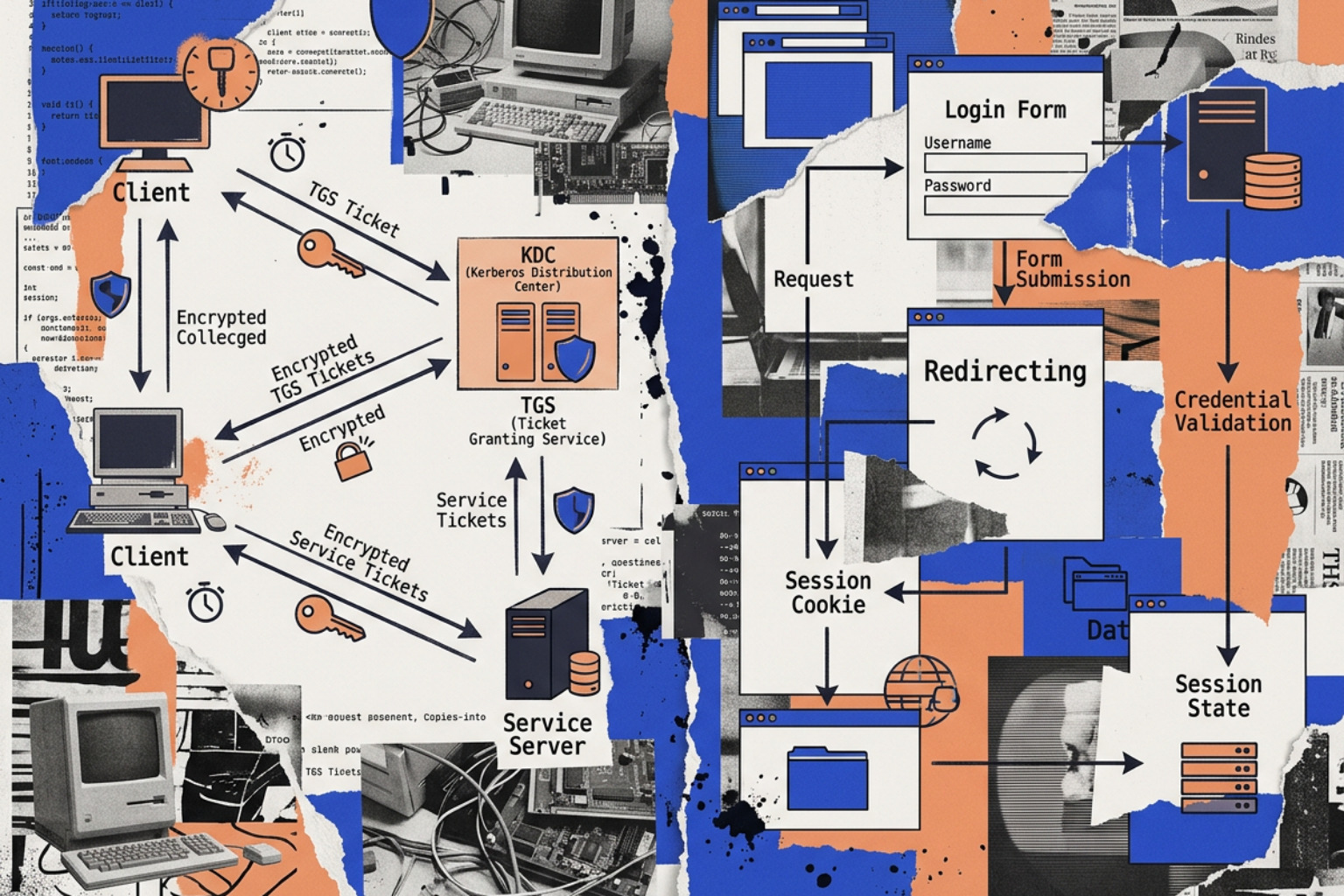
To understand how these two gatekeepers diverge, we have to look at their underlying security models. One relies on continuous trust verification via a centralized third party, while the other relies on a temporary, application-specific session established directly between the client and the web server.
For a broader perspective on how these protocols fit into the wider enterprise landscape, you can read A Comparative Analysis of Enterprise Authentication Protocols: LDAP, Kerberos, and RADIUS.
The Mechanics of Forms-Based Authentication
At its core, forms-based authentication is an application-level mechanism. It is built entirely on top of HTTP, which is natively stateless. Because HTTP does not remember who you are from one request to the next, the application must construct a custom layer to maintain your logged-in state.
The flow typically proceeds as follows:
- The Request: The user attempts to access a protected resource. Finding no valid session, the web application redirects the browser to a login page containing an HTML form.
- The Submission: The user enters their username and password. The browser packages these credentials into an HTTP POST request.
- The Verification: The web server receives the credentials. It validates them against a backend user store—which could be a local SQL database, an LDAP directory, or an external Identity Provider (IdP).
- The Session Token: If the credentials are valid, the server generates a unique session identifier. It writes this identifier to its own memory or a shared database (like Redis) and sends it back to the browser inside an HTTP response header, typically as a session cookie.
- Subsequent Access: For every subsequent request, the browser automatically attaches this session cookie. The server reads the cookie, looks up the active session in its database, and serves the requested resource.
This approach is highly customizable. Developers can design the login page however they want, easily integrate custom password recovery flows, and layer on multi-factor authentication (MFA) prompts directly in the browser. To learn more about securing these endpoints, see our detailed guide on Forms Based Authentication Explained.
The Mechanics of Kerberos Ticket-Based Authentication
Kerberos operates on a completely different philosophy. Instead of verifying credentials directly with each application, Kerberos uses a trusted third party called the Key Distribution Center (KDC). In a standard enterprise deployment, the KDC is integrated directly into the Active Directory Domain Controller.
Kerberos relies on symmetric cryptography and time-limited "tickets" to prove identity without ever sending a password over the network. The authentication dance involves three key phases:
- The Authentication Service (AS) Exchange:
- The client sends an
AS_REQcontaining a timestamp encrypted with a hash of the user's password. This proves the user knows the password without transmitting it. - The KDC decrypts the timestamp. If successful, it sends back an
AS_REPcontaining a Ticket Granting Ticket (TGT), which is encrypted with the KDC's secret key, and a session key encrypted with the user's password hash.
- The client sends an
- The Ticket Granting Service (TGS) Exchange:
- When the user wants to access a specific network resource (like a file share or an intranet site), the client requests a service ticket.
- The client sends a
TGS_REQto the KDC, presenting the TGT and an Authenticator (proving they own the TGT). - The KDC decrypts the TGT, validates the request, and returns a Service Ticket (ST) encrypted with the target service's secret key, along with a service session key.
- The Application (AP) Exchange:
- The client sends the Service Ticket directly to the application server (
AP_REQ). - The application server decrypts the ticket using its own secret key (often stored in a local keytab file or registered via a Service Principal Name in Active Directory).
- Since the ticket could only have been encrypted by the trusted KDC, the application server trusts the identity asserted inside it.
- The client sends the Service Ticket directly to the application server (
Crucially, Kerberos supports mutual authentication. When the client sends the service ticket, it can request that the server prove its own identity in return (AP_REP). This prevents rogue servers from impersonating legitimate enterprise resources—a major architectural advantage over basic forms-based setups. For a deeper dive into these network handshakes, read our Authentication Protocols Complete Guide.
Security Profiles: Encryption, Credential Exposure, and Threat Vectors

When comparing the security posture of forms-based authentication and Kerberos, we are looking at two entirely different attack surfaces. One relies on securing the transport layer to protect sensitive data in transit, while the other is cryptographically secure by design, even over untrusted networks.
To understand how these modern paradigms evolved from older, less secure methods, check out Understanding Password Authentication Protocols From Pap To Modern Security.
Credential Transmission and Attack Surface
In forms-based authentication, the user's raw password is submitted in plain text via an HTTP POST request. If SSL/TLS is misconfigured, disabled, or bypassed, anyone with a packet sniffer on the local network can read the password instantly.
Furthermore, because forms-based logins are highly visible, they are the primary target for credential stuffing and phishing attacks. Attackers set up lookalike login forms to harvest credentials, or use automated tools to spray leaked password databases against exposed web portals.
In contrast, Kerberos never transmits the password over the wire, not even in an encrypted form. The password is only used locally on the client machine to derive a cryptographic key. The network traffic consists entirely of encrypted tickets, authenticators, and session keys. Even if an attacker captures every single packet of a Kerberos exchange, they cannot extract the password hash directly from the traffic.
Mitigating Replay, Pass-the-Ticket, and Credential Stuffing
While Kerberos is immune to basic credential sniffing, it is not invulnerable. Attackers target the tickets themselves:
- Pass-the-Ticket (PtT): If an attacker gains administrative privileges on a compromised endpoint, they can harvest valid Kerberos tickets (such as TGTs) directly from the system memory (using tools like Mimikatz). They can then inject these tickets into their own session to impersonate the user across the network without ever knowing their password.
- Replay Attacks: If an attacker intercepts a Kerberos ticket and authenticator on the network, they might try to replay it to gain access. Kerberos mitigates this by embedding highly precise timestamps in its authenticators. If the time difference between the client and the server exceeds a strict threshold (typically 5 minutes), the server rejects the request.
- SPN Abuse (Kerberoasting): Attackers search Active Directory for accounts with Service Principal Names (SPNs) registered. They can request service tickets for these SPNs and attempt to crack the ticket's encryption offline to reveal the service account's password.
Forms-based authentication relies almost entirely on the security of the session cookie to prevent unauthorized access. If an attacker steals a session cookie via cross-site scripting (XSS), man-in-the-middle (MITM) attacks, or malware, they can hijack the session completely. Because there is no native mutual authentication, users are also highly vulnerable to phishing sites that perfectly mimic the legitimate login form.
For an engineer's perspective on defending against these active directory attack vectors, refer to Kerberos vs NTLM in 2026: A Practical, Engineer-to-Engineer Difference Guide.
Operational Realities: Managing Identity Infrastructure
Choosing between these protocols is as much an operational decision as a security one. The administrative overhead, infrastructure dependencies, and maintenance requirements for each are vastly different.
Administrative Overhead: Cookies and MFA vs. KDC and SPNs
Managing a forms-based environment is generally straightforward for web developers, but it carries long-term maintenance costs around security hygiene. You must implement secure session management, handle password hashing configurations (such as Argon2id or bcrypt), manage password resets, and integrate MFA providers (like TOTP, FIDO2/WebAuthn, or hardware-based passkeys).
If you are running load-balanced web servers, you also have to synchronize session states across all nodes using a shared database, or carefully configure machine keys so that cookies decrypted on Server A can still be read on Server B. For a complete operational checklist, see our Form Based Authentication Guide 2026.
Kerberos shifts the complexity from the application code to the infrastructure team. To deploy Kerberos, you need:
- A Centralized KDC: Typically running on Windows Server Active Directory Domain Controllers.
- Service Principal Names (SPNs): Every service running Kerberos must have a unique identifier registered in Active Directory (e.g.,
HTTP/webserver.domain.local). If an SPN is missing, duplicated, or misconfigured, Kerberos authentication will instantly fail, often falling back silently to less secure protocols like NTLM. - Keytab Files: Non-Windows systems (such as Linux web servers) require keytab files containing the cryptographic keys of the service accounts. These files must be securely generated on the domain controller and copied to the Linux servers.
- Strict Time Sync: All domain controllers, servers, and clients must synchronize their clocks via NTP. A clock drift of more than 5 minutes breaks the authentication flow.
Interoperability in Mixed and Cloud Environments
Forms-based authentication is the king of interoperability. Because it runs on standard HTTP, it does not care if the client is a Windows desktop, an iPad, a Linux terminal, or an IoT device. It works seamlessly across on-premises servers, hybrid architectures, and multi-tenant cloud environments.
Kerberos, while standardized under RFC 4120, is notoriously difficult to run in cloud-native and highly distributed environments. It requires direct, low-latency network connectivity to the Domain Controller (KDC). If a remote user is not on the corporate network or connected via VPN, they cannot request tickets from the KDC, and Kerberos authentication fails.
While you can bridge this gap using technologies like Active Directory Federation Services (ADFS) or cloud-native identity platforms, adapting classic Kerberos for modern cloud environments often increases configuration complexity by up to 40%. You can explore these architectural challenges further in the academic analysis: ENTERPRISE AUTHENTICATION ARCHITECTURES: COMPARING KERBEROS, ACTIVE DIRECTORY, AND OKTA FOR CLOUD DATA PLATFORMS.
Delegation, Impersonation, and Multi-Hop Scenarios
In multi-tier enterprise applications, a web front-end often needs to access a backend database or API on behalf of the logged-in user. This is known as the double-hop problem, and how these protocols handle it is a major differentiator.
In a traditional NTLM or basic forms-based environment, when a user authenticates to a web server, their credentials stop there. The web server cannot forward the user's identity to a backend database server. To work around this, developers often configure the web application to connect to the database using a single, highly privileged service account. While simple, this completely destroys audit trails; to the database, every single query looks like it came from the web server, making it impossible to track individual user actions.
Kerberos solves this natively through delegation:
- Unconstrained Delegation: The client sends their TGT to the web server, allowing the web server to impersonate the user to any service on the network. This is highly insecure; if the web server is compromised, the attacker can use those cached TGTs to access any resource in the domain.
- Constrained Delegation: This allows the administrator to specify exactly which backend services the web server is allowed to access on behalf of the user (e.g., only a specific SQL server). This limits the blast radius of a compromised front-end.
- Resource-Based Constrained Delegation (RBCD): This shifts the configuration trust to the backend resource itself, allowing the database administrator to decide which web servers are allowed to impersonate users to it, simplifying cross-domain and multi-tier management.
With forms-based authentication, achieving secure delegation requires modern claims-based identity frameworks (such as OAuth 2.0 or OpenID Connect). Instead of forwarding credentials, the web front-end obtains a cryptographically signed security token (like a JSON Web Token or JWT) from a trusted Identity Provider. This token contains specific "claims" about the user's identity and permissions, which the backend API can verify independently without needing a direct connection to the domain controller or user database.
Direct Forms Based Authentication Kerberos Comparison
To help you evaluate these protocols for your next deployment, let's look at how they stack up across key technical and business criteria.
| Feature | Forms-Based Authentication | Kerberos |
|---|---|---|
| Primary Use Case | Web applications, SaaS, public-facing portals | Intranet web apps, file shares, OS login |
| Authentication Source | Database, LDAP, Cloud IdP, OAuth provider | Active Directory Domain Controller (KDC) |
| Network Dependency | Works over any public network (via HTTPS) | Requires direct line-of-sight to Domain Controller |
| Client Requirement | Modern web browser | Domain-joined OS or Kerberos-aware client |
| SSO Experience | Requires federation (SAML/OIDC) | Native, zero-click SSO on domain-joined machines |
| Delegation Support | Handled via claims-based tokens (OAuth/OIDC) | Native (Constrained & Resource-Based Delegation) |
| Mutual Auth Support | No (requires manual application logic) | Yes (built-in cryptographically) |
| Setup Complexity | Low (handled in application code) | High (requires DNS, SPNs, Keytabs, GPOs) |
Deciding Factors in a Forms Based Authentication Kerberos Comparison
When choosing between these two approaches, ask your engineering and security teams the following questions:
- Where do the users live? If your users are employees working on corporate-owned, domain-joined laptops inside a physical office or connected via a persistent VPN, Kerberos provides a seamless, highly secure, zero-click SSO experience. If your users are external customers, partners, or remote employees accessing resources from personal devices, forms-based authentication (ideally backed by a modern identity provider) is the only realistic option.
- Where is the application hosted? If you are deploying a legacy web application on an internal IIS server inside your corporate network, Kerberos is a natural fit. If you are building a modern, containerized microservices application in AWS or Azure, setting up the necessary Active Directory trusts and maintaining Kerberos keytabs across auto-scaling clusters is an operational nightmare; go with forms-based authentication integrated with an OIDC provider.
- What are your compliance and auditing requirements? If you need to trace individual user actions all the way from the browser to the backend database, Kerberos constrained delegation makes this incredibly robust. If you are using forms-based auth, make sure your development team is prepared to implement secure token passing rather than relying on a shared database service account.
Performance and Scalability Metrics in Forms Based Authentication Kerberos Comparison
From a performance standpoint, both protocols have distinct trade-offs:
- Kerberos is incredibly efficient after the initial ticket acquisition. Because the service ticket is cached locally on the client machine, subsequent requests to the application server require no network round-trips to the Domain Controller. The application server decrypts the ticket locally using its cached key, resulting in authentication times in the 10-30 ms range. This significantly reduces the load on your domain controllers.
- Forms-based authentication performance depends entirely on how session state is managed. If your web servers must query a SQL database or Redis cache on every single HTTP request to validate a session cookie, it can introduce latency and create a database bottleneck at scale. However, if you use stateless JWTs (validated locally by the web server using public keys), the performance can match or exceed Kerberos, though you lose the ability to easily revoke sessions instantly.
Frequently Asked Questions about Authentication Protocols
Can forms-based authentication be as secure as Kerberos?
Yes, but it requires layering on modern security controls. By default, forms-based authentication is less secure because it exposes plain-text credentials during transmission and is highly vulnerable to credential stuffing.
However, you can achieve a highly secure, modern posture by:
- Enforcing strict SSL/TLS (HTTPS) to protect credentials in transit.
- Implementing Multi-Factor Authentication (MFA), which Microsoft reports blocks over 99.9% of account compromise attacks.
- Transitioning from standard passwords to passwordless options like FIDO2/WebAuthn passkeys, which use device-native biometrics and are completely immune to phishing.
Why does Kerberos require strict time synchronization?
Kerberos relies on timestamps to prevent replay attacks. If an attacker intercepts a valid Kerberos ticket and its accompanying authenticator on the network, they could attempt to replay those packets to gain unauthorized access.
To prevent this, the KDC and the application servers check the timestamp inside the authenticator. If the time on the client machine differs from the server's clock by more than the configured threshold (typically 5 minutes), the ticket is rejected as expired or potentially manipulated.
How do legacy systems handle the transition from NTLM to Kerberos?
Many legacy environments still rely on NTLM as a fallback when Kerberos fails. However, NTLM is highly vulnerable to relay attacks and lacks mutual authentication.
To transition safely:
- Enable NTLM Auditing: Use Group Policies to audit NTLM usage across your domain to identify which legacy applications are still using it.
- Fix SPN Misconfigurations: The most common reason Kerberos fails and falls back to NTLM is a missing or duplicate Service Principal Name (SPN). Ensure every service account has its SPNs registered correctly.
- Hardened Network Segmentation: For legacy systems that absolutely cannot be upgraded to support Kerberos, isolate them in secure network segments and restrict NTLM traffic explicitly to those zones.
Conclusion
Both forms-based authentication and Kerberos remain essential gatekeepers in modern enterprise security, but they serve different domains. Kerberos remains the undisputed heavyweight for secure, ticket-based SSO inside traditional, domain-joined Windows networks. Forms-based authentication, when properly secured with modern protocols and MFA, is the indispensable bridge for web, cloud, and hybrid environments.
As organizations transition toward Zero-Trust Architectures, the lines between network-centric and web-centric security are blurring. Centralizing your identities and securing your entry points is no longer optional.
Whether you are hardening your internal Kerberos infrastructure or securing your external-facing web forms, Unlocked is here to provide the deep technical insights and practical toolkits your team needs. To continue optimizing your web login security, read our comprehensive Form Based Authentication Guide 2026.