

Ditching Passwords: The Enterprise Guide to Passkey Deployment

How to Roll Out Enterprise Passkeys Without Lockouts
Passkey enterprise deployment starts with a risk-based plan, not a company-wide switch. Give administrators device-bound hardware keys and assess synced passkeys for general staff. Verify each employee’s identity before enrolling a first passkey, require a backup method, and test phishing-resistant sign-in policies before enforcing them in stages.
The shift is already underway: a FIDO Alliance survey found that 87% of surveyed large organizations had deployed or were deploying passkeys. The harder task is making enrollment, device replacement, and recovery work without reopening the door to phishable passwords and one-time codes.
Passkey enterprise deployment terms explained:
- Modern authentication protocols
- hardware authentication
- hardware security key for two factor authentication
Passkey Enterprise Deployment: Credential Models and Attestation Architecture
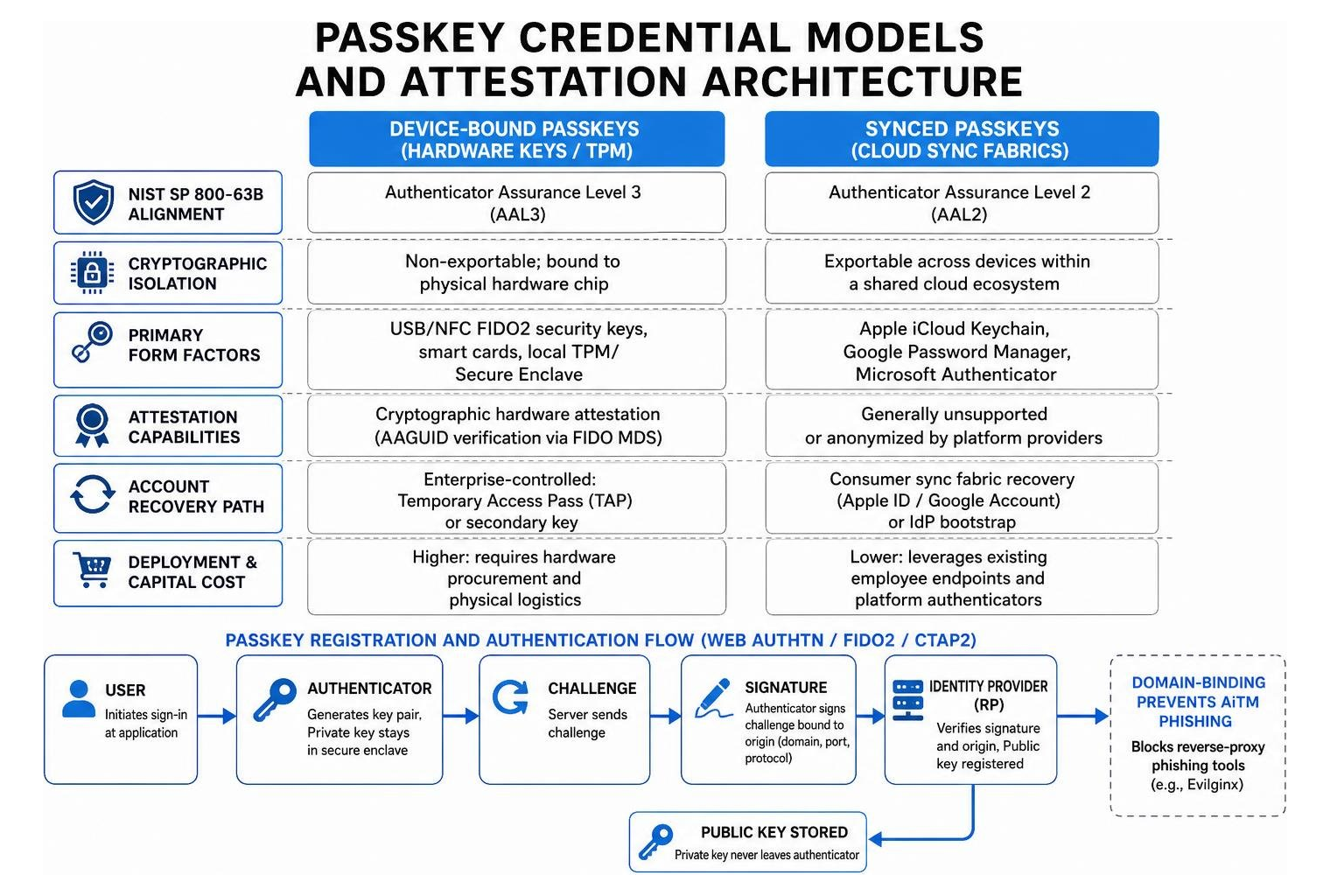
Deploying passkeys at enterprise scale requires navigating the cryptographic and architectural differences between device-bound and synced credentials. Understanding how passkey authentication works is fundamental: passkeys rely on the W3C WebAuthn and FIDO2 Client-to-Authenticator Protocol (CTAP2) standards. During registration, the authenticator generates an asymmetric key pair. The public key is registered with the Identity Provider (IdP) acting as the Relying Party (RP), while the private key remains locked inside a secure hardware enclave or encrypted key management fabric.
Crucially, the private key signs a challenge bound cryptographically to the specific origin (protocol, domain, and port) of the application. This domain-binding eliminates adversary-in-the-middle (AiTM) reverse-proxy phishing tools (such as Evilginx), which routinely bypass legacy multi-factor authentication (MFA) methods like SMS one-time passwords (OTPs) and mobile push notifications.
| Evaluation Dimension | Device-Bound Passkeys (Hardware Keys / TPM) | Synced Passkeys (Cloud Sync Fabrics) |
|---|---|---|
| NIST SP 800-63B Alignment | Authenticator Assurance Level 3 (AAL3) | Authenticator Assurance Level 2 (AAL2) |
| Cryptographic Isolation | Non-exportable; bound to physical hardware chip | Exportable across devices within a shared cloud ecosystem |
| Primary Form Factors | USB/NFC FIDO2 security keys, smart cards, local TPM/Secure Enclave | Apple iCloud Keychain, Google Password Manager, Microsoft Authenticator |
| Attestation Capabilities | Cryptographic hardware attestation (AAGUID verification via FIDO MDS) | Generally unsupported or anonymized by platform providers |
| Account Recovery Path | Enterprise-controlled: Temporary Access Pass (TAP) or secondary key | Consumer sync fabric recovery (Apple ID / Google Account) or IdP bootstrap |
| Deployment & Capital Cost | Higher: requires hardware procurement and physical logistics | Lower: leverages existing employee endpoints and platform authenticators |
Segmenting Workforce Personas by Assurance Tier
Enterprise workforces cannot be treated as a monolith. According to The State of Passkey Deployment in the Enterprise, 82% of deploying organizations adopt a hybrid strategy combining synced and device-bound credentials based on role risk profiles.
- Privileged Administrators and Cloud Engineers: System administrators managing cloud infrastructure, identity directories, and production codebases represent the highest-value targets for threat actors. These roles demand strict NIST AAL3 compliance. Security teams should mandate device-bound, FIPS 140-3 certified hardware tokens. When evaluating hardware security keys, verify that the tokens enforce physical user presence (e.g., touch or biometric gesture) and block private key extraction under all operating conditions.
- General Knowledge Workers: Standard corporate users accessing email, document collaboration suites, and line-of-business SaaS tools operate effectively under NIST AAL2 assurance. Synced passkeys or managed platform authenticators (such as Windows Hello for Business and Apple Platform SSO) provide phishing resistance while maintaining usability and self-service convenience across personal and corporate mobile devices.
- Shared Workstations and Kiosk Environments: Call centers, healthcare nurse stations, and manufacturing floors frequently feature shared endpoints utilized by dozens of staff per shift. Local platform authenticators like Windows Hello for Business fail at scale here due to OS-level limits (such as the standard 10-user profile cap). These environments require roaming, device-bound hardware authenticators that workers carry between terminals.
Attestation Enforcement and Sync Fabric Governance
Authenticator attestation is a cryptographic mechanism where an authenticator supplies a signed statement from its manufacturer during credential creation, validating its specific model and hardware capabilities via an Authenticator Attestation Globally Unique Identifier (AAGUID). Identity providers cross-reference these AAGUIDs against the FIDO Metadata Service (MDS) to enforce policy compliance.
In enterprise identity and access management, attestation acts as a gatekeeper. Enforcing strict attestation ensures that only enterprise-approved hardware tokens register on privileged accounts. However, platform-synced passkeys (such as those in Apple iCloud Keychain or Google Password Manager) do not provide individual hardware attestation certificates. If an enterprise globally mandates cryptographic attestation across its identity provider, all consumer-synced passkeys will fail registration silently. Governance policies must segment attestation requirements by security group, applying strict AAGUID allow-lists exclusively to high-assurance tiers while relaxing attestation for general workforce policies.
Overcoming Identity Provider and Cross-Platform Deployment Hurdles
Implementing passkeys across diverse enterprise operating systems requires configuring Identity Providers (IdPs) like Microsoft Entra ID and Okta to handle platform authenticators, cross-device handshakes, and strict Conditional Access rules. Achieving a resilient zero trust authentication architecture means auditing these platform constraints before enforcing policies.

When organizations plan a phishing-resistant passwordless authentication deployment in Microsoft Entra ID, misconfigurations often stem from applying monolithic policies across heterogeneous device fleets.
Avoiding Common Microsoft Entra ID Configuration Traps
- The Global Attestation Trap: As noted, enabling "Enforce Attestation" in the Entra ID Authentication Methods policy blocks all software-synced passkeys. Security teams must create dedicated Passkey Profiles targeting administrative security groups for attestation, leaving general workforce policies set to "Informational" or unconstrained.
- Circular Conditional Access Lockouts: A widespread deployment failure occurs when administrators create a Conditional Access policy requiring Phishing-Resistant MFA for "All Cloud Apps" without excluding the user registration workflow. An unenrolled user attempting to sign in to register their first passkey is immediately blocked by the policy requiring a passkey to authenticate, creating a deadlock. Always exclude the "Register security information" user action from blocking policies.
- Restrictive AAGUID Allow-Lists: Hardware security key manufacturers regularly release new firmware versions and hardware iterations that introduce new AAGUIDs. If an IdP relies on hardcoded allow-lists without automated FIDO MDS synchronization or change-management buffers, legitimate new keys will be rejected during enrollment.
- B2B Guest User Conflicts: Resource tenants cannot mandate direct FIDO2 passkey registration for external B2B guests. Attempting to enforce tenant-local passkey policies on guests causes authentication failures. Instead, configure Entra Cross-Tenant Access Settings to trust incoming MFA and phishing-resistant claims from the external partner’s home tenant.
Cross-Platform Interoperability: Windows, macOS, iOS, and Android
Cross-Device Authentication (CDA)—where an employee signs into a desktop browser by scanning a QR code with a mobile device—relies on the FIDO Hybrid transport protocol. The desktop and mobile device negotiate an encrypted tunnel via an ephemeral cloud relay server while validating physical proximity over Bluetooth Low Energy (BLE) advertisements.
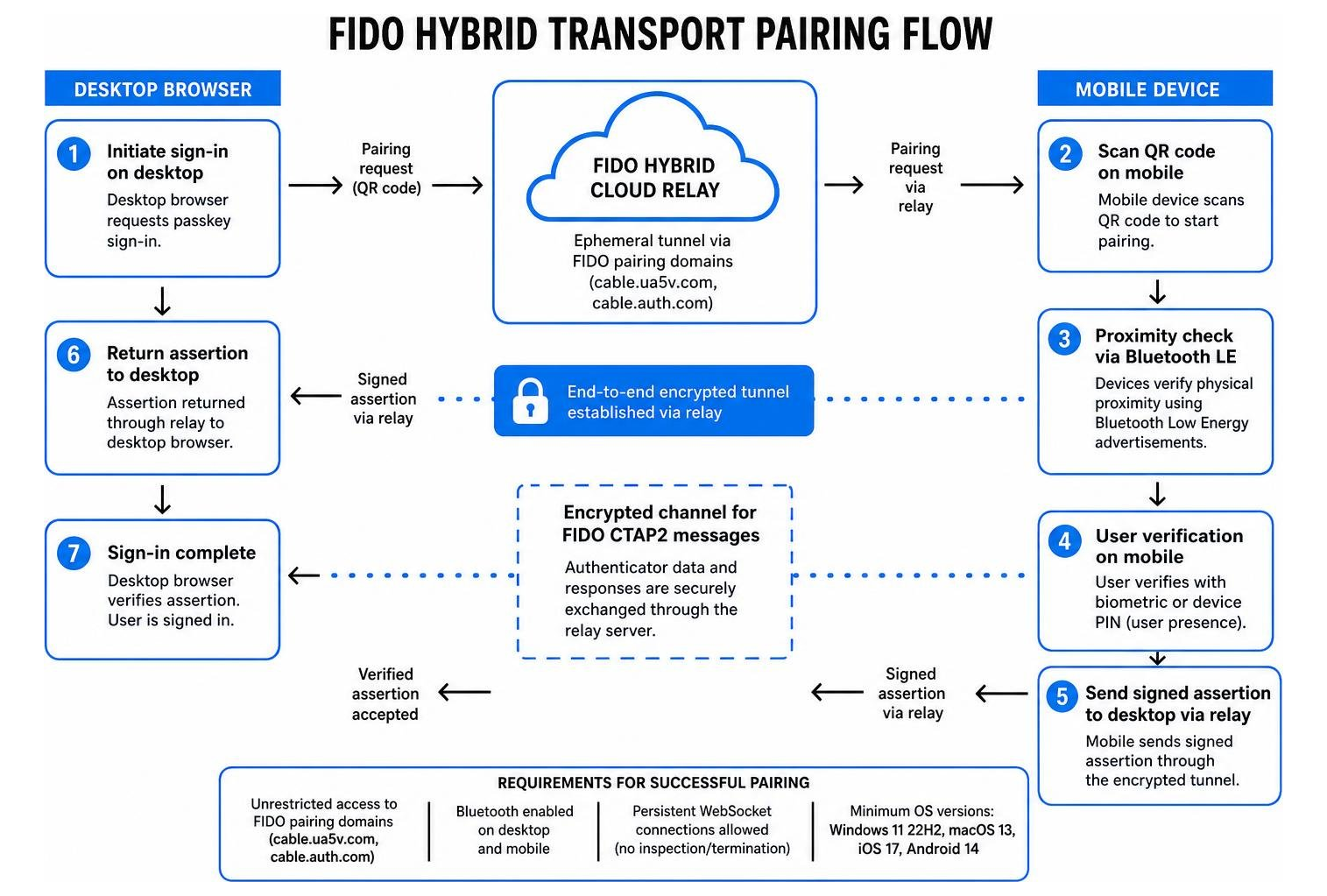
In corporate environments, CDA frequently encounters network-level blocks. Secure Web Gateways (SWGs), zero-trust network access (ZTNA) agents, and deep packet inspection firewalls often terminate persistent WebSocket connections or block traffic to FIDO pairing domains (such as cable.ua5v.com and cable.auth.com). Furthermore, endpoint management policies that disable Bluetooth radios at the OS or BIOS level prevent proximity verification, causing the pairing handshake to time out.
To ensure baseline cross-platform readiness across the fleet, endpoints must meet minimum operating system requirements: Windows 11 22H2 (or Windows 10 22H2 with platform updates), macOS 13 Ventura (leveraging Platform SSO), iOS 17, and Android 14 with modern Credential Manager support.
Solving the Credential Lifecycle: Bootstrapping and Phishing-Resistant Recovery
The foundational security of a passkey architecture is only as strong as its enrollment and recovery pathways. If an organization secures daily logins with non-phishable FIDO credentials but relies on helpdesk security questions or email OTPs to onboard new hires and reset lost authenticators, attackers will target these weak identity-proofing channels. As detailed in the White Paper: FIDO Deploying Passkeys in the Enterprise – Introduction, managing the lifecycle from initial issuance to emergency recovery dictates long-term deployment viability.
Identity Verification and Bootstrapping in Passkey Enterprise Deployment
The "bootstrapping paradox" poses a simple question: How do you issue an employee their first phishing-resistant passkey without first relying on a vulnerable password?
Enterprises solve this by integrating automated HR workflows with time-limited, single-use bootstrap tokens. Realizing the full business benefits of passwordless authentication requires removing manual helpdesk intervention during onboarding:
- HR-Driven Identity Proofing: New hires undergo remote identity verification through verified credentials, government ID scanning, and biometric facial liveness matching prior to day one.
- Automated Temporary Access Pass (TAP) Issuance: The enterprise HR system (e.g., Workday) triggers an API call via Microsoft Graph or Okta Workflows to generate a single-use Temporary Access Pass. The TAP is configured with a short lifespan (e.g., 1 to 4 hours) and restricted to the security registration portal.
- Portable Credential Bootstrapping: Upon receiving the TAP via a secure out-of-band channel, the employee authenticates to the identity portal and registers a portable credential (a FIDO2 hardware token or mobile passkey).
- Local Device Registration: The user leverages their newly registered portable passkey to bootstrap local platform authenticators (Windows Hello for Business or macOS Platform SSO) on their assigned corporate laptop.
Resilient Recovery Workflows for Device Loss and Replacement
When an employee loses, breaks, or upgrades their mobile phone, device-bound passkeys must be reprovisioned securely. If users do not possess a secondary authenticator, helpdesks face overwhelming ticket volumes.
- The Dual-Authenticator Mandate: IdP registration policies should enforce enrolling at least two distinct authenticators (e.g., a primary platform passkey on a workstation and a secondary mobile key or hardware token) before completing onboarding.
- Trusted Platform Session Recovery: An employee who replaces their smartphone can use their active, compliant corporate laptop session (authenticated via Windows Hello or macOS Touch ID) to access self-service identity settings and register the new mobile device without calling the support desk.
- Manager-Assisted and Biometric SSAR: For total device loss where all registered authenticators are unavailable, Self-Service Account Recovery (SSAR) paired with decentralized identity tools (such as Microsoft Entra Verified ID Face Check) or dual-manager cryptographic authorization workflows allows employees to issue themselves an emergency TAP safely.
Step-by-Step Rollout Strategy: From Pilot to Phishing-Resistant Enforcement
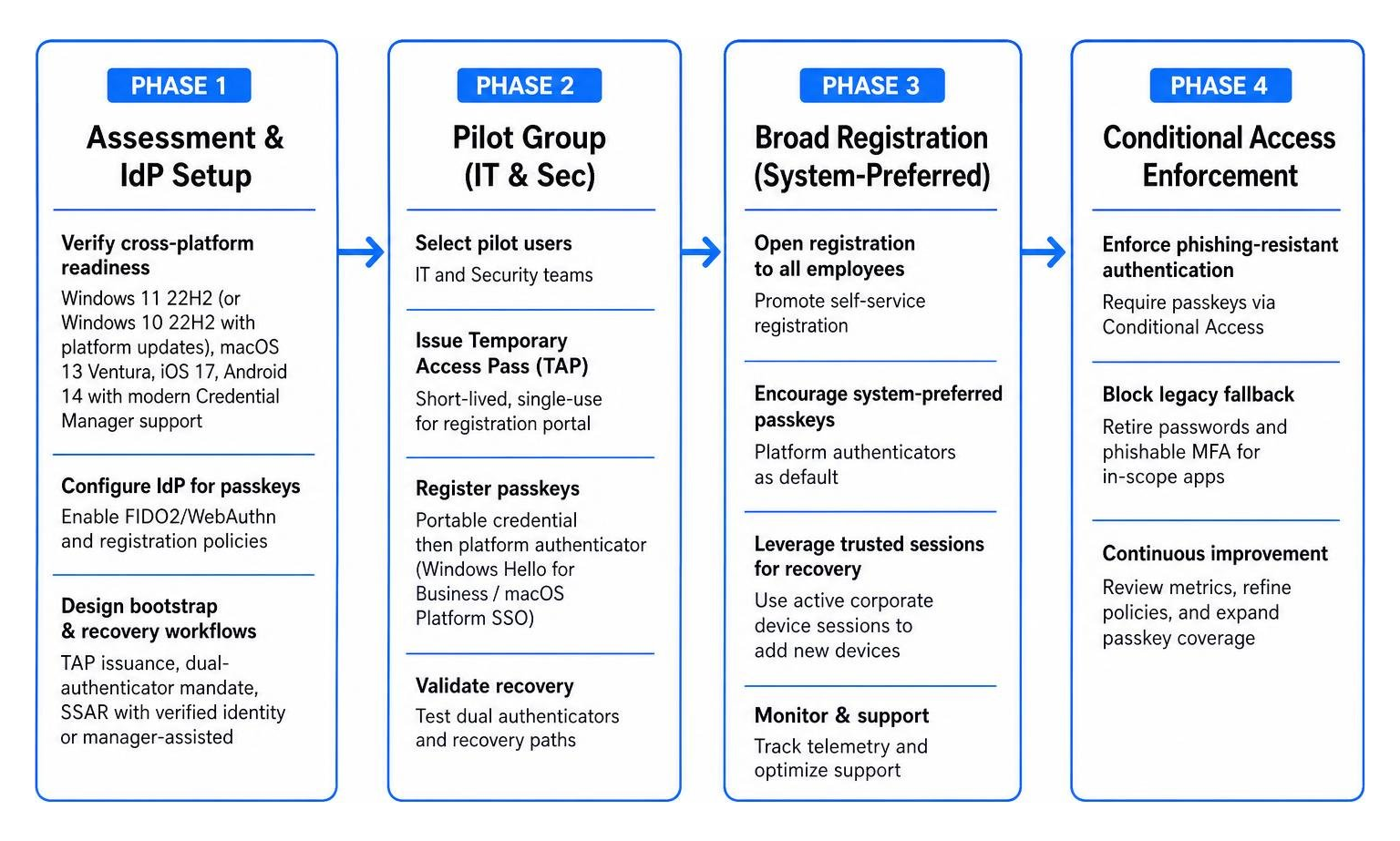
Moving an enterprise from legacy passwords and push MFA to passkeys demands a phased migration plan to avoid operational disruption. Organizations that utilize modern passwordless authenticator options should pace their rollouts based on support capacity and registration telemetry.
Staged Enforcement Without User Lockout
- Phase 1: Foundation and Discovery (Weeks 1–4): Audit endpoint hardware, browser fleets, and network proxies. Configure IdP authentication policies, establish Passkey Profiles, and integrate TAP automation. Deploy a tenant-wide Conditional Access policy requiring Phishing-Resistant MFA configured strictly in Report-Only mode to gather telemetry on sign-ins that would fail enforcement.
- Phase 2: High-Risk Cohort Pilot (Weeks 5–8): Enroll IT administrators, security personnel, and executive leadership. Test dual-key hardware registration, unmanaged device access, and emergency recovery pathways.
- Phase 3: Broad Workforce Registration (Weeks 9–16): Enable System-Preferred MFA in the IdP. This setting automatically prompts users who have registered a passkey to authenticate with it by default, organically scaling passkey usage without breaking workflows for users who have not yet enrolled. Run targeted change-management communications at staggered intervals (30, 15, 7, and 1 day prior to cohort deadlines).
- Phase 4: Phased Enforcement Waves (Weeks 17–24): Transition Conditional Access policies from Report-Only to active enforcement in rolling departmental cohorts. Throttle rollout waves based on daily helpdesk ticket thresholds to ensure support personnel are not overwhelmed.
- Phase 5: Legacy Credential Deprecation: Decommission SMS, voice, and standard TOTP authenticator methods from the IdP. Restrict password usage strictly to break-glass emergency administrative accounts protected by physical vaulting.
Measuring ROI and Success in Passkey Enterprise Deployment
Security teams justify identity modernization by tracking tangible operational and threat-reduction metrics:
- Helpdesk Ticket Reduction: Organizations typically observe a 40–60% reduction in password-reset and MFA-lockout support tickets within six months of deployment.
- Onboarding Acceleration: Automating remote cryptographic onboarding reduces user provisioning time by up to 90%, eliminating manual IT credential handoffs.
- Phishing Resilience Metrics: In a 12,000-user federal agency implementation complying with OMB M-22-09 mandates, credential capture rates during simulated phishing campaigns dropped from 18% to under 1% following FIDO enforcement.
- Return on Investment (ROI): Factoring in reduced support overhead, avoided data breach liabilities, and increased user sign-in speeds, most enterprises achieve positive ROI within 12 to 18 months.
Frequently Asked Questions About Passkey Enterprise Deployment
What happens when an employee loses their device-bound passkey?
When an employee loses a hardware security key or a device housing a local passkey, the private key remains protected against brute-force attacks by hardware PIN/biometric retry limits. However, the credential must be revoked at the Identity Provider level to maintain clean audit records.
If the user registered a secondary authenticator (such as a backup hardware key or a platform authenticator on a managed laptop), they can authenticate to their IdP self-service portal and revoke the lost credential immediately. If all authenticators are lost, the user must undergo out-of-band identity verification (via an automated identity-proofing service or a cryptographically signed manager approval) to receive a single-use Temporary Access Pass (TAP) for re-registration.
Can organizations use synced passkeys for privileged administrators?
No. Regulated frameworks and national standards, including NIST SP 800-63B (AAL3), steer high-assurance privileged roles toward device-bound, non-exportable authenticators.
Because synced passkeys replicate private keys across consumer cloud infrastructures (such as Apple iCloud or Google accounts), their security is bound to the integrity of the administrator's consumer identity and recovery mechanisms. Privileged access requires device-bound authenticators where private keys are non-exportable and anchored to dedicated, FIPS-validated hardware chips.
How do passkeys handle B2B guest users in enterprise applications?
Identity Providers cannot directly register or manage FIDO2 passkeys for external B2B guest accounts within the resource tenant. Attempting to force external users through local passkey registration flows leads to policy failures.
Enterprises resolve this by establishing Inbound Trust via Cross-Tenant Access Settings (or external federation policies). The resource tenant’s Conditional Access policies are configured to accept and trust MFA and phishing-resistant claims asserted by the guest user’s home tenant, shifting credential lifecycle management to the partner organization.
Conclusion
The shift toward phishing-resistant authentication is no longer theoretical; it is an operational imperative driven by escalating credential theft and regulatory mandates. Modern adversary-in-the-middle phishing kits and automated session hijacking techniques have rendered shared secrets and legacy MFA obsolete. Organizations that systematically plan their credential architecture, segment their workforce by assurance level, and solve the operational realities of bootstrapping and recovery eliminate an entire class of identity-based cyberattacks.
Building a mature, passwordless enterprise requires selecting robust authentication hardware tailored to diverse access tiers. To evaluate specialized hardware authenticators, Bluetooth proximity dongles, and physical FIDO2 tokens, explore our comprehensive guide on Beyond Passwords: The Complete Guide to Security Keys, Dongles, and Next-Generation Authentication to choose the right authentication infrastructure for your organization. EveryKey is a small wireless key. Your computer unlocks when you walk up and locks the moment you walk away, and it works alongside your passkey rollout. Unlocked is Everykey's blog.