

Beginner's Guide to How Passkey Authentication Works (2025 Update)

How Passkey Authentication Works: A Safer Login Without Passwords
How passkey authentication works is simple: your device creates a unique public and private key pair for each service. The service stores the public key. Your phone, computer, or security key keeps the private key protected. At sign-in, the service sends a one-time challenge, and your device signs it only after you approve with a fingerprint, face scan, or local PIN.
No password is typed, shared, or stored by the service. Because the passkey is tied to the real website domain, it cannot be used on a convincing phishing site.
This matters as adversary-in-the-middle phishing continues to target password-and-code logins. Following the November 2024 CISA Identity Infrastructure Advisory on advanced reverse-proxy phishing kits intercepting session tokens across enterprise identity providers, federal guidance has accelerated mandates for phishing-resistant credentials heading into 2026. Passkeys remove the reusable secret and session-interception vulnerabilities those attacks depend on.
Unlocked is an independent cybersecurity knowledge resource backed by EveryKey. This guide explains the mechanics, security tradeoffs, device options, and recovery steps security teams need to evaluate passkeys with confidence.
Passkeys vs. Passwords: The Cryptographic Paradigm Shift
For decades, digital identity relied on shared secrets. When an identity system prompts for a password, both the user and the authenticating server must know—or verify—a matching secret string. Even with cryptographic hashing and salting, this architecture remains fundamentally fragile. According to the Verizon Data Breach Investigations Report, 77% of hacking-related breaches involve stolen credentials. When a user creates a weak password, reuses it across services, or submits it to a deceptive login page, the shared secret model fails entirely.
Passkeys replace shared secrets with asymmetric public-key cryptography. When an account is registered using passkeys, the backend database never receives, hashes, or stores a secret string. Instead, the server stores an arbitrary public key that is mathematically useless to an adversary without its corresponding private key. If an attacker breaches the backend database, there are no passwords or hashed credentials to crack or dump onto dark web marketplaces.
| Feature / Metric | Traditional Passwords | Legacy MFA (SMS / App OTP) | Passkeys (FIDO2 / WebAuthn) |
|---|---|---|---|
| Underlying Mechanism | Symmetric shared secret / hash | Shared secret + timed one-time code | Asymmetric public-private keypair |
| Phishing Resistance | None (easily harvested via spoofing) | Vulnerable to AiTM reverse proxies | Native origin binding (immune to phishing) |
| Server-Side Breach Risk | High (hash extraction, offline cracking) | High (seed compromise or bypass) | Zero (public keys expose no usable secrets) |
| Average Sign-In Speed | ~15–20 seconds | ~31.2 seconds | 8.5 seconds (73% faster than MFA) |
| Average Success Rate | ~63% | ~70–80% | 93% (4x improvement over passwords) |
| Exposure to Credential Theft | 100% susceptible | Moderate-to-high risk | 99.99% reduction |
Recognizing that the future is passwordless: why it's time to ditch your passwords for passwordless login, organizations migrating away from shared secrets consistently experience measurable operational gains. In real-world enterprise deployments, adopting teams report an 81% reduction in login-related help desk support tickets, while commercial platforms see a 50% drop in login abandonment. The structural passwordless authentication benefits for businesses extend far beyond user convenience—they eliminate the core attack surface targeted by credential stuffing, brute force, and password-spraying campaigns.
Cryptographic Key Pairs and Origin Binding
To understand passkey security, one must examine asymmetric cryptography and origin binding. In an asymmetric scheme, two distinct keys are generated mathematically:
- The Private Key: A secret cryptographic key generated inside a secure hardware enclave or encrypted credential vault on the user's client device. It never leaves the physical authenticator and is never transmitted over a network.
- The Public Key: A complementary mathematical key sent to the online service (known in standard specifications as the Relying Party). The service uses this key strictly to verify digital signatures.
A core defense mechanism built into passkeys is origin binding. In traditional phishing campaigns, attackers deploy reverse-proxy frameworks like Evilginx to intercept credentials and session cookies in real time. Passkeys neutralize this attack vector at the browser protocol level.
During authentication, the browser automatically extracts the verified domain from the active address bar (the Relying Party ID or RP ID) and passes it directly to the local authenticator. The authenticator will only use the stored private key if the domain in the active session matches the exact origin registered during enrollment. As detailed in The cryptography behind passkeys - The Trail of Bits Blog, even if a user is tricked into visiting a lookalike domain such as auth-secure-login.com, the browser passes that exact origin to the authenticator. Because the authenticator possesses a passkey registered strictly for login.example.com, it will refuse to sign the challenge. This protocol-enforced domain check provides an estimated 99.99% reduction in exposure to credential theft.
WebAuthn and FIDO2 Architecture
Passkeys are built upon open industry standards developed by the W3C and the FIDO Alliance under the broader FIDO2 umbrella:
- W3C Web Authentication (WebAuthn): A standardized JavaScript browser API allowing web applications to create and use strong, public-key-based credentials. As outlined in the Passkeys - Security | MDN documentation, WebAuthn extends the Credential Management API to facilitate communication between web applications and platform authenticators.
- Client to Authenticator Protocol (CTAP2): The communication protocol enabling operating systems and browsers to interact with physical authenticators, such as external USB/NFC security keys or secondary mobile devices.
Passkeys are technically defined as discoverable credentials (historically called resident keys). Unlike legacy non-discoverable credentials that required the server to provide a Credential ID before the authenticator could locate the private key, discoverable credentials store user metadata (such as the user handle and display name) alongside the private key directly inside the authenticator. This architectural design enables modern identity providers to deliver smooth autofill experiences, as modern authentication explained: why secure identity is the backbone of Zero Trust illustrates across modern zero-trust environments.
Technical Deep Dive: How Passkey Authentication Works
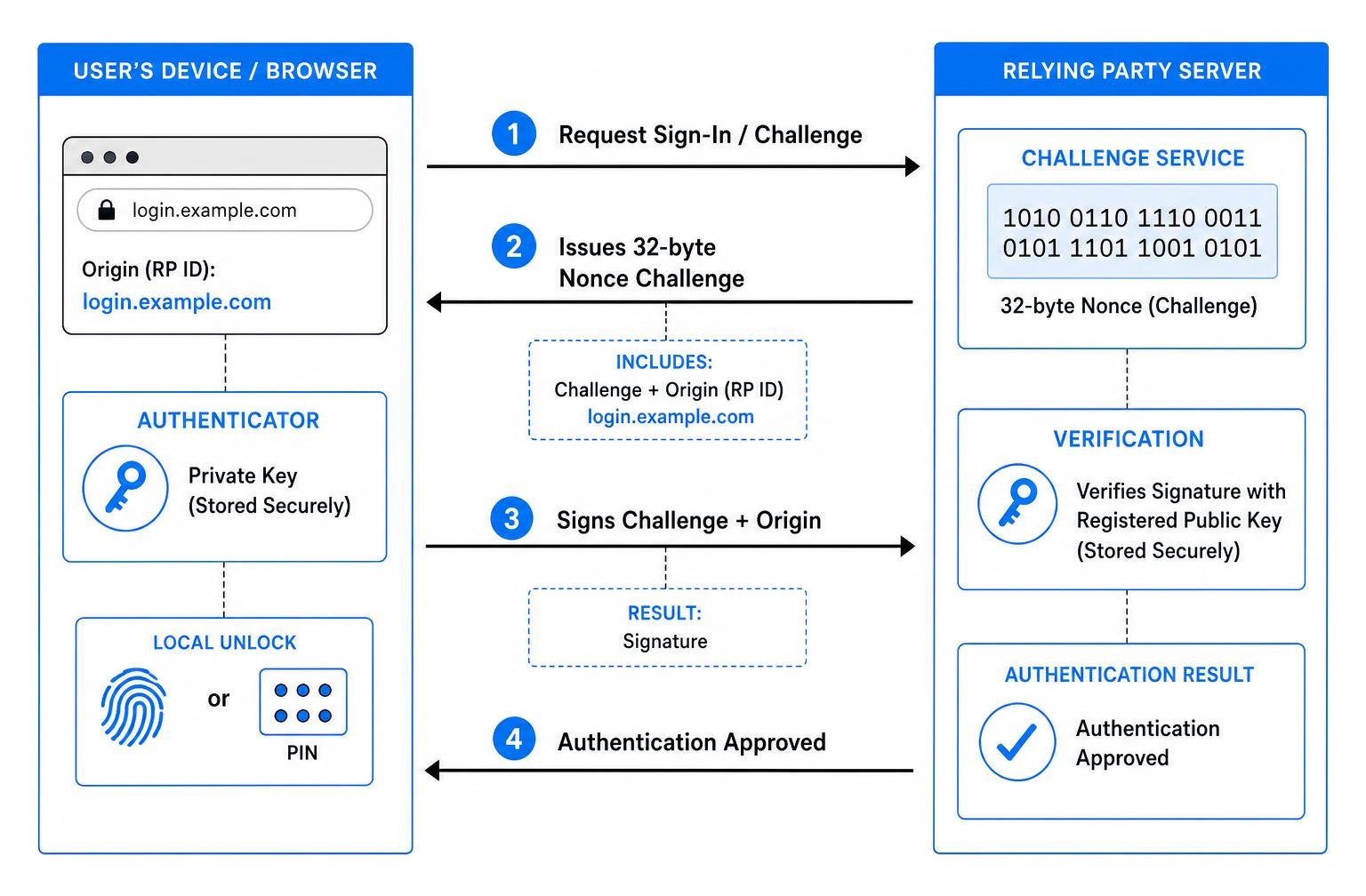
At the protocol level, passkey authentication relies on a cryptographic challenge-response mechanism that eliminates the risk of replay attacks. When authenticating, the Relying Party server generates a cryptographically secure, uniformly random sequence of bytes (a 32-byte nonce challenge). This challenge is valid for a single authentication attempt and expires within a strict window (typically 5 to 10 minutes).
Because the challenge changes on every authentication request, an eavesdropper intercepting the signed response over the network cannot reuse the signature to authenticate later. The server matches the returned signature against the active session challenge and verifies the mathematical proof using the user's public key.
Registration and Login Ceremony: How Passkey Authentication Works in Practice
The technical execution of passkey authentication divides into two distinct ceremonies: credential creation (registration) and credential assertion (authentication).
1. The Registration Ceremony (Enrollment)
When a user enables a passkey within an application:
- Step 1: Challenge & Options Generation. The web application backend creates a unique challenge, supplies the Relying Party ID (
rp.id), and includes user metadata (user.id,user.name). - Step 2: WebAuthn API Call. The client web page calls the browser API:
navigator.credentials.create({ publicKey: creationOptions }) - Step 3: User Verification (UV). The operating system prompts the user for local verification using an on-device biometric sensor (Apple Touch ID/Face ID, Windows Hello) or a device PIN.
- Step 4: Key Generation. Upon successful local verification, the client's secure hardware component (e.g., Apple Secure Enclave, Android StrongBox, or a Trusted Platform Module) generates an asymmetric keypair (commonly using algorithms like
ES256orEd25519). - Step 5: Attestation & Storage. The private key is securely stored in local hardware or an encrypted vault. The authenticator returns the public key, credential ID, and client data to the browser, which forwards them to the Relying Party server database.
2. The Authentication Ceremony (Sign-In)
When the user subsequently signs into the service:
- Step 1: Challenge Request. The browser requests authentication options from the Relying Party server, which returns a fresh 32-byte cryptographic challenge.
- Step 2: Assertion Request. The web application invokes:
navigator.credentials.get({ publicKey: requestOptions }) - Step 3: Local Authorization. The client authenticator prompts the user for a biometric scan or device PIN to authorize using the stored private key.
- Step 4: Digital Signature Generation. The authenticator compiles an assertion structure containing the client data, authenticator data flags (confirming user presence and user verification), and a digital signature created by signing the server challenge and origin with the private key.
- Step 5: Cryptographic Signature Verification. The server receives the assertion, retrieves the stored public key associated with the credential ID, and verifies the mathematical signature against the original challenge. Once verified, an authenticated user session is established.
As detailed in Passkeys 101: An Introduction to Passkeys and How They Work, this entire handshake completes in roughly 8.5 seconds without exposing credentials to network interception.
Cross-Device Verification: How Passkey Authentication Works via Bluetooth and QR Codes
A common challenge arises when a user attempts to sign into a web service on an unlinked workstation (such as a shared desktop or conference room PC) using a passkey stored on their smartphone. FIDO2 resolves this through Cross-Device Authentication (CDA), governed by the CTAP 2.2 Proximity Exchange Protocol (PXP).

- QR Code Discovery: The desktop browser renders a dynamic QR code containing a secure, short-lived session identifier and connection parameters.
- Scanning & Tunnel Initialization: The user scans the QR code using their smartphone camera. This initiates an end-to-end encrypted WebSocket tunnel mediated by a secure relay server.
- Bluetooth Low Energy (BLE) Proximity Verification: The two devices establish an out-of-band BLE handshake. BLE is used strictly as a physical proximity check to verify that the phone and the desktop are in the same room. The actual authentication payload is never transmitted unencrypted over raw Bluetooth.
- Biometric Assertion: The user approves the login request on their phone using biometrics. The smartphone signs the desktop server's cryptographic challenge and routes the signature through the encrypted tunnel.
This proximity requirement prevents remote attackers from tricking a victim into approving cross-device sign-ins from afar, helping achieve up to a 98% reduction in mobile account takeover fraud.
Synced vs. Device-Bound Passkeys and Multi-Device Ecosystems
The passkey specification accommodates two distinct storage and management models: synced passkeys and device-bound passkeys.
1. Synced Passkeys (Multi-Device Passkeys)
Synced passkeys are designed for broad workforce and consumer use, balancing strong security with multi-device convenience. The cryptographic private keys are encrypted on the client using zero-knowledge architecture and synchronized across a user's authorized hardware via cloud credential providers like Apple iCloud Keychain, Google Password Manager, or third-party managers.
Because the synchronization payload uses end-to-end encryption with keys derived from the user's device lock or master credentials, the cloud provider cannot extract or view the private keys. Synced passkeys eliminate the operational hurdle of manual key re-enrollment when a user buys a new phone or laptop.
2. Device-Bound Passkeys (Hardware Security Keys)
Device-bound passkeys are permanently locked inside a dedicated physical microcontroller, such as a hardware security token. The private key material is generated within the key's secure element and is architecturally non-exportable; it cannot be backed up to the cloud or duplicated across devices. Accessing the account requires inserting or tapping that specific physical key and entering a local device PIN.
Organizations evaluating physical authentication tokens can consult our FIDO2 security key comparison for an analysis of physical form factors, protocol compatibility, and enterprise management capabilities.
Hardware Security Keys, Attestation, and Enterprise Compliance
For enterprise IT environments subject to regulatory governance, passkey implementation strategies must align with established identity assurance standards:
- NIST SP 800-63B Guidelines: Synced passkeys generally meet Authenticator Assurance Level 2 (AAL2) requirements. However, environments demanding Authenticator Assurance Level 3 (AAL3)—such as defense contractors, critical infrastructure, and high-privilege administrators—require hardware-backed, non-exportable credentials. Device-bound passkeys fulfill AAL3 requirements.
- Authenticator Attestation and AAGUID Filtering: During passkey registration, Relying Parties can request a cryptographic attestation statement. This signed statement allows the server to query the FIDO Metadata Service (MDS) using the Authenticator Attestation Globally Unique Identifier (AAGUID). Enterprise identity administrators can enforce strict policies, allowing only approved hardware vendors or certified device models while blocking unmanaged personal sync vaults.
- Compliance Frameworks: Passkeys satisfy identity and access management controls under SOC 2 Trust Services Criteria CC6 (Logical Access) and ISO/IEC 27001 Annex A (Access Control), providing auditable cryptographic proof of identity verification. For organizations designing robust access models, combining passkeys with zero trust authentication: securing access in a borderless world provides end-to-end verification across distributed endpoints.
Account Recovery, Lost Authenticators, and Phishing-Resistant Fallbacks
A critical architectural consideration when implementing passkeys is handling lost, stolen, or damaged authenticators. If an authentication system replaces passwords with passkeys but falls back to SMS one-time codes or email reset links for account recovery, attackers will simply target the weaker recovery channel to bypass the passkey entirely.
To maintain a secure identity architecture, organizations should adopt resilient recovery practices:
- Multi-Passkey Provisioning: Encourage or require users to register at least two independent authenticators during onboarding (e.g., a primary platform authenticator on a laptop and a secondary physical key or mobile authenticator).
- Encrypted Cloud Vault Recovery: Users utilizing synced passkeys can restore access seamlessly on a replacement device simply by signing into their zero-knowledge cloud credential account.
- Phishing-Resistant Administrative Recovery: For device-bound setups, identity providers should leverage identity proofing (such as in-person or video-verified identity confirmation) paired with short-lived, single-use enrollment tokens, completely avoiding legacy SMS OTP resets. Exploring the best authentication methods of 2026: MFA, biometrics, passkeys & more helps security teams design robust account recovery frameworks without introducing phishable backdoors.
Frequently Asked Questions About Passkey Authentication
Are passkeys considered true multi-factor authentication (MFA)?
Yes. Passkeys natively satisfy multi-factor authentication requirements in a single authentication step. Under standard NIST identity models, MFA requires at least two distinct authentication factors:
- Possession Factor (Something you have): The physical authenticator holding the cryptographic private key (your smartphone, laptop TPM, or hardware security token).
- Inherence or Knowledge Factor (Something you are / Something you know): The local biometric verification (fingerprint or facial scan) or device PIN required to unlock the private key.
Because both factors are verified locally before the cryptographic signature is generated, passkeys deliver MFA security without the latency, fatigue, or interception risks associated with push notifications or SMS codes.
How do passkeys protect user privacy and biometric data?
A common concern among end users is whether web services receive copies of their fingerprints or facial scans. Passkeys never transmit biometric data over the network.
Biometric template processing and matching occur exclusively inside the device's isolated hardware security enclave (such as Apple's Secure Enclave or Android's Trusted Execution Environment). The operating system executes the biometric comparison locally and only sends a boolean confirmation signal to the WebAuthn API to authorize signing the challenge. The Relying Party server receives only the mathematical signature—it learns nothing about the user's biometrics. Furthermore, because unique, unrelated keypairs are generated for every individual website, passkeys prevent cross-site tracking or correlation by advertising networks.
What happens if an authenticator device is lost, stolen, or damaged?
If a device storing passkeys is lost or destroyed, account recovery depends on the key storage model deployed:
- With Synced Passkeys: The user logs into their encrypted credential provider (such as Apple iCloud, Google, or a dedicated password manager) on a new device. The end-to-end encrypted passkeys restore automatically to the new hardware.
- With Device-Bound Passkeys: The user must authenticate using a pre-registered backup security key, an alternate registered device, or an out-of-band administrative identity recovery process. Once access is restored, the lost authenticator's public key should be revoked immediately in the account management portal to prevent unauthorized access.
Building a Resilient Passwordless Strategy
Passkeys mark a fundamental turning point in digital security. By shifting authentication from shared secrets to asymmetric public-key cryptography and protocol-enforced origin binding, passkeys systematically dismantle the primary attack vectors exploited by cybercriminals: credential stuffing, database hash cracking, and adversary-in-the-middle phishing.
While transition planning requires security teams to balance consumer-friendly synced passkeys with compliance-driven hardware security tokens, the operational dividends are immediate. Organizations that deploy passkeys consistently experience faster logins, fewer help desk reset tickets, and measurable reductions in account takeover incidents.
To explore practical deployment frameworks, evaluate hardware key integrations, and select the right credential management tools for your enterprise, explore the best authentication app for securing your online accounts and continue building a modern, phishing-resistant security architecture with Unlocked.