The Least Privileged Path: Configuring MID Server Discovery Safely
You can't reduce privilege you can't see. Learn to run local admin rights discovery safely with ServiceNow MID Server, JEA, and GPO-based methods, then move toward a zero standing privilege model.

Why Local Admin Rights Discovery Is the Starting Point for Every Privilege Reduction Program
Local admin rights discovery — the systematic identification of accounts holding local administrator privileges across enterprise endpoints — is the foundational step in hardening any corporate network.
Recent threat intelligence highlights why this is critical. In late 2024 and early 2025, ransomware groups like RansomHub and BlackSuit have heavily exploited compromised local administrator credentials to disable endpoint detection and response (EDR) agents and deploy payloads. Furthermore, the exploitation of privilege escalation vulnerabilities, such as CVE-2024-38193 (a Windows Ancillary Function Driver vulnerability exploited in the wild), demonstrates that once attackers gain an initial foothold, their immediate objective is to discover and abuse local administrative access.
For small and medium-sized businesses (SMBs), local admin rights are often granted reactively to reduce IT support tickets. However, the business risk is severe: a single compromised endpoint with local admin rights can lead to a network-wide ransomware deployment. The cost of recovery, downtime, and potential regulatory fines far outweighs the operational friction of implementing a privilege reduction program.
| Discovery Objective | Technical Focus | Business Risk Mitigated |
|---|---|---|
| Identify Local Admin Accounts | Enumerate all accounts in the local Administrators group. |
Prevents unauthorized software installation and security tool disabling. |
| Map Standing vs. JIT Access | Differentiate permanent access from Just-In-Time (JIT) elevation. | Shrinks the active attack surface from 24/7 exposure to minutes. |
| Detect Non-Human Identities | Audit service accounts and scheduled tasks with admin rights. | Secures unmonitored, high-privilege machine identities. |
| Execute Safe Scanning | Run discovery without triggering account lockouts or user disruption. | Maintains business continuity during security audits. |
| Build an Auditable Register | Generate a continuous inventory for compliance (SOC 2, ISO 27001, CIS Controls). | Avoids compliance failures and demonstrates due diligence to insurers. |
This guide is written for security practitioners and IT decision-makers configuring discovery mechanisms—such as ServiceNow MID Server discovery—where balancing credential security with visibility is a constant challenge. Achieving a least-privileged discovery path ensures you map your environment accurately without introducing new vectors for credential theft.
The Risk Landscape: Local Admin vs. Domain Admin Rights
To manage privileges effectively, IT teams must understand the structural differences between local administrator rights and domain administrator rights, as well as how attackers exploit these configurations.
Defining Local Admin vs. Domain Admin
A local administrator has full administrative control over a single specific endpoint or server. This account can install software, modify system configurations, stop security services, and access any file stored on that local machine. However, its authority stops at the machine's boundary; it cannot naturally authenticate to other network resources.
In contrast, a domain administrator holds keys to the entire Active Directory (AD) kingdom. A domain admin can modify directory objects, control domain controllers, change policies across all domain-joined assets, and access any system joined to the domain.
The critical point of failure is when local administrator rights are abused to escalate privileges. If an attacker gains local administrator rights on a machine where a domain administrator (or another high-privilege account) has an active session, the attacker can dump credentials from memory and compromise the entire domain. Furthermore, local admin rights on a Domain Controller (DC) are functionally identical to domain admin rights, as the local security database on a DC is the Active Directory database itself.
Lateral Movement and Credential Dumping (MITRE ATT&CK T1003 & T1021.002)
Attackers rarely land directly on their target. Instead, they compromise a low-privilege workstation and look to move laterally. Local admin rights are the primary currency for lateral movement.
With local admin privileges, an attacker can target the Local Security Authority Subsystem Service (LSASS) process to perform credential dumping (MITRE ATT&CK T1003). By extracting NTLM hashes or cleartext passwords cached in memory, they can pivot to other machines. If the same local admin password is shared across multiple workstations (a common legacy practice), or if a domain-level group is nested inside the local Administrators group on multiple systems, the attacker can hop from machine to machine via SMB/Windows Admin Shares (MITRE ATT&CK T1021.002) without generating significant noise.
For SMBs, this technical chain translates to a catastrophic business risk. If a standard employee's laptop is compromised, the damage is localized. But if that employee has local admin rights, the attacker can harvest credentials, move laterally to the local backup server, delete backups, and encrypt the network. Removing unnecessary standing admin rights is the single most effective way to break this lateral movement chain.
For a deeper look at managing these risks, read Your Guide to Managing Privileged User Access and Security Risks and implement User Permission Management Access Control Best Practices for IT Teams.
Methods and Tools for Local Admin Rights Discovery
Before an organization can strip away administrative rights, it must map where those rights exist. This phase of local admin rights discovery is critical; prematurely removing access can break legacy applications, halt business workflows, and trigger a wave of help desk tickets.
Historically, organizations have relied on simple discovery tools to establish a baseline. For instance, more than 1,600 IT security professionals have downloaded the legacy Viewfinity Local Admin Discovery tool to map local group memberships. In modern environments, discovery must be automated, continuous, and integrated into broader IT operations.
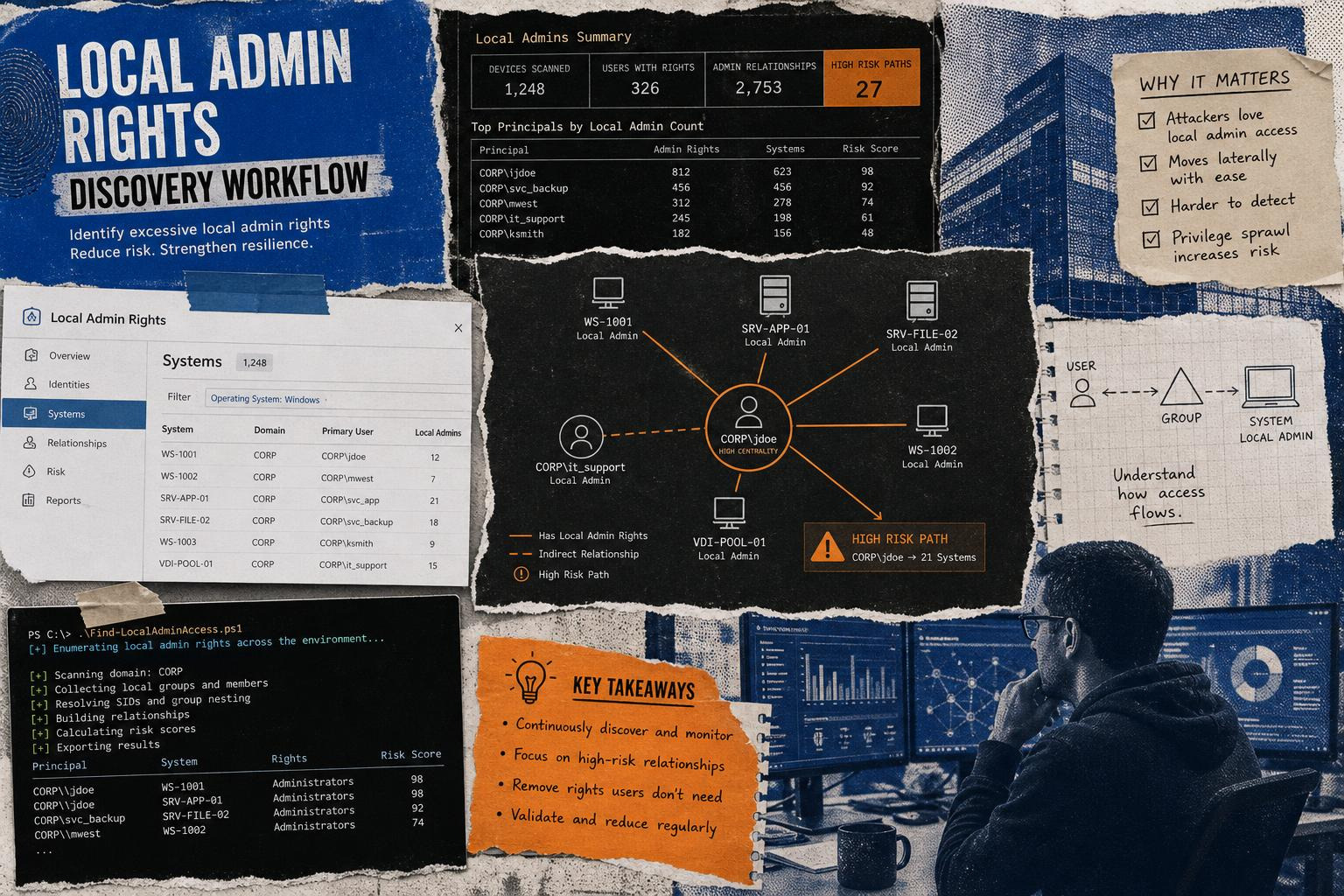
Enterprise discovery methods generally rely on three primary network communication protocols:
- Server Message Block (SMB): Used to connect to remote hosts and verify administrative share access (such as
ADMIN$). - Windows Management Instrumentation (WMI) / Common Information Model (CIM): Used to query the local operating system configuration and group memberships over DCOM or WMI namespaces.
- Windows Remote Management (WinRM): Uses WS-Management protocols to run PowerShell commands remotely.
For comprehensive security guidelines on managing these endpoints, see Local Admin Rights Best Practice Essential Guidelines for Security.
Native PowerShell and WMI Queries for Local Admin Rights Discovery
For administrative teams looking to perform discovery using native Windows capabilities, PowerShell offers highly precise methods.
A common way to query local groups on a remote machine is by using the Active Directory Service Interfaces (ADSI) WinNT provider. This method allows a non-privileged account to read local group memberships without requiring full local admin access on the target system:
Alternatively, modern environments can query the Win32_GroupUser WMI class. However, running remote WMI queries typically requires appropriate namespace permissions (such as Remote Enable and Account Enable on Root\CIMV2).
For automated, domain-wide scanning, practitioners often turn to specialized PowerShell scripts. The classic PowerSploit recon function Find-LocalAdminAccess queries the local domain for machines where the current user context has local administrator access. It does this by attempting to open a handle to the Service Control Manager on remote hosts via the OpenSCManagerA API with SC_MANAGER_ALL_ACCESS privileges.
Other lightweight alternatives, such as the Leo4j/Find-LocalAdminAccess repository, provide both light and full versions of the script, allowing administrators to scan targets via SMB, WMI, or PSRemoting, and even execute validation commands on discovered hosts.
Offensive Reconnaissance: How Attackers Leverage Local Admin Rights Discovery
It is vital to recognize that the same discovery methods used by IT administrators are highly prized by threat actors during the reconnaissance phase of an attack.
When an attacker establishes a foothold, they need to identify where their compromised account has administrative power. They use tools like PowerView or specialized post-exploitation modules to map out their targets:
- PowerView (Find-LocalAdminAccess): Attackers run this to find workstations where their current user token grants administrative rights. This is often documented in offensive tutorials such as Finding Local Admin with the Veil-Framework – harmj0y.
- Empire Modules: The Empire Find-LocalAdminAccess module automates this process inside an active command-and-control (C2) session, allowing attackers to filter targets by operating system, service pack, or Active Directory site.
- Metasploit Post-Exploitation: The Metasploit localadminsearch_enum module uses direct Windows API integrations (via Meterpreter's Railgun) to query
OpenSCManagerAand enumerate logged-in users on remote targets. Notably, this module will fail if run under the localSYSTEMaccount, asSYSTEMdoes not possess network credentials to authenticate to remote hosts; it must be run within a delegated domain user context.
By understanding these offensive techniques, security teams can configure detection rules to flag anomalous OpenSCManagerA connection attempts or high-volume queries to ADMIN$ shares.
Zero-Privilege Discovery: Scanning Safely Without Target Admin Rights
A common dilemma when setting up IT discovery (such as ServiceNow MID Server discovery) is that traditional scanning methods demand administrative credentials for every target machine. This violates the principle of least privilege: if the discovery server is compromised, the stored credentials grant an attacker administrative access to every asset in the enterprise.
Fortunately, organizations can configure Windows discovery without granting domain or local administrator privileges to the scanning account.

Configuring Just Enough Administration (JEA)
Instead of using full administrator credentials, organizations can leverage PowerShell Just Enough Administration (JEA). JEA is a security technology built on Windows PowerShell remoting that restricts users to specific cmdlets, parameters, and system commands.
By registering a JEA endpoint on target workstations, the MID Server or scanning service account can connect via WinRM and run pre-approved discovery scripts. The execution runs under a temporary, high-privilege virtual account local to the target machine, but the scanning account itself only has permission to connect and request those specific data points.
Setting this up requires configuring session configuration files (.pssc) and role capability files (.psrc), such as BMC_Disco_Session_Endpoint.pssc and BMC_Disco_Role_Capability.psrc in enterprise configurations, ensuring the scanning account is restricted solely to discovery-related read commands.
Passive, GPO-Based Discovery
Another highly effective way to discover local admin rights without performing active network scans of target endpoints is by analyzing Group Policy Objects (GPOs) directly from the Domain Controllers.
Tools like ADReaper, a high-performance Active Directory reconnaissance toolkit written in Go, allow security teams to discover local administrator assignments by parsing GPO files inside the SYSVOL share.
Because GPOs dictate which domain groups are added to local Administrators groups across the enterprise, parsing these policies provides a complete map of administrative rights without sending a single packet to the workstations themselves. This "zero-touch" discovery avoids firewall blocks, prevents account lockouts, and is completely invisible to endpoint detection systems.
Adopting these zero-privilege methodologies is a core component of a modern Zero Trust Security Building a Stronger Future with Zero Trust Architecture initiative.
Technical Hurdles: Credential Guard, Firewalls, and Legacy Applications
Implementing an automated discovery and remediation program is rarely seamless. Security teams must navigate several technical hurdles built into modern Windows operating systems.
1. Windows Defender Credential Guard
Credential Guard uses virtualization-based security to isolate secrets (such as NTLM password hashes and Kerberos Ticket Granting Tickets) in a secure container, preventing them from being read by malware running with administrative rights.
However, Credential Guard also blocks the delegation of credentials. If a discovery tool attempts to use delegated or impersonated credentials over a remote WMI or PowerShell session, the connection will fail. To resolve this, discovery tools must use explicit network credentials or leverage JEA endpoints that run locally under virtual accounts.
2. Remote User Account Control (UAC)
When a local (non-domain) account attempts to connect to a Windows Vista or newer system via WMI or administrative shares, Remote UAC strips administrative privileges from the network token. This prevents remote administration even if the local account is a member of the local Administrators group.
To allow remote discovery using local accounts, administrators must configure the LocalAccountTokenFilterPolicy registry key, though doing so carries significant risk and is generally discouraged in favor of domain-joined service accounts with explicit, restricted rights.
3. Local Vulnerabilities and Peripheral Risks
Even with robust configuration, software vulnerabilities can bypass access controls. Over the years, critical privilege escalation vulnerabilities have repeatedly altered the threat landscape:
- SeriousSAM (CVE-2021-36934): Also known as HiveNightmare, this vulnerability arose because Windows 10 and 11 (starting with version 1809) granted overly permissive read access to the sensitive Registry database files (SAM, SECURITY, SYSTEM) within the
%windir%\system32\configfolder to theBUILTIN\Usersgroup. Attackers could bypass file locks by reading these files directly from Volume Shadow Copies, extracting local administrative hashes in seconds. - Peripheral Plug-and-Play Bugs: In some cases, hardware can bypass local security policies. For example, plugging in a Razer peripheral triggers the automatic installation of the Razer Synapse software. Because the Windows plug-and-play installer runs with
SYSTEMprivileges, an attacker with physical access could Shift+Right-click during the installation folder-selection dialog to spawn an elevated PowerShell terminal, gaining full administrative rights on a locked-down machine.
These examples underscore why continuous monitoring and vulnerability management must accompany any identity security initiative. To stay ahead of these threats, review Identity and Access Management Risks The Top Security Threats Defining 2026.
From Discovery to Governance: Building a Zero Standing Privilege Framework
Once the discovery phase is complete, organizations must transition from mapping privileges to actively governing them. The ultimate goal of modern identity security is to enforce Zero Standing Privileges (ZSP).
Standing Privileges vs. Just-In-Time (JIT) Elevation
Leaving users with permanent, 24/7 local admin rights ("standing privileges") is a major operational risk. If a user's workstation is compromised while they are browsing the web or opening emails, the payload executes with full administrative authority.
Instead, organizations should adopt Just-In-Time (JIT) elevation. Under a JIT model, all users run as standard, non-privileged accounts. When an administrative task is required, the user requests temporary elevation. This request can be approved automatically via policy, routed to an IT queue, or validated using Multi-Factor Authentication (MFA). Once the task is complete or the time limit expires, the elevated privileges are automatically revoked.
| Capability | Standing Privileges | Just-In-Time (JIT) Elevation |
|---|---|---|
| Default User State | Local Administrator | Standard User |
| Attack Surface Exposure | Permanent (24/7) | Ephemeral (Minutes to Hours) |
| Audit Trail Generation | Poor (No context on why rights are used) | High (Tied to specific tickets and approvals) |
| Ransomware / Malware Risk | Critical (Malware inherits admin rights) | Low (Malware runs in standard user context) |
| Compliance Alignment | Fails modern zero-trust audits | Aligns with SOC 2, ISO 27001, and CIS Controls |
Implementing a Local Admin Rights Register
To maintain governance, organizations must build an auditable local admin rights register. This register acts as the single source of truth for administrative access across the enterprise.
A robust governance framework includes:
- Continuous Drift Detection: Automated scans (via RMM tools or discovery scripts) should regularly compare the actual membership of local Administrators groups against the approved register. Any unauthorized additions must trigger an automated ticket and immediate remediation.
- Microsoft LAPS Integration: For local administrator accounts that must exist (such as local fallback accounts), organizations should deploy Microsoft Local Administrator Password Solution (LAPS). LAPS automatically randomizes and rotates the password for the local administrator account on each domain-joined computer, storing it securely in Active Directory or Microsoft Entra ID.
- Governance of Non-Human Identities (NHIs): Machine identities, service accounts, and API integrations outnumber human identities by a factor of 10 to 50 in typical enterprises. These accounts often operate with stale credentials, lack MFA, and have excessive standing administrative privileges. Identifying and securing these non-human accounts during the discovery process is a critical component of modern privilege governance.
For actionable strategies on implementing this model, consult our guides on Privileged Access Governance and Essential Strategies for Managing Identity and Access Management Risks.
Additionally, organizations can layer their access control policies by exploring Zero Trust Authentication Securing Access in a Borderless World, leveraging Context Aware Access Smarter Safer Control for the Modern Enterprise, and implementing Adaptive Access Control Smarter Security Through Context and Continuous Trust. Understanding how decisions are made dynamically is further detailed in Access Security Control Explained How Modern Systems Decide Who Gets In and Who Doesn t.
Finally, don't overlook external users; learn how to secure third-party credentials by reading The Contractor Access Gap Why Identities Outside Your Organization Create Inside Risk.
Frequently Asked Questions About Local Admin Rights
How do we handle legacy applications that require local admin rights?
When a legacy application "requires" local admin rights, it is usually because the application needs to write to protected directories (like C:\Program Files or C:\Windows) or modify registry keys under HKEY_LOCAL_MACHINE.
Instead of granting the user full admin rights, administrators should:
- Isolate the specific file, folder, or registry paths the application needs access to, and grant write permissions only to those specific paths for the user's group.
- Use compatibility shims via the Microsoft Application Compatibility Toolkit (ACT) to spoof administrative privileges for the application.
- Deploy an Endpoint Privilege Management (EPM) tool to elevate the specific application process when it runs, while keeping the user's account at standard privileges.
How does Windows Credential Guard impact remote admin discovery?
Credential Guard prevents the use of delegated or impersonated credentials over remote connections (such as remote WMI and PowerShell sessions). If a discovery service account attempts to hop from a discovery server to a target workstation using delegated credentials, the connection will fail.
To bypass this safely, discovery must be configured to use explicit network credentials for each session, or rely on local agents or JEA endpoints that run locally under virtual accounts, removing the need for credential delegation.
Why are non-human identities a major risk for local admin rights?
Non-human identities (NHIs) — such as service accounts, scheduled tasks, and machine accounts — often operate with high-level administrative privileges but receive far less oversight than human accounts.
They typically lack Multi-Factor Authentication (MFA), use static or stale credentials, and are rarely monitored for behavioral anomalies. If an attacker compromises an over-privileged service account with local admin rights, they can easily pivot throughout the network undetected.
Conclusion
Securing your enterprise endpoints requires a continuous cycle of discovery, privilege reduction, and governance. By moving away from standing administrative privileges and embracing a Zero Standing Privilege (ZSP) model, organizations can dramatically shrink their attack surface and neutralize lateral movement threats.
Whether you are configuring ServiceNow MID Server discovery or auditing workstation configurations, achieving the least-privileged path is critical. To learn more about securing high-privilege credentials and implementing comprehensive access controls, explore our guide to What is Privileged Access Management.
When evaluating solutions to eliminate the risk of exposed administrative credentials, organizations have several strong options. Standardizing on FIDO2 hardware security keys, deploying enterprise Endpoint Privilege Management (EPM) suites, or implementing passwordless authentication systems like EveryKey can significantly reduce the credential harvesting attack surface. By ensuring that administrative credentials are never stored in memory where attackers can harvest them, and pairing robust privilege governance with modern, context-aware authentication, organizations can build a resilient defense in a zero-trust world.