

How to Implement Tomcat Form Authentication in 5 Steps

Configure Tomcat Database Form Authentication Securely
A Tomcat form based authentication database setup protects the URLs that need sign-in in web.xml, configures FORM login with custom login and error pages, and connects Tomcat to your user and role tables through a DataSourceRealm. Your login form must submit a POST request to j_security_check with fields named j_username and j_password.
Tomcat then handles the flow: it intercepts an unauthenticated request for a protected page, validates the credentials against the configured Realm, checks the user's roles, and returns the user to the original URL.
Use a pooled JNDI DataSource and DataSourceRealm rather than the older JDBCRealm for production workloads. Store salted, hashed credentials, enforce HTTPS with CONFIDENTIAL, and give Tomcat's database account read-only access.
This setup matters beyond convenience. Apache Tomcat's March 2025 advisory for CVE-2025-24813 reinforced a basic lesson for every Java server: patch promptly, limit exposed services, and treat authentication configuration as part of the attack surface. Form login pages also face routine credential-guessing attempts, so strong passwords, rate limits, logging, and TLS belong alongside the Realm configuration.
Relevant articles related to tomcat form based authentication database:
- Form Based Authentication Example
- Forms-Based Authentication
- Form Based Authentication vs Basic Authentication
Architecture of a Tomcat Form Based Authentication Database Setup
Tomcat provides container-managed security governed by the Java Servlet Specification (such as Version 2.4 Section 12 through modern Jakarta EE standards). In container-managed security, the web application declares access rules in its deployment descriptors (web.xml), while Tomcat handles authentication lifecycles and role authorization. This architecture decouples application business logic from underlying storage mechanisms using pluggable Realm components, detailed extensively in the Apache Tomcat 10 (10.0.27) - Realm Configuration How-To .
When examining Form-Based Authentication vs Basic Authentication, form-based authentication is the preferred enterprise choice because it allows custom-branded JSP or HTML interfaces, provides clear failed-login routing, and does not require browsers to retain base64-encoded credentials in memory.
Realm Scoping Across Engine, Host, and Context Levels
Tomcat uses an adapter component implementing the org.apache.catalina.Realm interface to query user credentials and assigned roles. You can define this Realm component at three hierarchical container scopes:
- Engine Level: Declaring a
<Realm>directly inside<Engine>shares the identity store across every virtual host and deployed web application. If no Realm is configured at the Engine level, Tomcat automatically assigns an internalNullRealminstance, causing authentication attempts to fail safely by default. - Host Level: Placing a Realm inside a
<Host>element restricts user definitions to applications running on that specific virtual host. - Context Level: Nesting a Realm within an individual web application's
<Context>element provides complete multi-tenant application isolation, ensuring one application's credentials cannot access another.
DataSourceRealm vs JDBCRealm Operational Differences
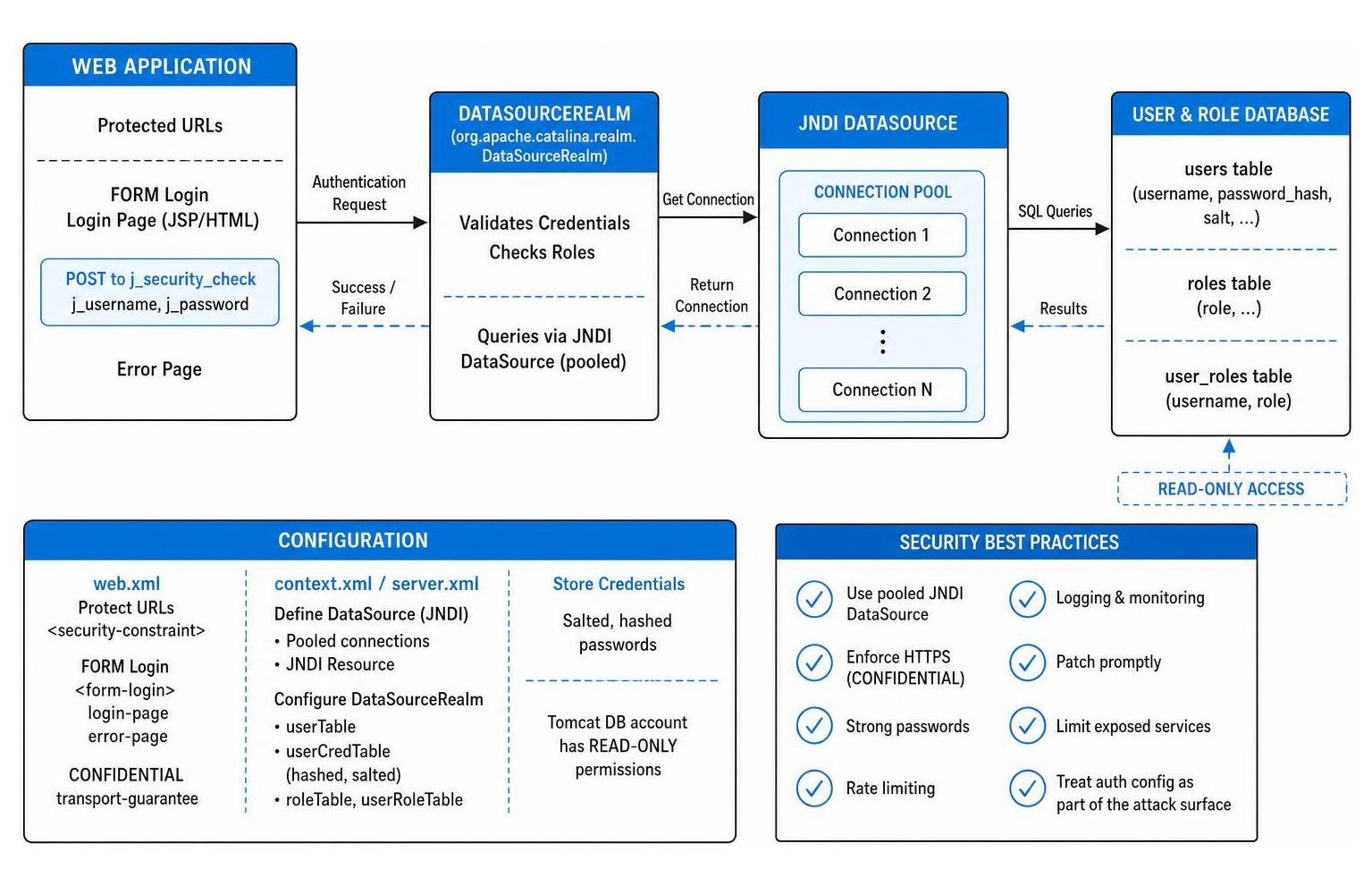
Tomcat historically provided two primary relational database realms: JDBCRealm (org.apache.catalina.realm.JDBCRealm) and DataSourceRealm (org.apache.catalina.realm.DataSourceRealm). While JDBCRealm opens a single direct database connection and synchronizes authentication lookups (forcing one user to wait while another is verified), DataSourceRealm routes queries through pooled JNDI resources.
| Feature / Metric | Legacy JDBCRealm | Modern DataSourceRealm |
|---|---|---|
| Connection Strategy | Single unpooled JDBC connection | Container-managed JNDI connection pool |
| Concurrency Model | Synchronized bottleneck (single-threaded) | Multi-threaded concurrent database lookups |
| Failover & Recovery | Manual reconnect logic | Automatic stale connection eviction via pool |
| Configuration Scope | Direct JDBC connection attributes in XML | Standardized JNDI DataSource resource name |
| Production Suitability | Development and testing only | Enterprise production standard |
5 Steps to Implement Form-Based Database Authentication
Adhering to standard declarative security outlined in the Apache Tomcat 9 (9.0.120) - Realm Configuration How-To and our Form-Based Authentication Guide 2026, this section walks through setting up an enterprise-grade database realm step by step.
Step 1: Configuring the Schema for a Tomcat Form Based Authentication Database
Tomcat's relational realms require a normalized two-table structure: one table for user credentials and another for role mappings. Create these tables in your database (e.g., MySQL, PostgreSQL, or MariaDB):
Establish a users table with a user_name (VARCHAR primary key) and user_pass (VARCHAR(256) for hashed credentials), alongside a user_roles table with user_name and role_name columns forming a composite primary key, where user_name maintains a foreign key constraint referencing users(user_name).
Security Best Practice: Grant Tomcat's database account strict SELECT privileges only. Tomcat never writes, updates, or deletes rows in authentication tables during the login lifecycle.
Step 2: Establish JNDI DataSource and Password Credential Handlers
Define a pooled DataSource resource in your application's META-INF/context.xml file to manage database connections efficiently:
Declare a <Resource> element with attributes name="jdbc/AuthDB", auth="Container", type="javax.sql.DataSource", driverClassName="com.mysql.cj.jdbc.Driver", url="jdbc:mysql://localhost:3306/authdb", username="tomcat_auth", maxTotal="20", maxIdle="10", and a validationQuery="SELECT 1" to automatically evict broken sockets.
Make sure the corresponding JDBC driver JAR file is deployed to Tomcat's $CATALINA_HOME/lib directory so the container classloader can resolve it at startup.
Step 3: Connecting Server.xml to Your Tomcat Form Based Authentication Database
Next, link the Realm to your JNDI DataSource. You can place the configuration in $CATALINA_BASE/conf/server.xml or within META-INF/context.xml. Using context.xml provides clean application isolation:
Configure <Realm className="org.apache.catalina.realm.DataSourceRealm" dataSourceName="jdbc/AuthDB" localDataSource="true" userTable="users" userNameCol="user_name" userCredCol="user_pass" userRoleTable="user_roles" roleNameCol="role_name"> and nest a <CredentialHandler className="org.apache.catalina.realm.MessageDigestCredentialHandler" algorithm="SHA-512" iterations="10000" saltLength="16" /> element directly inside it. For production systems, consider the stronger PBKDF2-based SecretKeyCredentialHandler with a high iteration count (see current OWASP password storage guidance) instead of a plain digest handler.
When defining the Realm inside context.xml, setting localDataSource="true" instructs Tomcat to look up the DataSource inside the local application context rather than searching global server resources.
Step 4: Configure Web.xml Security Constraints and Login Config
Open WEB-INF/web.xml to declare your URL access rules, security roles, and form-based login dispatcher. Review our Login Config in web.xml Example for structural details:
Define a <security-constraint> containing a <web-resource-collection> with <url-pattern>/admin/*</url-pattern>, an <auth-constraint> specifying <role-name>admin</role-name>, and a <user-data-constraint> with <transport-guarantee>CONFIDENTIAL</transport-guarantee>. Follow this with a <login-config> block configuring <auth-method>FORM</auth-method>, <form-login-page>/login.jsp</form-login-page>, <form-error-page>/login-error.jsp</form-error-page>, and declare all <security-role> tags.
Step 5: Construct Custom Login and Error Form Pages

Tomcat requires exact form action targets and input parameter names. The form action must post to j_security_check, the username field must be named j_username, and the password field must be named j_password.
Here is a clean login.jsp implementation:
Build an HTML <form action="j_security_check" method="POST"> containing an input named j_username for user identity input, an input named j_password with type="password", and a submit button.
Create login-error.jsp to capture rejected authentication attempts. It is best practice to embed the sign-in form directly inside the error view so legitimate users can re-attempt login immediately without extra navigation:
Include a visible error notification banner along with the identical <form action="j_security_check" method="POST"> input fields (j_username and j_password) to allow immediate credential correction.
Hardening Credentials with Transport Encryption and Password Salting
Never store plaintext credentials in database tables. Tomcat includes the MessageDigestCredentialHandler component, allowing administrators to generate secure cryptographic hashes. To understand how cryptographic randomizers prevent rainbow-table compromises, see What is Salting: Strengthening Password Security Against Modern Attacks.
Use Tomcat's built-in command-line digest tool to generate salted, iterated password strings by running $CATALINA_HOME/bin/digest.sh -a SHA-512 -i 10000 -s 16 -k userPassword in a terminal:
The output string follows the standard format {salt}${iterations}${digest}, producing a secure hash string such as e8a3b1...$10000$4c8d1f...:
Insert this output directly into the user_pass column of your users table.
To prevent eavesdropping on credentials in transit, set <transport-guarantee>CONFIDENTIAL</transport-guarantee> within web.xml. This forces Tomcat to automatically redirect plain HTTP requests to HTTPS (port 8443 or 443) with an HTTP 302 redirect before rendering forms or accepting POST requests.
Troubleshooting Common Tomcat Form Authentication Failures
- HTTP 400 - Invalid Direct Reference to Form Login Page: This occurs when a user accesses
j_security_checkdirectly or when an authentication form is placed on an unprotected public landing page. Tomcat container-managed security requires a user to request a protected resource first; Tomcat saves that request in session memory and dispatches the login view. Submitting directly without an intercepted request triggers an HTTP 400 error. - Circular Redirect Loops: If
login.jsporlogin-error.jspresides inside a URL pattern protected by<security-constraint>(such as/admin/login.jsp), Tomcat falls into an infinite redirect loop. Ensure login and error resources reside in unprotected URL namespaces or are explicitly listed in an unconstrained<security-constraint>block. - HTTP 403 Forbidden on Successful Authentication: If credentials match the
userstable but the user receives an HTTP 403 status, verify role mapping. The value inuser_roles.role_namemust match the declared<role-name>within both the<auth-constraint>and<security-role>tags inweb.xml(character-casing matters). - Public Header Login Forms: If your architecture requires an optional login form in a global site header across public pages, avoid
j_security_check. Use Servlet 3.0+ programmatic authentication within a custom servlet instead by executingrequest.login(username, password)in your POST handler and managing error redirects via standardServletExceptionhandling.
Frequently Asked Questions About Tomcat Authentication
Why does posting directly to jsecuritycheck cause an HTTP 400 error?
Tomcat's declarative form authentication relies on saving an intercepted request in session memory when an unauthenticated user attempts to access a protected URL. Submitting directly to j_security_check from a public page provides no saved request to replay, prompting Tomcat to return an HTTP 400 - Invalid Direct Reference error. For public header forms, use programmatic login via HttpServletRequest.login().
How does Tomcat handle session caching when database roles change?
Upon successful authentication, Tomcat creates a principal and caches assigned roles directly in memory for the duration of the HTTP session. Modifications made directly to database rows take effect immediately for new logins, but existing active sessions will retain their original cached roles until the session times out or is explicitly invalidated.
What makes DataSourceRealm superior to JDBCRealm for production systems?
JDBCRealm synchronizes requests across a single database connection, creating a concurrency bottleneck under heavy loads. DataSourceRealm leverages container-managed JNDI connection pooling, supporting multi-threaded credential lookups, connection validation queries, and automatic recovery from stale database sockets.
Conclusion
Implementing database-backed form authentication in Apache Tomcat provides a standards-compliant, declarative security model that separates access control rules from underlying database mechanics. By replacing outdated JDBCRealm connections with connection-pooled DataSourceRealm configurations, enforcing salted cryptographic digests, and securing transport layers via SSL/TLS constraints, organizations can reliably defend against credential harvesting and brute-force intrusion vectors.
For deeper insights on modern web authentication architecture, explore Forms-Based Authentication Explained: How Web Login Forms Work and How to Secure Them on Unlocked, Everykey's blog.