

Demystifying Identity Provisioning: Definitions, Stages, and Best Practices

Why User Provisioning Is the Backbone of Identity Security
What is user provisioning in identity management? It is the process of creating, modifying, and deleting user accounts across an organization's IT systems — and defining exactly what each user can access, when, and why.
Here's the short version:
- Provisioning = giving a user the right accounts and permissions to do their job
- Modifying = updating access when their role changes
- Deprovisioning = revoking access when they leave or change positions
Think of it as the operational engine behind identity management. It's not about verifying who someone is (that's authentication). It's about what they're allowed to do once they're in.
The scale of this problem is bigger than most people realize. Enterprise firms now use an average of 473 SaaS applications. Onboarding a single employee manually can take IT teams several days across 15 to 20 different systems. Every one of those systems needs the right account, the right permissions, and — critically — the right removal process when that employee leaves.
When provisioning is done poorly, the consequences are concrete: dormant accounts that attackers can exploit, over-privileged users who accumulate access they no longer need, and compliance gaps that fail audits under frameworks like SOC 2, HIPAA, and ISO 27001.
This guide breaks down exactly how user provisioning works, what the key standards and protocols are (SCIM, JIT, RBAC), and what best practices actually look like in practice — whether you're a CISO building an enterprise IAM strategy or an IT admin trying to stop doing this manually.
What is User Provisioning in Identity Management?
To understand how modern enterprises secure their perimeters, we have to look closely at the identity lifecycle. At its core, user provisioning is the mechanism that translates a real-world human (or a non-human entity like an API integration or service account) into a functional digital object within your network.
The technical specifications of this process are outlined in standards such as RFC 7643, which you can read in detail in the Understanding User Provisioning in Identity Management documentation. When we talk about user provisioning, we are discussing the creation of a "user object." This object contains a unique identifier, organizational details, contact information, and specific security entitlements.
It is common for those new to IT infrastructure to confuse user provisioning with infrastructure provisioning. However, they serve completely different purposes.
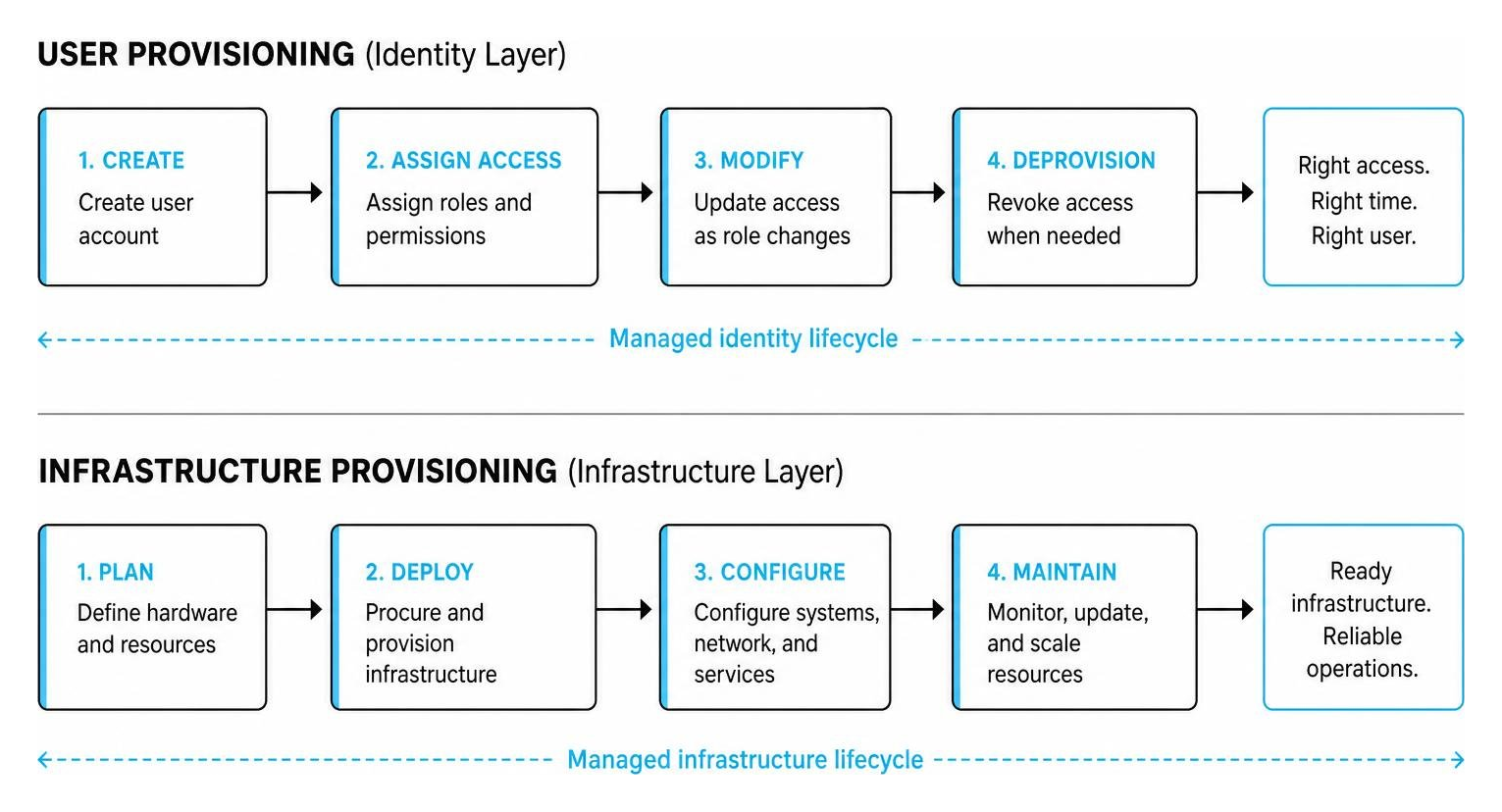
While infrastructure provisioning sets up the physical or virtual hardware (such as spinning up a new AWS EC2 instance or configuring a network switch), user provisioning deals strictly with the digital identity layer. It ensures that when a new developer joins the team, they have an active, configured account in AWS, rather than setting up the AWS environment itself.
The Core Difference Between Provisioning and Authentication
Another common point of confusion is the distinction between authentication and provisioning.
- Authentication (AuthN) is the act of proving who you are. When you enter a password, tap a physical security key, or complete a Multi-Factor Authentication (MFA) prompt via a protocol like SAML, you are authenticating.
- Provisioning is the act of establishing what accounts you own and what permissions are attached to them long before you even attempt to log in.
Without provisioning, authentication has nowhere to land. You can prove your identity using the most secure single sign-on (SSO) gateway in the world, but if your user account hasn't been provisioned in the target application, you will be met with an "Account Not Found" error. Provisioning sets up the mailbox; authentication is the key that opens it.
The Role of Deprovisioning in Identity Management
If provisioning is the welcoming committee, deprovisioning is the security escort out of the building. Deprovisioning is the process of removing or disabling a digital identity when a user no longer requires access—such as when an employee leaves the company, a contractor’s agreement expires, or a partner integration is retired.
Failure to deprovision users results in orphan accounts: active, unmonitored accounts associated with departed users. These are a goldmine for malicious actors, as they lack active owners to notice suspicious password resets or anomalous login locations.
When offboarding, organizations typically choose between two methods:
- Soft Deprovisioning: The user's access is disabled, and their login capabilities are frozen, but their data, files, and account configurations are preserved for a retention period. This is crucial for business continuity, allowing managers to retrieve client emails or hand over projects.
- Hard Deprovisioning: The account, along with all associated personal data and configuration files, is permanently deleted from the target systems.
How User Provisioning Works: The Lifecycle Stages
To manage user identities systematically, organizations rely on the Joiner-Mover-Leaver (JML) framework. This framework maps identity management directly to the HR lifecycle of an employee.
Modern enterprise environments use User provisioning software to automate these transitions, linking the central Human Resources Information System (HRIS)—which acts as the authoritative source of record—directly to the directory services.
Stage 1: Account Creation and Birthright Access
The lifecycle begins when a new hire is entered into the HR database. This event triggers the provisioning system to create a central user object (often in Active Directory or a cloud-based Identity Provider).
Based on the department, location, and job title, the system automatically grants birthright access. These are the baseline tools that every employee in that category needs to function on day one—such as a corporate email account, access to the internal intranet, and communication channels like Slack or Microsoft Teams.
Stage 2: Access Modification and the Threat of Privilege Creep
As employees transition within an organization—receiving promotions, transferring to new departments, or joining cross-functional project teams—their access needs change. This is the "Mover" phase.
Without automated provisioning policies, organizations frequently fall victim to privilege creep (also known as permission accumulation). This occurs when an IT admin manually copies permissions from an existing user to a new role without removing the old ones. Over time, a marketing manager who spent a brief stint assisting the finance team retains access to sensitive accounting databases.
Automated entitlement management prevents this by re-evaluating access policies during every role modification, stripping away old permissions as new ones are granted.
Stage 3: Deactivation and Offboarding
The final stage of the lifecycle is the "Leaver" phase. When an employee's termination date is reached in the HR system, an automated deactivation signal is sent to the identity provider.
Within minutes, access is revoked across all downstream SaaS applications. Manually offboarding an employee across dozens of applications invites human error; a single forgotten account can leave a massive security gap. Automation ensures that deprovisioning is immediate, comprehensive, and auditable.
Types of User Provisioning and Technical Protocols
Depending on an organization's maturity and architectural needs, different provisioning methods are used. While manual setups are highly discouraged for anything beyond isolated, low-value systems, automated and role-based approaches form the foundation of modern identity governance.
To understand how these systems align with federal and enterprise security standards, refer to the Automated Directory Provisioning and Governance Standards published by NIST.
| Provisioning Type | Mechanism | Security Risk | Administrative Overhead | Best Used For |
|---|---|---|---|---|
| Manual | IT admins manually create accounts via UI or custom scripts. | High (Human error, orphan accounts) | Extremely High | Low-volume, legacy on-premises apps |
| Automated | Direct sync between HR system, IdP, and downstream apps. | Low (Standardized, policy-driven) | Low | Core enterprise SaaS and directory services |
| Self-Service | Users request access via a portal; routed for manager approval. | Medium (Requires strict approval gates) | Medium | Specialized, high-cost software licenses |
| Role-Based (RBAC) | Access granted automatically based on pre-defined business roles. | Low (Enforces least privilege) | Low (Once configured) | Large enterprises with structured departments |
SCIM and Modern Provisioning Standards
To achieve seamless automation across different software ecosystems, the industry relies on the System for Cross-domain Identity Management (SCIM) protocol.
SCIM 2.0 is an open standard that uses a RESTful API architecture and JSON-formatted payloads to standardize user management operations. Instead of writing custom APIs for every SaaS application, identity providers and application vendors implement SCIM. This allows continuous, real-time directory synchronization.
You can read the underlying protocol specifications in the System for Cross-domain Identity Management (SCIM) Core Schema.
For practical implementation details on how major cloud providers handle these integrations, explore What is provisioning with Microsoft Entra ID? - Microsoft Entra ID Governance | Microsoft Learn and the developer guides at What is user provisioning? — WorkOS Guides.
Just-In-Time (JIT) Provisioning via SAML
For applications that do not require constant directory synchronization, Just-In-Time (JIT) provisioning offers a lightweight alternative.
JIT provisioning triggers account creation "on the fly" the first time a user attempts to log into an application via Single Sign-On (SSO). The identity provider passes user attributes (such as name, email, and department) inside secure SAML assertions. The target application reads these assertions and creates the user account instantly.
While JIT is highly efficient for account creation, it has a major security limitation: it does not support deprovisioning or active modifications. If an employee is terminated, JIT cannot delete their account or revoke permissions inside the target application in real time. For true lifecycle coverage, SCIM remains the gold standard.
Business and Security Benefits of Automated User Provisioning
In an era of rapid SaaS sprawl, manual identity management is no longer viable. Automating the provisioning process directly addresses both operational bottlenecks and critical security vulnerabilities.

- Operational Efficiency: Instead of taking IT teams several days to configure access across dozens of tools, automated workflows complete the same process in minutes.
- Cost Savings: Orphan accounts often sit dormant while continuing to consume expensive software licenses. Automated deprovisioning reclaims these licenses instantly, preventing wasted enterprise spend.
- Elimination of Shared Credentials: Automation ensures every user has a unique, trackable account, eliminating the security risks of shared passwords.
How Automated Provisioning Supports Security and Compliance
Implementing automated provisioning is a prerequisite for achieving compliance with major security frameworks like SOC 2, ISO 27001, HIPAA, and GDPR.
- Enforcing Least Privilege: By leveraging Role-Based Access Control (RBAC), organizations ensure users only receive the exact permissions required for their specific job functions.
- Segregation of Duties (SoD): Automated provisioning engines can enforce policies that prevent toxic combinations of access. For example, a system can automatically block a user from having both "create vendor" and "approve payment" entitlements, preventing internal fraud.
- Comprehensive Audit Trails: Compliance audits require proof of who authorized access to sensitive data and when. Automated provisioning systems log every account creation, role change, and deactivation, providing a clear, tamper-proof audit trail.
Real-World Impact: Efficiency Gains and Risk Reduction
The operational impact of moving from manual to automated provisioning is measurable across diverse enterprise sectors:
- Administrative Overhead Reduction: Case studies in administrative efficiency demonstrate massive overhead reductions. For instance, media firm Zefr reduced the time spent on user provisioning and decommissioning from four hours to just 30 minutes per week—an 88% reduction in administrative overhead.
- Provisioning Velocity: Sustainability platform CO2 AI achieved an 85% reduction in provisioning time while completely eliminating shared credentials across their environments.
- Scalability at Scale: Financial institutions like Axos Financial manage over 200,000 database permissions annually. Handling this volume manually would require an army of IT administrators; automation makes it manageable for a lean security team.
- AI-Driven Optimization: Modern identity governance is increasingly augmented by intelligence. Statistics show that 68.6% of organizations have experienced significant improvements in their provisioning and deprovisioning workflows by integrating generative AI technologies to assist with role mining and anomaly detection.
Common Challenges and Best Practices for Implementation
Deploying an enterprise-grade provisioning system is not without its hurdles. To avoid common pitfalls, architects should consult the comprehensive framework guidelines found in User Provisioning in the Enterprise.
- Data Quality Issues: If your HR database contains outdated titles, duplicate entries, or formatting errors, your provisioning system will push those errors downstream, resulting in broken accounts and incorrect permissions.
- Application Compatibility: While modern SaaS tools support SCIM, legacy on-premises applications and custom-built databases often do not. Bridging these systems requires specialized agents or custom API connectors.
- Role Explosion: When designing an RBAC framework, organizations often make the mistake of creating too many granular roles. This leads to administrative complexity that is just as difficult to manage as manual provisioning.
Best Practices for Implementing User Provisioning
To ensure a successful, secure deployment, follow these industry-proven best practices, which align with the NIST Guidelines on Access Control and Identity Lifecycle Management.
- Establish a Single Source of Truth: Your identity provider should always pull its data from an authoritative source—typically your HRIS platform. Never allow manual modifications in downstream apps to override this central directory.
- Keep RBAC Roles Broad and Manageable: Focus on defining a small set of "birthright" roles based on department and location, then use self-service workflows with automated expiration dates for temporary or highly specialized access.
- Conduct Regular Access Audits: Implement quarterly or semi-annual access certification campaigns. Require managers to actively review and re-verify that their direct reports still require their assigned permissions.
- Enforce Bidirectional Sync (Write-Back): Ensure that when a downstream application generates a new data point (like an employee's new corporate email address), that information is written back to the authoritative HR database to maintain data integrity.
- Plan for Legacy Systems Wisely: Do not waste months of engineering time building custom SCIM connectors for legacy systems with low user velocity. As noted in IBM's Provisioning features - IBM Documentation, it is often more cost-effective to automate 80% of your high-volume cloud applications while retaining structured, manual workflow approvals for low-volume legacy systems.
Frequently Asked Questions about User Provisioning
What is user provisioning in identity management?
User provisioning is the process of creating, maintaining, modifying, and deactivating user accounts and access rights across an organization's IT systems. It ensures that digital identities are properly aligned with real-world users and their organizational roles throughout their lifecycle.
How does user provisioning differ from authentication?
Authentication is the process of verifying who a user is (e.g., via passwords, biometrics, or MFA keys). User provisioning is the process of setting up the accounts, groups, and permissions that dictate what that user is allowed to do once their identity is verified.
What is the role of deprovisioning in identity management?
Deprovisioning is the process of disabling or deleting user accounts when an employee leaves or no longer requires access. It is a critical security function that prevents "orphan accounts"—dormant credentials that remain active and vulnerable to exploitation by cybercriminals.
Conclusion
User provisioning is not merely an administrative convenience; it is a foundational pillar of modern cybersecurity. By automating the identity lifecycle from onboarding to offboarding, organizations can eliminate administrative overhead, secure their SaaS ecosystems, and maintain compliance with stringent regulatory frameworks.
For organizations looking to take their identity security to the next level, integrating physical credential security with digital access is the logical next step. To learn more about securing your organization's entire credential landscape, explore the Identity and Access Management (IAM) Complete Guide on Unlocked.