
In-Depth Guide to Comparing Business Password Managers

Core Evaluation Criteria for a Password Manager App for Business
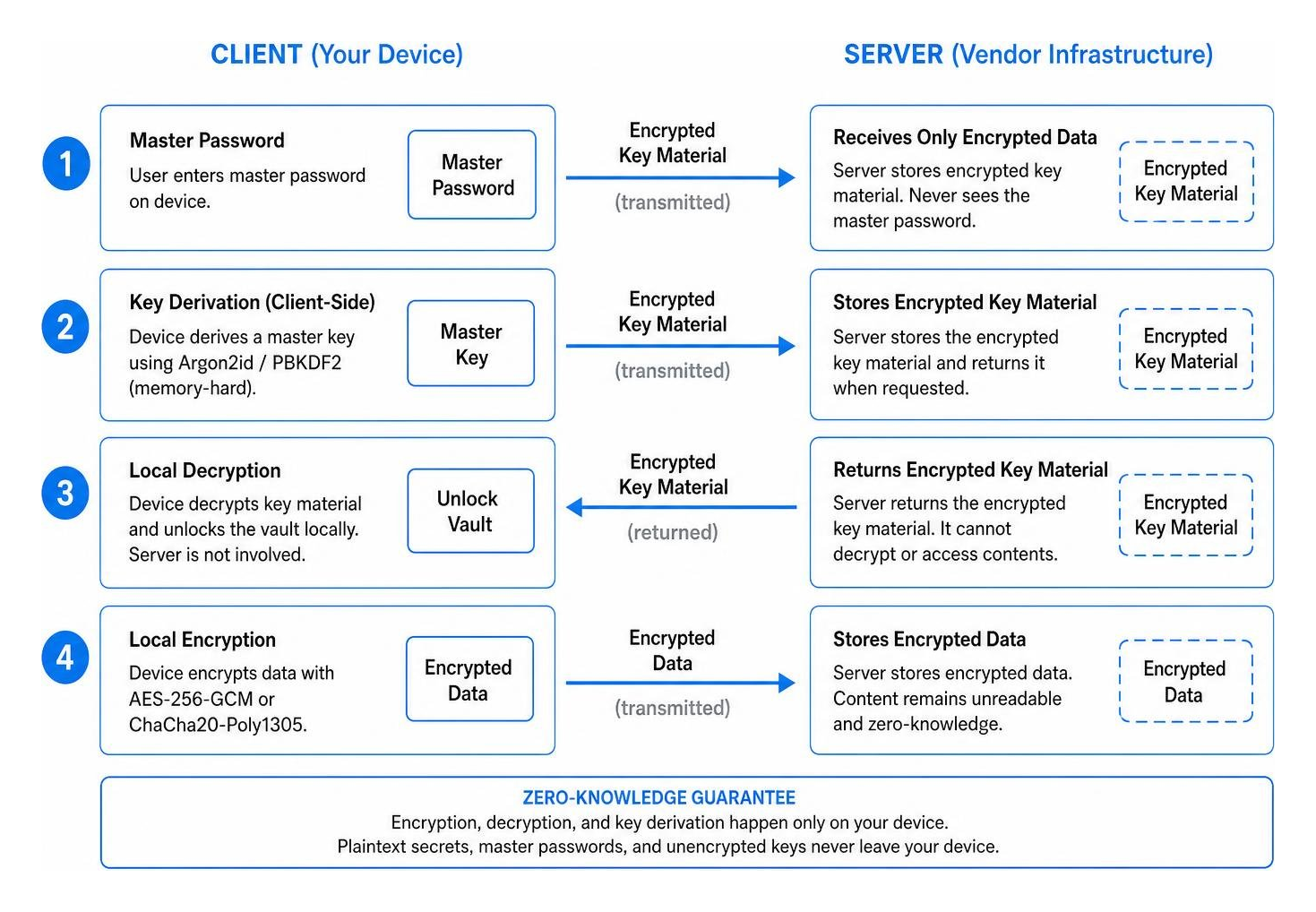
When evaluating modern solutions, security engineering teams must look beyond consumer-grade feature sets. According to findings from the Verizon 2026 Data Breach Investigations Report (DBIR) published in May 2026, stolen credentials remain a leading way attackers get in, although exploitation of vulnerabilities has now overtaken them as the most common initial access vector. Addressing this systemic identity exposure requires strict adherence to NIST SP 800-63B digital identity guidelines alongside centralized credential governance. A corporate credential vault operates as a mission-critical component of an enterprise's defense-in-depth framework. The baseline requirement for any enterprise-grade deployment is an end-to-end, zero-knowledge cryptographic architecture.
In a verified zero-knowledge implementation, cryptographic operations—including encryption, decryption, and key derivation—occur exclusively on client endpoints. Plaintext secrets, master passwords, and unencrypted private keys are never transmitted across the network or stored on vendor infrastructure. Modern platforms rely on symmetric encryption standards such as AES-256-GCM (Galois/Counter Mode) or ChaCha20-Poly1305 to ensure data confidentiality and integrity.
To defend against offline brute-force and dictionary attacks, robust master key derivation requires a deliberately slow key derivation function, such as the memory-hard Argon2id or PBKDF2 with high iteration counts. Understanding these foundational mechanics is critical when architecting robust password storage for business across distributed operating environments.
Beyond cryptographic primitives, enterprise buyers must audit operational controls, certifications, and hosting models to satisfy regulatory baselines such as SOC 2 Type II, ISO/IEC 27001:2022, HIPAA, and GDPR.
| Architecture Model | Primary Advantages | Operational Trade-offs | Compliance & Governance Fit |
|---|---|---|---|
| Cloud-Native SaaS | Rapid global deployment, vendor-managed high availability, automated patching, native API integrations. | Data residency hosted on vendor infrastructure; relies on tenant isolation boundaries. | Ideal for agile enterprises requiring SOC 2 Type II assurance without dedicated infrastructure maintenance. |
| Self-Hosted / On-Premises | Complete sovereignty over ciphertext databases, strict data residency control, air-gapped support. | Higher administrative overhead for patching, container orchestration (Docker/Kubernetes), and disaster recovery. | Essential for defense, banking, and critical infrastructure with strict data localization mandates. |
| Local-First / Distributed Sync | Vault data stored within corporate storage (e.g., existing Google Workspace / M365 buckets), zero centralized vendor database. | Complex cross-device synchronization, manual fleet configuration, limited unified real-time telemetry. | Suited for organizations seeking zero third-party cloud trust without operating full on-premises servers. |
Why Every Password Manager App for Business Must Support SCIM and SSO
Standalone master passwords introduce substantial organizational risk. If an employee leaves the company, manually revoking access across dozens of individual applications creates severe administrative friction and leaves dangerous windows of exposure. Enterprise credential security relies heavily on the Joiner-Mover-Leaver (JML) identity lifecycle.
Federated authentication via SAML 2.0 or OpenID Connect (OIDC) links the password manager directly to centralized Identity Providers (IdPs) like Microsoft Entra ID, Okta, PingFederate, or Google Workspace. When paired with SCIM (RFC 7644 System for Cross-domain Identity Management), user provisioning and deprovisioning occur in real time.
When HR offboards an employee in the primary directory, SCIM instantly revokes the user's vault tokens, unassigns shared collections, and severs access to company resources without administrative delays. Exploring modern enterprise password storage solutions for 2026 highlights how centralized identity synchronization forms the backbone of Zero Trust network architectures.
Secret Management, CLI Automation, and Developer Workflows
Enterprise environments extend far beyond browser logins. Engineering teams manage infrastructure credentials, including API keys, database connection strings, TLS certificates, and SSH keys. Storing these non-human credentials in static configuration files or plaintext repositories exposes organizations to immediate credential harvesting risks.
Modern business password managers bridge human access and machine automation by offering dedicated Command-Line Interfaces (CLIs), Software Development Kits (SDKs), and CI/CD secret injection modules. These tools pull secrets into memory at runtime during pipeline execution (such as GitHub Actions, GitLab CI, or Terraform runs), ensuring secrets are never hardcoded in source control. Evaluating flexible alternatives to 1Password allows DevOps leaders to assess programmatic secret distribution across hybrid cloud environments, protecting both human and machine identities from lateral movement attacks.
Top Business Password Managers Compared
Selecting an enterprise vault requires balancing administrative governance, developer utility, operational cost, and user friction. Below is an architectural analysis of leading solutions used across mid-market and enterprise environments. For a strategic overview of governance models, reference our comprehensive enterprise password storage guide.
Bitwarden Enterprise: Open-Source Transparency and Self-Hosting
Bitwarden has established itself as an open-source standard for organizations that prioritize auditable codebases, flexible infrastructure hosting, and cost predictability. The platform is available as a vendor-hosted SaaS solution or as a self-hosted deployment running via Docker or Kubernetes on internal corporate infrastructure.
Bitwarden’s architecture separates individual vaults from shared organizational collections. Access is governed via fine-grained Role-Based Access Control (RBAC), allowing IT administrators to assign collection permissions based on user groups synchronized via the Bitwarden Directory Connector or SCIM.
- Pros:
- Fully open-source codebase with regularly published third-party security audits.
- Native self-hosting options satisfy strict data localization and sovereignty requirements.
- Direct integration with major directory services and enterprise IdPs via SCIM and SAML 2.0.
- Highly cost-effective licensing models across both business and enterprise tiers.
- Cons:
- Self-hosted environments require internal infrastructure management, backup planning, and manual maintenance.
- The administrative interface focuses strictly on utility rather than guided workflow customization.
- Best Suited For: Technical teams, defense and public sector organizations, and businesses requiring transparent, self-hosted, or cost-scalable vault solutions.
1Password Business: Granular Access and Developer Secrets
1Password Business focuses heavily on user experience, administrative policy enforcement, and DevOps secret orchestration. Its proprietary dual-layer encryption model pairs a user-defined Master Password with an automatically generated, client-side 128-bit Secret Key. This Secret Key never leaves the local device, ensuring that even if encrypted server payloads are intercepted, brute-force attacks remain cryptographically infeasible.
1Password's Watchtower feature provides real-time security intelligence, alerting security operations teams to compromised passwords, reused credentials, expired certificates, and missing multi-factor authentication. Organizations reviewing the broader landscape of top password manager applications consistently note 1Password’s strengths in developer tooling, including native SSH agent integration, CLI automation, and runtime secret injection.
- Pros:
- Dual-layer security model (Master Password + 128-bit Secret Key) prevents offline server-side cracking.
- Advanced developer tooling, including SSH key management and native CI/CD secret injection plugins.
- Streamlined integration with SIEM providers like Splunk, Datadog, and Elastic via real-time event streaming.
- Intuitive user interface across desktop and mobile clients drives high organizational adoption.
- Cons:
- Proprietary, closed-source core architecture.
- Premium per-user pricing relative to entry-level competitors.
- Best Suited For: Mid-market to large enterprises, software engineering organizations, and companies prioritizing developer-first secret management and deep SIEM observability.
Proton Pass for Business: Privacy-First Swiss Vault Architecture
Developed by the team behind Proton Mail and Proton VPN, Proton Pass for Business is built upon a privacy-by-design framework. Headquartered in Switzerland, Proton operates under the jurisdiction of the Swiss Federal Act on Data Protection (FADP) and the Swiss Federal Constitution, providing legal privacy protections outside US and EU surveillance sharing agreements.
Proton Pass utilizes end-to-end, zero-knowledge encryption for all stored records, metadata, and custom fields. In addition to password management, the platform includes built-in email alias generation (Hide-my-email aliases) to mitigate targeted phishing and credential harvesting. For security teams evaluating specialized privacy software or reviewing alternatives to Keeper, Proton Pass provides a focused, highly private ecosystem.
- Pros:
- Strict Swiss privacy jurisdiction protects stored metadata from extraterritorial legal requests.
- Open-source client applications backed by independently verified public security audits.
- Integrated email alias masking prevents initial corporate email address harvesting.
- Native passkey synchronization across all supported operating systems and browsers.
- Cons:
- Less extensive developer CLI and programmatic secret infrastructure tooling compared to mature enterprise competitors.
- Ecosystem integrations are primarily optimized for Proton-centric enterprise suites.
- Best Suited For: Privacy-focused firms, legal practices, investigative operations, and businesses operating in jurisdictions with stringent regulatory confidentiality mandates.
How to Implement and Roll Out Credential Governance
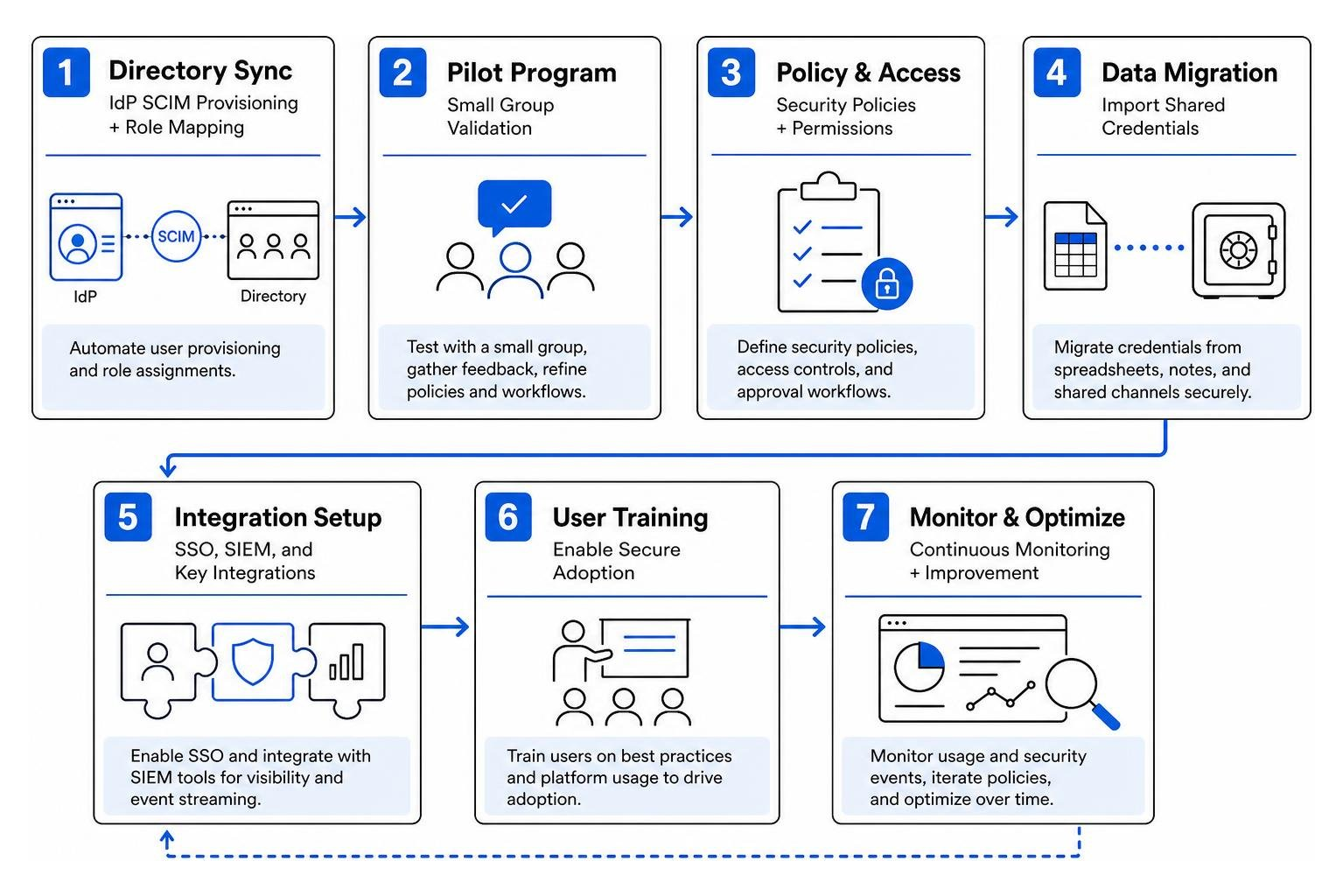
Deploying a credential management platform across an organization requires structured change management to prevent shadow IT workarounds and insecure credential handling. If processes are too complex, employees naturally revert to storing secrets in unencrypted notes, spreadsheets, or shared chat channels. Following established best practices for how to share passwords securely ensures teams collaborate safely without creating security blind spots.
Deploying a Password Manager App for Business Across Distributed Teams
A successful company-wide deployment follows a phased implementation framework:
- Establish Identity Federation and SCIM Sync: Integrate the vault platform with the corporate IdP before inviting users. Map existing Active Directory or Okta security groups directly to shared vault collections to enforce role-based access automatically.
- Mandate Hardware-Backed MFA: Enforce phishing-resistant multi-factor authentication (FIDO2 / WebAuthn security keys) across all vault accounts. Disable fallback options to insecure SMS or unencrypted email codes.
- Run an IT and DevOps Pilot: Begin the rollout within IT and engineering teams. Migrate shared infrastructure credentials, validate CLI integrations, test secret injection workflows, and document resolution pathways for common user questions.
- Conduct Department-by-Department Rollouts: Provide role-specific training sessions. Non-technical teams should focus on browser autofill, mobile synchronization, and secure team sharing, while technical teams focus on developer tooling. Ensure employees understand what is a password manager and how it prevents credential stuffing and phishing attacks.
- Decommission Legacy Credential Stores: Enforce strict deadlines for retiring unencrypted spreadsheets, shared text files, and browser-stored passwords.
Auditing, Compliance Monitoring, and SIEM Integration
Continuous visibility is necessary to maintain regulatory compliance with frameworks like NIS2, HIPAA, and ISO 27001. Enterprise password managers generate comprehensive audit trails covering every administrative action, permission modification, vault export, and login attempt.
Security teams should configure automated audit log exports via Syslog (RFC 5424) or native API connectors into centralized SIEM platforms such as Splunk, Microsoft Sentinel, or Elastic. Key detection use cases include:
- Anomalous Vault Exports: Alerting on mass credential export events initiated by any user account.
- Geographic Impossibility: Flagging authentication attempts originating from anomalous IP ranges or conflicting geographic regions within brief time windows.
- Privileged Access Modifications: Monitoring changes to global admin roles, collection permissions, or automated provisioning configurations.
- Credential Hygiene Tracking: Regularly querying the vault API to track the reduction of weak, reused, or compromised passwords across the entire workforce.
Frequently Asked Questions
How does zero-knowledge architecture protect vault data if the vendor is breached?
In a true zero-knowledge architecture, the vendor's servers store only encrypted ciphertext. Decryption keys are derived exclusively on client devices using memory-hard algorithms like Argon2id combined with the user's master secret. Because the vendor never possesses the plaintext keys or master passwords, an attacker who compromises the vendor's database obtains only unreadable ciphertext, preserving the underlying credential data.
What is the difference between team and enterprise password management tiers?
Team tiers typically offer shared vaults, basic administrative consoles, and standard two-factor authentication suitable for smaller organizations. Enterprise tiers provide advanced infrastructure integrations, including SCIM automated provisioning, SAML 2.0 / OIDC single sign-on federation, SIEM audit streaming, custom policy engines, programmatic developer secret automation, and dedicated enterprise support.
How do enterprise password managers eliminate shadow IT risks?
Enterprise password managers detect when employees create accounts on unapproved SaaS platforms during standard browsing workflows. Administrators gain visibility into newly registered domains, allowing security teams to discover unauthorized applications, bring unmanaged accounts under centralized governance, enforce corporate security policies, and automatically revoke access during offboarding.
Conclusion
Securing corporate identities requires eliminating unmanaged, weak, and reused credentials across both human and non-human workflows. Throughout early to mid-2026, identity-centric attack vectors—such as adversary-in-the-middle (AiTM) phishing, automated credential stuffing, and session token theft—have continued to bypass perimeter-based defenses. The Cybersecurity and Infrastructure Security Agency (CISA) and modern identity security standards emphasize that robust credential lifecycle governance, phishing-resistant MFA, and automated JML offboarding are essential components of any Zero Trust architecture.
Choosing the right password manager app for business depends on your organizational requirements. Bitwarden provides open-source transparency and robust self-hosting; 1Password delivers mature developer secret automation and granular analytics; and Proton Pass offers specialized privacy protections under Swiss legal jurisdiction. For security leaders assessing access management architectures, you can explore comprehensive credential management guidance at Unlocked to strengthen your organization's identity security posture.