Best YubiKey Alternatives of 2026
The best YubiKey alternatives in 2026 are Google Titan, Everykey, SoloKeys Solo 2, and Feitian ePass. All support FIDO2 — most cost less than YubiKey, and several add biometrics, Bluetooth, or proximity unlock.

Last updated: May 21, 2026
The best YubiKey alternatives in 2026 are Everykey, Google Titan Security Key, Nitrokey 3, SoloKeys Solo 2, Thetis Pro, and Feitian ePass. All support FIDO2 phishing-resistant authentication. Some cost less than YubiKey, others add proximity unlock, open-source firmware, or Bluetooth — features YubiKey does not offer.
Quick Comparison: YubiKey vs. Top Alternatives
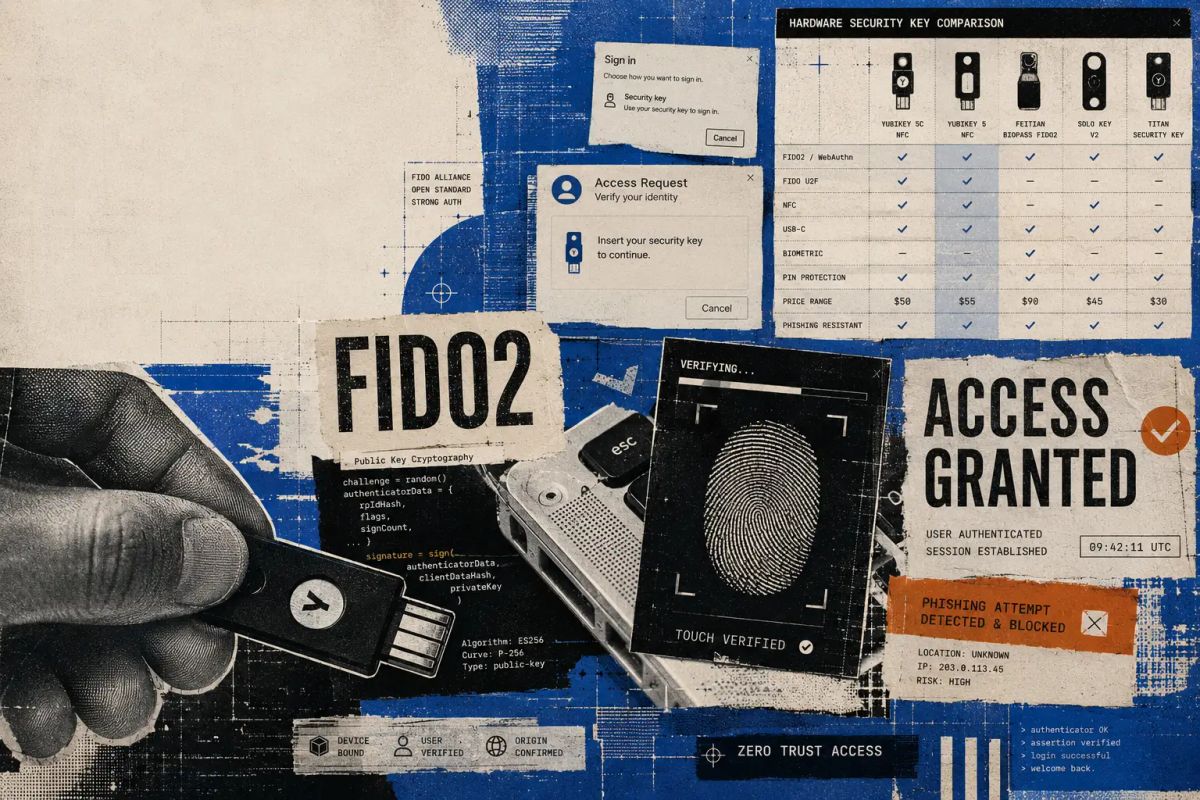
| Security Key | Price | Connection | Open Source | Best For |
|---|---|---|---|---|
| YubiKey 5 NFC | Price: ~$50 | Connection: USB-A, NFC | Open Source: — | Best For: Widest protocol support |
| Everykey | Price: Contact sales | Connection: Bluetooth LE | Open Source: — | Best For: Proximity-based auto-unlock |
| Google Titan | Price: ~$30 | Connection: USB-A/C, NFC | Open Source: — | Best For: Google ecosystem, 250+ passkeys |
| Nitrokey 3 | Price: ~$59 | Connection: USB-C, NFC | Open Source: ✓ | Best For: Open source, privacy-focused |
| SoloKeys Solo 2 | Price: ~$35 | Connection: USB-A/C, NFC (2+ models) | Open Source: ✓ | Best For: Budget open-source option |
| Thetis Pro | Price: ~$33 | Connection: USB-A, USB-C, NFC | Open Source: — | Best For: Budget all-rounder |
| Feitian ePass | Price: ~$25 | Connection: USB-A/C, NFC | Open Source: — | Best For: Enterprise bulk deployments |
What Is a YubiKey?
A YubiKey is a hardware security key made by Yubico. You plug it into a USB port or tap it against your phone to prove your identity when logging in to websites, apps, and services. Unlike passwords or SMS codes, a YubiKey uses public-key cryptography — the private key never leaves the device, which makes it resistant to phishing, credential stuffing, and man-in-the-middle attacks.
The YubiKey 5 series is the current flagship line. It supports FIDO2/WebAuthn, FIDO U2F, Yubico OTP, OATH-TOTP, OATH-HOTP, PIV smart card, and OpenPGP — more protocols than any competitor. Models range from the YubiKey 5 NFC (USB-A, ~$50) to the YubiKey 5C NFC (USB-C, ~$55) and the YubiKey Bio (fingerprint, ~$90). YubiKeys are durable, water-resistant, and have no battery or moving parts.
So why look for alternatives? Common reasons include cost (a family or team deployment gets expensive at $50+ per key), wanting open-source firmware you can audit, needing Bluetooth or proximity-based access that YubiKey does not support, or preferring a different form factor. The alternatives below each address one or more of these gaps.
Best YubiKey Alternatives in 2026
We evaluated each alternative based on protocol support (FIDO2, U2F, OTP, PIV, OpenPGP), connection types (USB-A, USB-C, NFC, Bluetooth), build quality, open-source transparency, and value for money. Every key on this list is FIDO2-certified and works with major services including Google, Microsoft, Apple, GitHub, and Salesforce. For background on how these authentication methods compare to software-based alternatives, see our authentication methods guide.
1. Everykey — Best for Proximity-Based Passwordless Access
Everykey takes a fundamentally different approach to hardware authentication. Instead of requiring you to plug in or tap a USB device every time you log in, Everykey uses Bluetooth Low Energy to detect your physical proximity and automatically unlocks devices, accounts, and applications when you are nearby. Walk away, and everything locks again.
This proximity-based model eliminates the friction that makes traditional security keys annoying in daily use. There is no fumbling with USB ports, no tapping, and no PIN entry. Everykey acts as a continuous identity signal rather than a one-time authentication event.
Key features:
- Proximity-based auto-unlock for laptops, desktops, phones, and web accounts
- Auto-lock when you walk away — no manual action needed
- Password and passkey management built in (Everykey Vault)
- Layered encryption using AES-128, AES-256, and RSA-4096
- Remote freeze capability if the device is lost or stolen
- Rotating encrypted Bluetooth payloads to prevent replay and spoofing attacks
- Audited by RSM (formerly SecureState)
Best for: Users and organizations that want security without friction. Everykey is particularly strong for enterprise deployments where employee compliance with MFA policies is a challenge — proximity-based access means there is nothing to forget, lose track of, or skip. It is also the only alternative on this list that replaces both your security key and your password manager in a single device.
Considerations: Everykey requires Bluetooth, which means it does not work with the same plug-and-tap simplicity as USB keys on devices without Bluetooth. Pricing is available through EveryKey's sales team.
2. Google Titan Security Key — Best for the Google Ecosystem
The Google Titan Security Key is Google's own hardware authentication device, built on the same technology Google uses internally to protect its 100,000+ employees. It uses a custom secure element chip designed by Google and is available in USB-A/NFC and USB-C/NFC form factors at around $30.
Key features:
- Stores 250+ passkeys — best-in-class capacity for FIDO2 keys
- Works with Google Advanced Protection Program
- Custom secure element chip with Google-engineered firmware
- USB-A/NFC and USB-C/NFC options
- Compatible with all FIDO2-supporting services
Best for: Users heavily invested in Google's ecosystem (Gmail, Google Workspace, Chrome, Android). The 250+ passkey storage capacity also makes it a strong general-purpose FIDO2 key if you want to register it across many services. At ~$30, it is significantly cheaper than a comparable YubiKey.
Considerations: Does not support OTP, PIV, or OpenPGP protocols — it is FIDO2/U2F only. If you need smart card functionality or legacy protocol support, a YubiKey or Nitrokey may be a better fit.
3. Nitrokey 3 — Best Open-Source, Privacy-Focused Key
The Nitrokey 3 is the flagship product from the Berlin-based Nitrokey team, and it is the most full-featured open-source security key available. Both the hardware design and the firmware (built on the Trussed framework in Rust) are publicly auditable. Priced at around $59 for the USB-C/NFC model.
Key features:
- Fully open-source hardware and firmware
- Firmware written in Rust (memory-safe, eliminating entire vulnerability classes)
- Common Criteria EAL 6+ certified secure element
- FIDO2, FIDO U2F, TOTP/HOTP, OpenPGP, and PIV support
- Built-in password manager (encrypted on-device storage)
- USB-C and NFC, USB-A variant also available
Best for: Security professionals, privacy advocates, and organizations that require auditable hardware and firmware. The Nitrokey 3 is the closest alternative to YubiKey in terms of protocol breadth, and it is the only key on this list with a Common Criteria EAL 6+ secure element combined with open-source firmware.
Considerations: At $59, it costs more than most alternatives and roughly matches YubiKey pricing. Some users report that firmware updates have historically been slower than Yubico's release cycle.
4. SoloKeys Solo 2 — Best Budget Open-Source Key
The SoloKeys Solo 2 is an open-source FIDO2 security key designed for people who want transparency and auditability at a lower price point. Every circuit board, component, and design decision is publicly available. Starting at $35 for the USB-A model without NFC, or $46 for the Solo 2+ with NFC.
Key features:
- Fully open-source hardware schematics and firmware
- Capacitive touch sensor (no physical button press needed)
- FIDO2/WebAuthn and FIDO U2F support
- NFC available on Solo 2+ models for mobile authentication
- USB-A and USB-C options
- "Hacker" edition available for developers who want to modify firmware
Best for: Developers and security-minded users who want an open-source key without paying Nitrokey prices. The "Hacker" edition is specifically designed for people who want to flash custom firmware or contribute to the project.
Considerations: Solo 2 supports FIDO2 and U2F only — no OTP, PIV, OpenPGP, or password management. If you need those protocols, look at Nitrokey 3 or YubiKey instead. NFC is only available on the pricier Solo 2+ models.
5. Thetis Pro — Best Budget All-Rounder
The Thetis Pro packs FIDO2, NFC, and both USB-A and USB-C into a single device at around $33 — making it one of the most affordable full-featured security keys available. It includes a 360° rotating metal cover for durability.
Key features:
- Dual USB-A and USB-C ports in one device
- NFC for mobile authentication
- FIDO2, FIDO U2F, TOTP/HOTP support
- Built-in TOTP/HOTP authenticator app
- 360° rotating metal cover (durable, keychain-friendly)
- PinPlex option for complex PIN protection
Best for: Users who want a versatile key that works with everything — USB-A desktops, USB-C laptops, and NFC phones — without buying multiple devices. At $33, it is the best value for a key that covers all three connection types.
Considerations: Not open source. The TOTP/HOTP authenticator function works but is less polished than dedicated apps like Authy or the best authenticator apps. If you are looking for a software-only authenticator to pair with any hardware key, see our authenticator app comparison.
6. Feitian ePass — Best for Enterprise Bulk Deployments
The Feitian ePass series offers FIDO2 security keys starting at around $25 for basic USB-A models, making them one of the most cost-effective options for large-scale enterprise deployments. Feitian is a major OEM supplier — they have manufactured security keys for other brands, including earlier versions of Google's Titan key.
Key features:
- FIPS 140-2 Level 2 certified (with Physical Security Level 3)
- Multiple form factors: USB-A, USB-C, NFC, Bluetooth
- FIDO2, FIDO U2F, OTP, and PIV support on higher-end models
- JavaCard secure element
- No limit on registered account count
- Volume pricing available for enterprise orders
Best for: IT teams deploying security keys across hundreds or thousands of employees where per-unit cost matters. The FIPS certification also makes Feitian keys suitable for government and regulated industries.
Considerations: Not open source. The product line has many model variants (K9, K40, A4B, etc.), which can be confusing to navigate. Consumer documentation is less polished than Yubico's.
YubiKey vs. Google Titan: Head-to-Head
This is the most common comparison for people shopping for a hardware security key. The short answer: YubiKey wins on protocol support, Titan wins on price and passkey storage.
YubiKey supports FIDO2, U2F, OTP, PIV, OpenPGP, and smart card protocols. Google Titan supports only FIDO2 and U2F. If you need to use your key for SSH authentication via OpenPGP, code signing, or PIV smart card login to enterprise systems, YubiKey is the only option. If you only need it for website login and passkeys, Titan gives you the same core security at roughly 40% less cost and with 250+ passkey slots (YubiKey stores around 25).
Both keys are equally phishing-resistant — the underlying FIDO2 protocol verifies the domain before authenticating, preventing credential theft even if a user clicks a fake login page. For most people protecting personal accounts (Gmail, banking, social media), Titan is the smarter buy. For IT professionals managing infrastructure access, YubiKey's broader protocol support justifies the premium.
YubiKey vs. Nitrokey: Head-to-Head
Both keys support a broad range of protocols (FIDO2, U2F, OTP, OpenPGP, PIV). The fundamental difference is philosophy: YubiKey uses proprietary firmware with a strong track record, while Nitrokey uses open-source firmware written in Rust that anyone can audit.
If you trust Yubico's security engineering and want the most battle-tested option, go with YubiKey. If auditability matters to you — because you are a security researcher, work in a high-assurance environment, or simply prefer open-source on principle — Nitrokey 3 is the better fit. Pricing is comparable (~$50-59 for both).
One practical difference: YubiKey has a larger ecosystem of documentation, tutorials, and third-party integrations. Nitrokey's community is smaller but deeply technical. For organizations evaluating open-source security keys alongside their broader password management strategy, pairing a Nitrokey with an open-source password manager like Bitwarden creates a fully auditable authentication stack.
How to Choose the Right Security Key
The "best" YubiKey alternative depends on what gap you are trying to fill. Here is a decision framework:
If you want zero-friction access without plugging anything in: Everykey is the only option that uses proximity-based authentication. It auto-locks when you walk away — no other key on this list does that.
If price is your primary concern: Feitian ePass (from ~$25) or Thetis Pro (~$33) offer FIDO2 authentication at a fraction of YubiKey's cost. For bulk enterprise deployments, Feitian's volume pricing makes it the clear choice.
If you want open-source firmware you can audit: Nitrokey 3 (full protocol support, Rust firmware, EAL 6+ secure element) or SoloKeys Solo 2 (FIDO2 only, lower price). Both publish their hardware schematics and firmware source code.
If you are in the Google ecosystem: Google Titan offers tight integration with Google Advanced Protection, 250+ passkey storage, and Google-engineered firmware at ~$30.
If you need the widest protocol support: YubiKey 5 series remains the leader here, supporting FIDO2, U2F, OTP, PIV, OpenPGP, and smart card in a single device. Nitrokey 3 is the closest open-source equivalent.
If you need FIPS certification for compliance: Feitian ePass (FIPS 140-2 L2) or YubiKey 5 FIPS series. Both meet U.S. government security standards.
Do You Still Need a Security Key in the Age of Passkeys?
Yes — but the role is shifting. Software passkeys stored on your phone or laptop cover most consumer use cases now. Hardware security keys remain essential for high-assurance scenarios: protecting admin accounts, meeting compliance requirements (NIST, PCI-DSS, HIPAA), and providing a phishing-resistant backup when your phone is lost, broken, or compromised.
For most people, the question is not "passkeys or hardware key" — it is "passkeys everywhere, plus a hardware key for your most critical accounts." Any of the keys listed above serves that purpose well. If you are also evaluating software-based alternatives, our guide to open-source password managers covers tools that pair well with hardware security keys.
Frequently Asked Questions
What is the cheapest YubiKey alternative?
The Feitian ePass starts at around $25 for a basic USB-A FIDO2 key, and the Thetis Pro offers USB-A, USB-C, and NFC in one device for about $33. Both are significantly cheaper than a YubiKey 5 NFC (~$50).
Are there open-source alternatives to YubiKey?
Yes. Nitrokey 3 and SoloKeys Solo 2 both publish their hardware designs and firmware source code. Nitrokey's firmware is written in Rust and runs on a Common Criteria EAL 6+ secure element. SoloKeys offers a "Hacker" edition specifically designed for developers who want to modify firmware.
Can I use a YubiKey alternative with Google, Microsoft, and Apple accounts?
Yes. Any FIDO2-certified security key works with Google, Microsoft, Apple, and hundreds of other services that support WebAuthn. All six alternatives listed in this article are FIDO2 certified.
What happens if I lose my security key?
Most services let you register multiple security keys or set up backup authentication methods (recovery codes, backup key, authenticator app). Best practice is to register at least two keys and store the backup in a secure location. Everykey also offers remote freeze — if your device is lost or stolen, you can disable it instantly from your account.
Do security keys work on mobile phones?
Yes. Keys with NFC (Google Titan, Nitrokey 3, SoloKeys Solo 2+, Thetis Pro, Feitian ePass) work by tapping against the back of an NFC-enabled Android or iPhone. Everykey connects via Bluetooth Low Energy, which works on both iOS and Android without any tapping.
YubiKey vs. authenticator apps — which is more secure?
Hardware security keys are more secure than authenticator apps because the private key never leaves the physical device. Authenticator apps can be compromised if your phone is infected with malware or if someone gains access to your cloud backup. That said, authenticator apps are far better than SMS codes and are sufficient for most consumer accounts.
Which YubiKey alternative supports the most protocols?
Nitrokey 3 comes closest to YubiKey in protocol breadth, supporting FIDO2, FIDO U2F, TOTP/HOTP, OpenPGP, and PIV. Most other alternatives support only FIDO2 and U2F.
Is Everykey compatible with FIDO2?
Yes. Everykey supports FIDO2 WebAuthn for phishing-resistant authentication, in addition to its unique proximity-based auto-unlock and password management capabilities. It uses layered AES-128, AES-256, and RSA-4096 encryption.